2. Presets
Browsing
- ◀ ▶ load the previous / next preset.
- Click the preset display (LCD) to open the preset window. It has three tabs at the top: BROWSE / SHARE / AI SOUND. It opens on the tab you used last (BROWSE the first time).
- Right-click the LCD for the preset menu as before. Factory presets are listed by category; your own presets by folder and category. The current sound is ticked. Browse Presets... at the top of the menu opens the BROWSE tab, AI Sound... the AI SOUND tab.
At the bottom of the menu and at the bottom of BROWSE (both do the same):
| Menu | BROWSE button | Details |
|---|---|---|
| Save Preset... | Save... | Save the current sound (same as SAVE in the header). |
| Load Preset File... | Load File... | Load a preset file (.wav3preset) from anywhere. |
| Open Preset Folder | Open Folder | Open the preset folder in Explorer. |
| Restore Factory Presets... | Restore Factory... | Rewrite the factory presets to their original state (see "Where files are kept"). |
| Support on Ko-fi | Ko-fi | Open the Ko-fi donation page in your browser. |
The preset window (BROWSE)
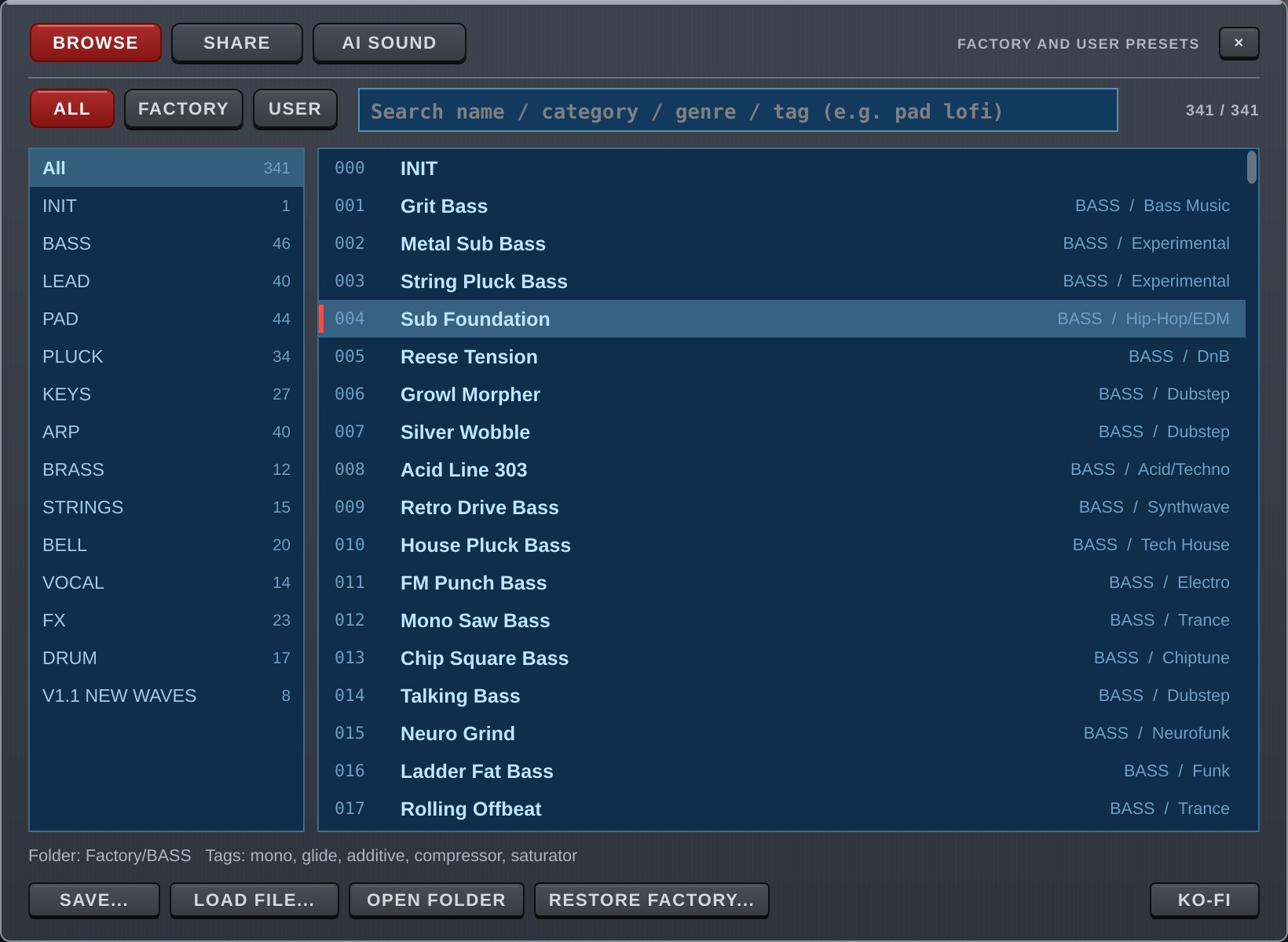
The BROWSE tab lists and searches the presets. When it opens you can type into the search field right away.
- ALL / FACTORY / USER: show all presets / only the factory presets / only your own presets.
- Search field: finds presets by name, category, genre, folder, and by tags made automatically from the sound (mono, arp, unison, reverb and so on). Words separated by spaces must all match (e.g.
pad lofi). Upper and lower case are the same. The numbers on the right are "shown / total". - Left list (categories): the number of presets in each category (for the current ALL / FACTORY / USER and search words). All shows every category.
- Right list (presets): the preset loaded now is highlighted with a mark on the left. The line below shows the folder and tags of the selected preset.
- Click / ↑↓: load that sound. The window stays open so you can compare.
- Double-click / Enter: load and close.
- The mouse wheel scrolls the lists.
- Esc, the × at the top right, or a click on the dark area outside the window closes it.
- ALL / FACTORY / USER, the category and the last tab are remembered for next time (a per-user setting on your computer, not saved in songs).
SHARE
This tab is for sharing presets with other users. It is not ready yet and has no content for now.
Saving
Press SAVE in the header to open the save window.
| Field | Details |
|---|---|
| Name | Preset name (up to 64 characters). |
| Category | e.g. LEAD / PAD / BASS. Saved in capitals and used to group the menu. |
| Genre | e.g. Trance / Lo-Fi. Optional; used by search. |
| Folder | Where the preset is saved. |
Enter saves, Esc closes.
- If you load one of your presets and save without changing the name, the file is overwritten.
- If you load a factory preset and save, the factory file is not overwritten; the sound is saved as a new user preset (USR, directly in the Presets folder) (v1.5).
- If a different file with the same name exists, you are asked before it is replaced.
- A sound made by AI SOUND is saved with the AI's name and category already filled in, into the
AIfolder (chapter 11).
Factory presets
WAV3+CORE comes with 341 factory presets in the categories ARP / BASS / BELL / BRASS / DRUM / FX / KEYS / LEAD / PAD / PLUCK / STRINGS / VOCAL, plus v1.1 New Waves (8 sounds added in v1.1 that use the new built-in waves and features).
Presets numbered after 256 use the newer features: arpeggiator lanes, the 303 knobs, OSC TRIGGER, FREE MOD, the Filter 2 envelope and the chord pads.
Where files are kept
| What | Where |
|---|---|
| Presets | Documents\WAV3PLUSCORE\Presets |
| Factory presets | Documents\WAV3PLUSCORE\Presets\Factory\<category>\<number> <name>.wav3preset |
| Settings (skin, MIDI Learn, AI) | %APPDATA%\WAV3PLUSCORE |
- If your Documents folder has been moved (for example to OneDrive), the folder is created there.
- The factory presets are written from the plug-in to the Factory folder on the first start. After that they are ordinary files: you can overwrite, rename or delete them.
- Deleted factory presets do not come back by themselves. To restore all of them, use Restore Factory Presets... in the menu or Restore Factory... in BROWSE (your own presets are not touched).
- If the folder cannot be written (no permission, read-only, missing drive), the built-in factory presets still appear in the list and work. Only SAVE is unavailable.
- If writing stops halfway (for example the disk is full), only the presets written so far appear. Free some space and restart; the rest is written then.
Version 1.6.0 · 2026-11-08 · W3PC Audio · wav3pluscore.com