0. Introduction
What WAV3+CORE is
WAV3+CORE (pronounced "wave plus core") is a wavetable synthesizer by W3PC Audio, made as a VST3 plug-in.
It does more than bend one waveform or move between waveforms: the aim is to let you design the movement itself. Its main features are:
- Six wavetable oscillators. Each oscillator holds four waves, Wave A to D, and can morph between them.
- Harmonic EQ and formant control. Raise or lower individual harmonics by number, or move the pitch while keeping the "mouth shape" of a voice.
- Wave Effects (16 types). Fold, Warp, SelfSync and more reshape the waveform itself.
- More sources. NOISE, STRING (a physical model of strings and winds), METAL (metallic sounds) and WAVE SEQ (a sequencer that switches between oscillators).
- Two multimode filters with 19 types, in series or in parallel.
- 26 effects that you can reorder and run in parallel.
- Arpeggiator and chord functions, with per-step values (velocity, length, ratchet, slide, accent and more) and 303 style knobs.
- AI SOUND. Describe a sound in words and your own AI (your API key, or a local LLM) builds the patch.
WAV3+CORE is donationware: every feature is free and there is no license key. If you like it, a donation is very welcome.
System requirements
| Item | Details |
|---|---|
| OS | Windows 11 (64-bit) |
| Format | VST3 |
| Tested DAWs | FL Studio, Cubase, Cakewalk Sonar |
| Mac | Not supported at the moment |
CPU load depends a lot on the sound. If it is too heavy, lower Quality (Live) or FX Quality in GLOBAL (SOURCES on the OSC page, chapter 9).
Installation
WAV3+CORE comes as a zip file, without an installer.
- Extract the downloaded zip file.
- Copy the
WAV3PLUSCORE.vst3folder, as a whole, toC:\Program Files\Common Files\VST3(click "Continue" if Windows asks for administrator permission). - Rescan plug-ins in your DAW.
- Load "WAV3+CORE" (manufacturer W3PC Audio) as an instrument.
If your DAW does not find it: right-click the zip file → "Properties". If there is an "Unblock" checkbox near the bottom, tick it, click OK, then extract and copy again (this removes the mark Windows adds to files downloaded from the internet).
To uninstall, delete the folder C:\Program Files\Common Files\VST3\WAV3PLUSCORE.vst3. Your presets and settings (chapter 2) stay.
On the first start, Documents\WAV3PLUSCORE\Presets is created and the factory presets are written there (chapter 2).
Donations and contact
- Website: https://wav3pluscore.com
- Donate: https://ko-fi.com/wav3pluscore
- Contact: info@wav3pluscore.com
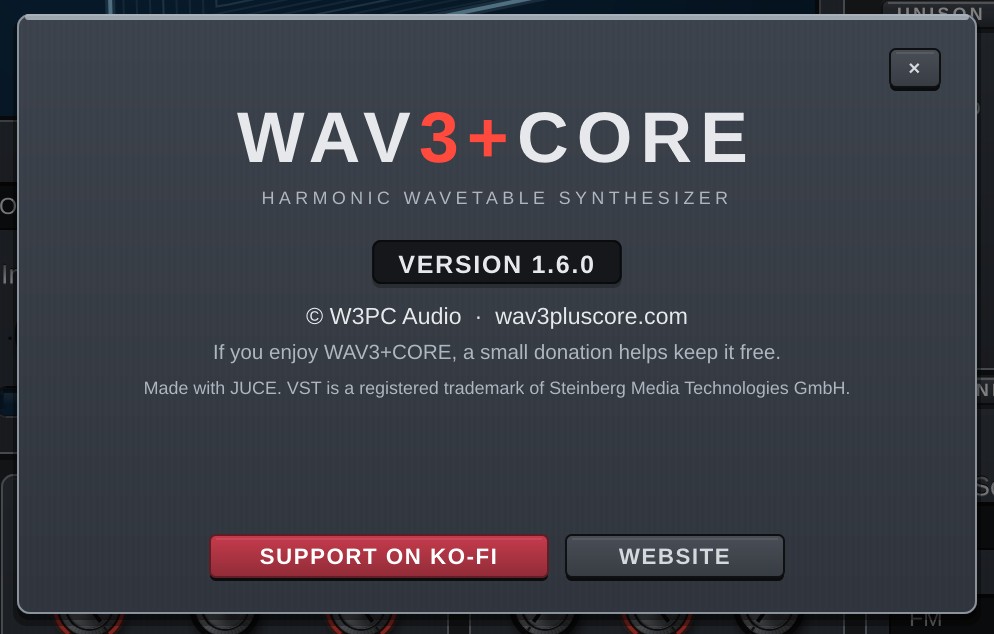
Click the WAV3+CORE logo in the header to see the version number and buttons for the website and Ko-fi.
When reporting a problem, please include your DAW, what you did and what happened, and a screenshot if possible.
1. Basics
The screen

The top of the window (the header) is the same on every page. From left to right:
| Item | Details |
|---|---|
| Logo | Click it for the About screen: version, website and a Ko-fi (donation) button. |
| Page buttons | Switch between the six pages: OSC / FILTER / MOD / FX / ARP / VIEW. The button of the open page lights up. GLOBAL and MIDI are at the bottom of SOURCES on the left of the OSC page (chapters 9 and 10). |
| Preset display (LCD) | Shows the number, FACTORY / USER with the category, and the preset name. While you move a knob it shows that knob's name and value instead. A "*" after the name means the sound has been changed. Click it to open the preset window (tabs BROWSE / SHARE / AI SOUND) and type into the search field right away; right-click it for the preset menu (chapters 2 and 11). |
| ◀ ▶ | Load the previous / next preset. |
| CABLES / MOD LIST | CABLES: while on, all modulation cables of the current page stay visible. MOD LIST: opens a window listing every Mod Matrix slot in use (both in chapter 6, "Cables and MOD LIST"). |
| ↶ ↷ | Undo / redo the last change. |
| SAVE | Save a preset (chapter 2). |
| PANIC | Stops all voices and effect tails at once. Use it if a note keeps sounding. |
| RESET... | A small window asks what to reset: the part shown now (for example OSC 1, GLOBAL, MIDI, FX: Key Bloom; on the MOD page the ENV tab / LFO tab / Mod Matrix) or All parameters. Cancel does nothing. Either way one Undo (↶) brings it back. VIEW settings are not reset. |
| Scope and meter | The small screen shows the output waveform (scope). The faint bars behind it are the output level meter: the top half is L, the bottom half is R, growing from left to right (-48 to 0 dB; light part = peak, stronger part = average level). They turn orange above -1 dB. When the output clips, the thin strip at the right edge of the screen turns red for about one second (click the screen to clear it). |
| Status line | Under the scope. "V 3/12" = voices playing / voice limit, "OSC 3" = oscillators playing, "CPU" = approximate CPU use. |
| SAFE | A red tag at the top right of the scope screen: how many times the last-stage safety limiter (always on, protects ears and speakers) has acted. It only turns the sound down above +18 dBFS and clips at +24 dBFS; normal sounds are never touched. If a calculation broke down and the sound was muted, the same tag also shows "NaN" with a count. Cleared by changing the sound or pressing PANIC. |
| MASTER | Overall volume. |
Keyboard and wheels

The bottom of the window has an on-screen keyboard. Click a key to play it.
- The two wheels on the left are Pitch Bend (springs back to the centre) and Mod Wheel (CC#1; double-click to reset).
- Right-click a key to latch (hold) it. Right-click or click it again to release.
- The small buttons VEL / NOTE / AT at the right end of the keyboard are the Mod Matrix sources Velocity (how hard a key is played) / Note (pitch) / Aftertouch (1.6). Click or right-click one for the menu that assigns it to knobs (chapter 6). VIEW Hide hides them together with the keyboard.
- Light blue keys are the keys being pressed (playing). The range with a coloured band and chord names is the chord pad zone (chapter 8).
- Grey keys are notes outside the current scale while Lock (Scale Lock) on the ARP page is on. This is only a display: they still play as usual (with Keys on, they snap to the scale; chapter 8).
About screen
Click the WAV3+CORE logo at the left of the header. It shows the version number and buttons for donations (SUPPORT ON KO-FI) and the website (WEBSITE). Close it with the × at the top right, the Esc key, or a click outside it. The screen sways a little when it opens and when you move the plugin window (the buttons still work while it sways).
VIEW page
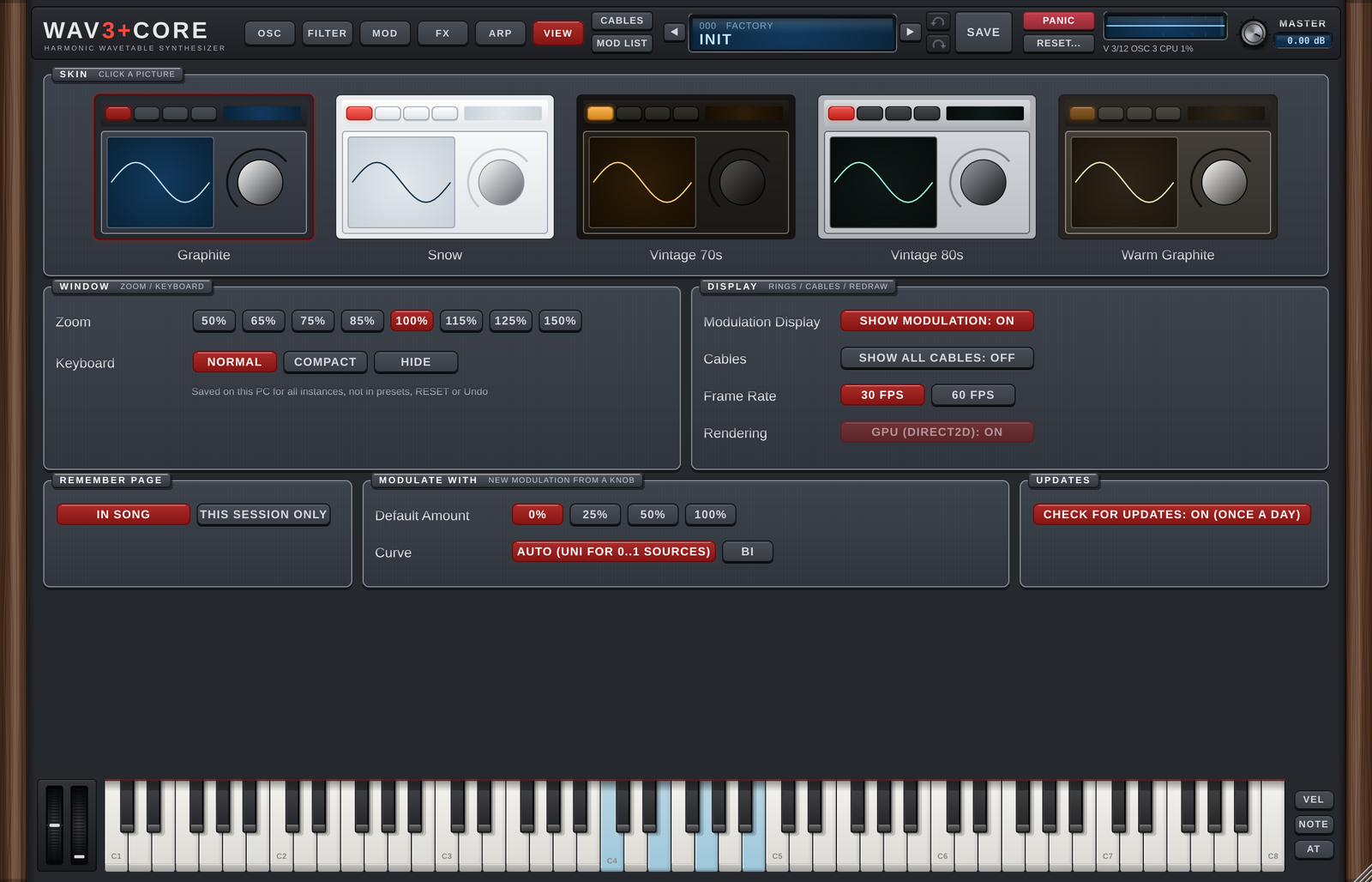
Display settings. They are stored on this computer and become the default for every instance (the zoom is also saved with each song). They are not part of presets, RESET or Undo.
| Item | Details |
|---|---|
| Skin | Click a picture to choose the skin (Graphite / Snow / Vintage 70s / Vintage 80s / Warm Graphite). |
| Zoom | Window size (50-150%). You can also drag the bottom-right corner of the window. |
| Keyboard | Size of the keyboard and wheels: Normal (as before) / Compact (lower keys) / Hide. Compact and Hide make the window shorter; the pages above keep their size. |
| Modulation Display | Modulation rings around the knobs and dots in the LCDs (Show Modulation). |
| Cables | Same as CABLES in the header (keep all cables of the page shown). |
| Frame Rate | How often moving displays (meters, LCDs, waveforms) are redrawn: 30 fps / 60 fps (smoother, a little more CPU / GPU). |
| Rendering | Draw with the GPU (Direct2D, Windows). Turn it off if the window flickers. |
| Remember Page | Save the open page with the song (In Song) or only while the song stays open (This Session Only). GLOBAL / MIDI shown on the OSC page are remembered too. The VIEW page is not remembered (the window opens on the page before it). |
| Modulate With | Starting amount (Default Amount: 0 / 25 / 50 / 100%) and curve (Curve: Auto = UNI for one-way sources / BI) of a modulation made with a knob's right-click Modulate with or the assign mode. |
| Updates | Check for updates once a day. Off = no network access at all. |
Update check
When the window opens, WAV3+CORE checks for a new version at most once a day. It only reads the version information on wav3pluscore.com; nothing that identifies you or your computer is sent.

- If a new version is available, a small UPDATE appears at the top right of the preset display (LCD). Click it to open the download page in your browser. Nothing is downloaded or installed automatically.
- If the check fails (offline, for example), nothing is shown.
- Turn off Updates on the VIEW page and no connection is made at all.
Drop-downs
| Action | Result |
|---|---|
| Click | Open the list of choices. |
| Hover and click ◀ ▶ at the edges | Previous / next choice; wraps around at the ends. |
| Hover and turn the mouse wheel | Up = previous choice, down = next; stops at the ends. In scrolling lists the wheel scrolls instead, and right after a scroll (about 0.5 s) it does not change drop-downs. |
Knobs
| Action | Result |
|---|---|
| Drag up / down | Change the value. |
| Drag with the right button | Fine adjustment (8 times finer). |
| Double-click | Reset to the default. |
| Right-click | Open the knob menu (below). |
The knob menu:
| Item | Details |
|---|---|
| Enter Value... | Type a value. Enter confirms, Esc cancels. For time knobs, a number without a unit is read in the unit shown (with "250 ms" shown, typing 500 gives 500 ms; type "0.5 s" for seconds). |
| Reset to Default | Reset to the default. |
| Modulate with ▸ | Choose a modulation source (LFO, envelope, velocity…) for this knob. It goes into the first free Mod Matrix slot (nothing happens if all 40 slots are in use). The amount (Range) is the Default Amount you chose (initially 0%; +25% / +50% / +100% are also available) and the curve is the Default Curve (initially Auto = Uni-Linear + for one-way sources such as envelopes and macros, Bi-Linear + for LFOs and the like; Always Bi-Linear + is also available). The knob's popup (with a small amount knob) opens right away so you can dial in the amount (once the mouse has been over the knob or the popup, it closes as usual when you move away). A 0% connection shows as a dashed ring around the knob and a dashed cable (it does not change the sound yet). |
| Mod Amount... | Adjust the depth of the modulation connected to this knob, right there. |
| Remove Modulation | Remove the modulation connected to this knob. |
| MIDI Learn | Choose it, then move a MIDI controller to assign it to this knob (chapter 10). |
Resetting a section
Right-click the title strip of a section (plate) to get "Reset …". It resets only the knobs and buttons inside that section.
Copying oscillators
On the OSC page, right-click an OSC row in SOURCES to copy, paste, copy to another OSC or swap. The LFO tabs on the MOD page offer the same for LFO settings only.
How modulation is shown
When a knob is modulated, an arc (the range the modulation moves it through) and a dot (its current position) appear around it. LCD screens also show the current position as dots. Turn this off with Show Modulation in VIEW.
Zoom and skins
VIEW also has these settings (v1.5; each is saved per computer and does not affect the sound):
- Remember Page: when you close and reopen the window, it opens on the page you left.
In Song(default) also saves the page with the song, so it opens there when you reload the project.This Session Onlyonly restores it when you reopen the window (not saved with the song). - Frame Rate: how many times per second moving displays (meters, LCDs, waveforms) are redrawn.
30 fps(default) or60 fps(smoother, more drawing work). - GPU Rendering (Direct2D): draws the window with the GPU on Windows (on by default). If the window flickers or turns black on your computer or DAW, turn it off to draw with the CPU instead.
Use Zoom in VIEW to set the window size from 50% to 150%. You can also drag the bottom-right corner of the window, or the edges and corners of the DAW's plug-in window.
- While you drag, the screen is shown as a stretched still picture (slightly soft). When you stop, it is redrawn sharply at the new size.
- The DAW's window can take any shape. The interface is scaled to the largest size that fits while keeping its proportions, centred, and the rest is filled with the panel colour.
- When you stop, if the window's shape does not match the interface, WAV3+CORE asks the DAW for a size that fits, following the direction you dragged (width or height). Some DAWs keep the window as it is. Sizes below 50% or above 150% are brought back into that range.
- Only while you drag the triangle at the bottom-right corner does the window keep its proportions.
- The zoom is saved with each song (project) and comes back when you reopen it. A new instance opens at the zoom you chose last.
There are two skins:
- Graphite: dark panel (used for the pictures in this manual)
- Snow: white panel
DAW automation
Almost every parameter can be automated in your DAW. The exceptions are the parameters that set the routing; they are still saved with the sound as usual.
- Mod Matrix SOURCE / CONTROL / DESTINATION
- Destinations of the ARP MOD lanes
- FX CHAIN order and parallel (‖)
- FX In of each source
- OSC Trigger / Env (TRIGGER)
- Filter 2 Own ENV
This keeps the automation in your songs from shifting when more choices (destinations, effects…) are added in later versions.
The full parameter list is in the last chapter (chapter 14).
2. Presets
Browsing
- ◀ ▶ load the previous / next preset.
- Click the preset display (LCD) to open the preset window. It has three tabs at the top: BROWSE / SHARE / AI SOUND. It opens on the tab you used last (BROWSE the first time).
- Right-click the LCD for the preset menu as before. Factory presets are listed by category; your own presets by folder and category. The current sound is ticked. Browse Presets... at the top of the menu opens the BROWSE tab, AI Sound... the AI SOUND tab.
At the bottom of the menu and at the bottom of BROWSE (both do the same):
| Menu | BROWSE button | Details |
|---|---|---|
| Save Preset... | Save... | Save the current sound (same as SAVE in the header). |
| Load Preset File... | Load File... | Load a preset file (.wav3preset) from anywhere. |
| Open Preset Folder | Open Folder | Open the preset folder in Explorer. |
| Restore Factory Presets... | Restore Factory... | Rewrite the factory presets to their original state (see "Where files are kept"). |
| Support on Ko-fi | Ko-fi | Open the Ko-fi donation page in your browser. |
The preset window (BROWSE)
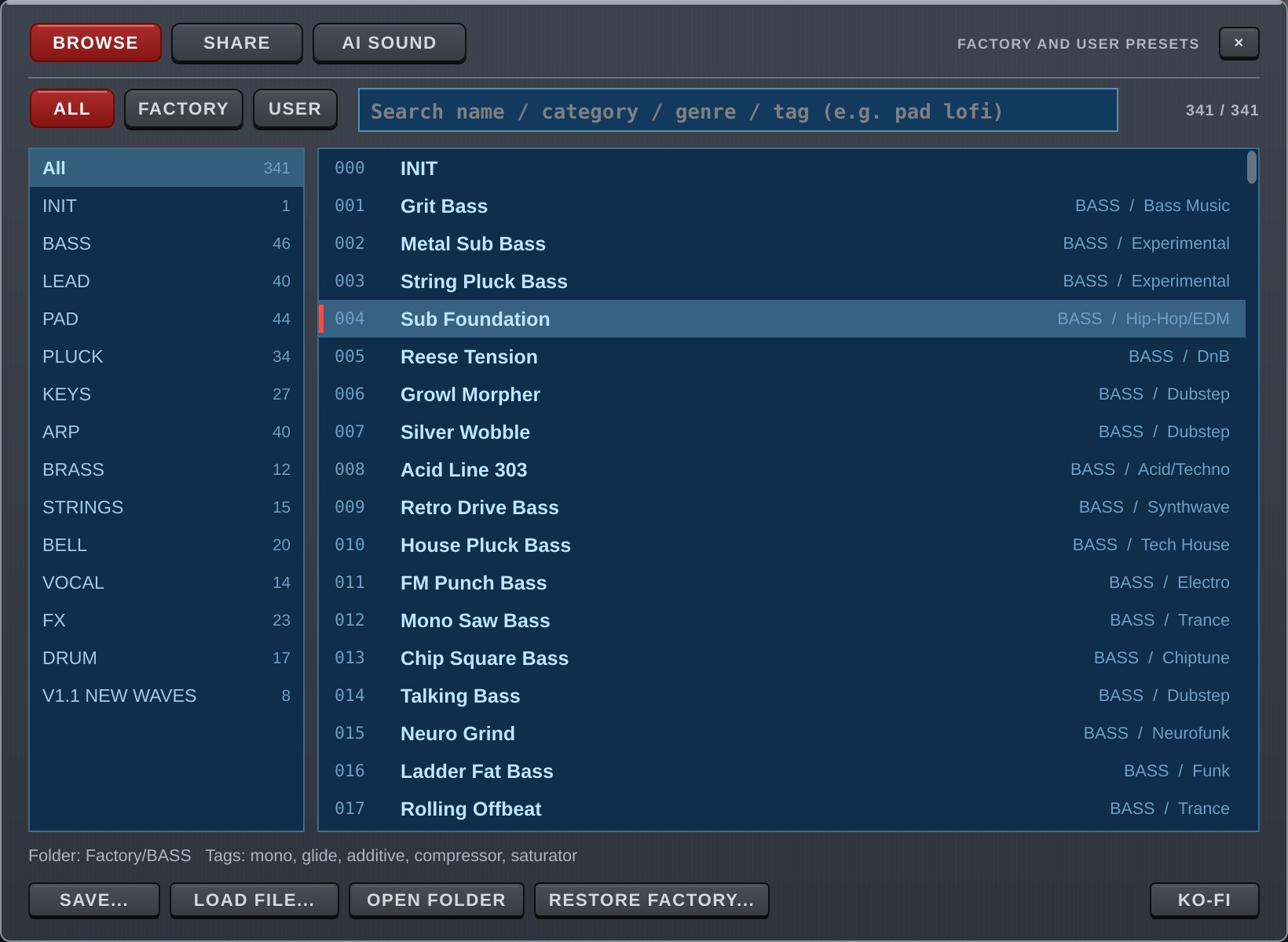
The BROWSE tab lists and searches the presets. When it opens you can type into the search field right away.
- ALL / FACTORY / USER: show all presets / only the factory presets / only your own presets.
- Search field: finds presets by name, category, genre, folder, and by tags made automatically from the sound (mono, arp, unison, reverb and so on). Words separated by spaces must all match (e.g.
pad lofi). Upper and lower case are the same. The numbers on the right are "shown / total". - Left list (categories): the number of presets in each category (for the current ALL / FACTORY / USER and search words). All shows every category.
- Right list (presets): the preset loaded now is highlighted with a mark on the left. The line below shows the folder and tags of the selected preset.
- Click / ↑↓: load that sound. The window stays open so you can compare.
- Double-click / Enter: load and close.
- The mouse wheel scrolls the lists.
- Esc, the × at the top right, or a click on the dark area outside the window closes it.
- ALL / FACTORY / USER, the category and the last tab are remembered for next time (a per-user setting on your computer, not saved in songs).
SHARE
This tab is for sharing presets with other users. It is not ready yet and has no content for now.
Saving
Press SAVE in the header to open the save window.
| Field | Details |
|---|---|
| Name | Preset name (up to 64 characters). |
| Category | e.g. LEAD / PAD / BASS. Saved in capitals and used to group the menu. |
| Genre | e.g. Trance / Lo-Fi. Optional; used by search. |
| Folder | Where the preset is saved. |
Enter saves, Esc closes.
- If you load one of your presets and save without changing the name, the file is overwritten.
- If you load a factory preset and save, the factory file is not overwritten; the sound is saved as a new user preset (USR, directly in the Presets folder) (v1.5).
- If a different file with the same name exists, you are asked before it is replaced.
- A sound made by AI SOUND is saved with the AI's name and category already filled in, into the
AIfolder (chapter 11).
Factory presets
WAV3+CORE comes with 341 factory presets in the categories ARP / BASS / BELL / BRASS / DRUM / FX / KEYS / LEAD / PAD / PLUCK / STRINGS / VOCAL, plus v1.1 New Waves (8 sounds added in v1.1 that use the new built-in waves and features).
Presets numbered after 256 use the newer features: arpeggiator lanes, the 303 knobs, OSC TRIGGER, FREE MOD, the Filter 2 envelope and the chord pads.
Where files are kept
| What | Where |
|---|---|
| Presets | Documents\WAV3PLUSCORE\Presets |
| Factory presets | Documents\WAV3PLUSCORE\Presets\Factory\<category>\<number> <name>.wav3preset |
| Settings (skin, MIDI Learn, AI) | %APPDATA%\WAV3PLUSCORE |
- If your Documents folder has been moved (for example to OneDrive), the folder is created there.
- The factory presets are written from the plug-in to the Factory folder on the first start. After that they are ordinary files: you can overwrite, rename or delete them.
- Deleted factory presets do not come back by themselves. To restore all of them, use Restore Factory Presets... in the menu or Restore Factory... in BROWSE (your own presets are not touched).
- If the folder cannot be written (no permission, read-only, missing drive), the built-in factory presets still appear in the list and work. Only SAVE is unavailable.
- If writing stops halfway (for example the disk is full), only the presets written so far appear. Free some space and restart; the rest is written then.
3. Signal flow
Before the details, here is the overall picture of how sound travels through WAV3+CORE. Each part is explained from chapter 4 on.
Audio
OSC1-6 / NOISE / STRING / METAL → FILTER 1 / 2
series or parallel → AMP
AMP envelope → FX CHAIN
26 effects, any order → FINAL EQ → MASTER → LIMITER
- Sources: nine of them: OSC1-6 (wavetable), NOISE, STRING and METAL. WAVE SEQ switches which of OSC1-6 plays (chapter 4).
- Filters: for each source, the F1<>F2 knob sets how much goes to Filter 1 and Filter 2. With Bypass on, the source skips the filters.
- On the FILTER page, F1 Out set to
To Filter 2puts the filters in series (Filter 1 → Filter 2);Outputruns them in parallel. - Link makes Filter 2's cutoff follow Filter 1 (Offset shifts it in semitones).
- On the FILTER page, F1 Out set to
- AMP: the AMP envelope shapes the volume over time (chapter 6). Set Order on the FILTER page to
Amp > Filterto put the AMP before the filters (v1.6, chapter 5). - FX CHAIN: 26 effects in any order; neighbours can run in parallel (chapter 7). Each source can choose where it enters the chain (FX In).
Direct Outskips the effects. - FINAL EQ → MASTER → LIMITER: a 6-band EQ after all effects, the overall volume (MASTER) and the final limiter. To limit before the MASTER volume, use Pre Limiter inside the FX CHAIN (v1.5, chapter 7).
MIDI from the keys
keyboard / DAW → CHORD
Memory / Pads → ARP
arpeggiator → SYNTH
Notes pass through the chord functions (CHORD) and the arpeggiator (ARP) before they reach the synth. With both off, the notes you play sound as they are. Chord/Arp Mode on the ARP page sets whether chords are passed to the arpeggiator (Chord -> Arp) or the two run separately (Independent) (chapter 8).
Modulation
| What | How many | Where |
|---|---|---|
| LFO | 6 (one per OSC) | MOD page |
| Envelopes | AMP / FILTER / FILTER 2 / NOISE / FREE 1-4 / PITCH | MOD page, FILTER page |
| Mod Matrix | 40 slots | MOD page |
| Macros | 6 | MOD page |
| ARP lanes (MOD1-4) | 4 | ARP page |
All of them can move the parameters listed as Mod Matrix destinations. The easiest way is to right-click a knob and choose Modulate with (chapter 1).
4. OSC page
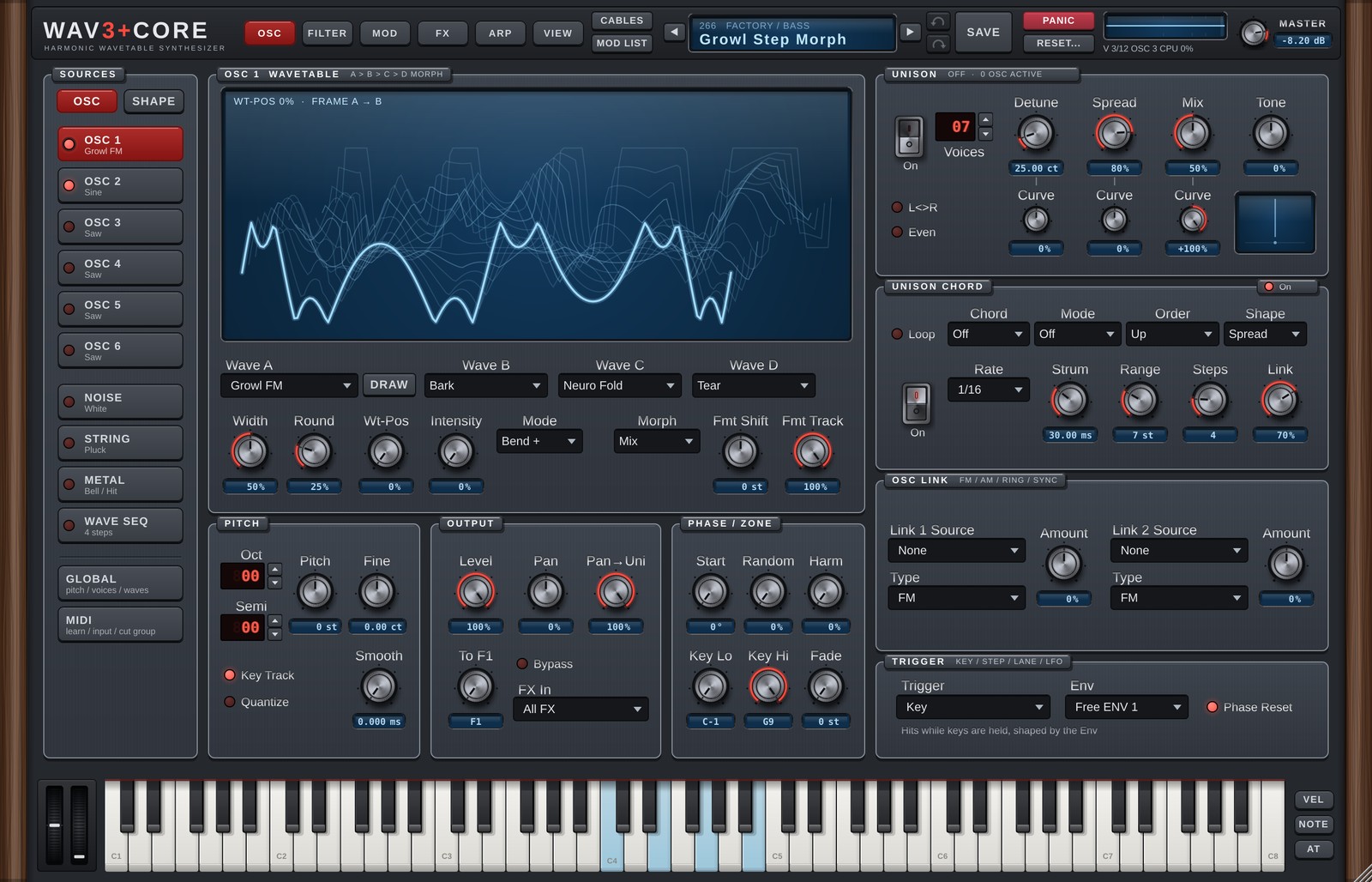
The OSC page is where the raw sound is made. Pick a source in SOURCES on the left and the right side shows its settings.
SOURCES
| Row | Details |
|---|---|
| OSC 1-6 | Wavetable oscillators. The current wave name is shown under each row. |
| NOISE | Noise (13 types). |
| STRING | Physical model of strings and winds. |
| METAL | Metallic sound model. |
| WAVE SEQ | Sequencer that switches between OSC1-6. |
- The round button at the left of each row turns that source on or off.
- The OSC / SHAPE tabs at the top switch between the oscillator's basic settings (OSC) and waveform shaping (SHAPE).
- Right-click an OSC row to copy, paste, copy to another OSC or swap. The top of that menu assigns the OSC's output (source OSCn Out: Assign OSC1 Out to Knobs etc., chapter 6; 1.6). Only the OSC settings are copied, not that OSC's LFO (v1.5; copy the LFO separately by right-clicking its LFO tab on the MOD page). An OSC Link Source set to the OSC itself (Self) stays Self when pasted.
WAVETABLE
Each oscillator holds four waves, Wave A to D, and Wt-Pos morphs smoothly between them. The screen shows the current wave frames layered.
| Control | Details |
|---|---|
| Wave A | The main wave. The ◀ ▶ that appear at its edges while hovering, and the mouse wheel, step through the waves (empty User / Add slots are skipped). |
| Wave B / C / D | Morph targets. Off = not used. |
| DRAW | Draw a wave by hand into a User slot (see "Drawing a wave"). |
| Width | For Pulse, the pulse width. For Sine / Saw / Tri / Ramp and the other built-in waves it makes the wave asymmetric (Sine: the length of each half cycle; Saw etc.: the ratio of the slopes). 50% = unchanged. No effect on User / Add / Resynth / Noise. |
| Round | Rounds the corners of Pulse (no effect on other waves). |
| Wt-Pos | Moves through the frames that are set, in the order A → B → C → D. Move it with an LFO or envelope in the Mod Matrix for a sound that keeps changing. |
| Morph | How the frames blend. Mix = crossfade the two waves (as before). Harmonic = interpolate the harmonics (level and phase), so waves with different phases do not cancel on the way and the overtones "migrate". Each wave's Harmonic EQ and Shape Amt apply before the interpolation; Wave Effects and formant lock apply after it. Not used for Resynth waves. |
| Intensity | Bends how the wave is read, changing the tone. Mode (to its right) picks how. |
| Mode | Bend + / Bend - / Bend +/- / Formant / Spectrum / Mirror / Sync / Quantize |
| Fmt Shift | Moves the formant (the vowel-like peaks) up or down without changing the pitch (±24 semitones). |
| Fmt Track | How much the formant follows the played pitch. 100% = follows it like an ordinary instrument; 0% = the peaks stay put (the same "mouth shape" on every note). |
Fmt Shift / Fmt Track (formant lock) work on User / Add / Resynth waves (not on built-in waves). The reference pitch is the analysed original pitch for Resynth and C4 for User / Add; playing at that pitch sounds like the original.
Wave types
The built-in waves include analog types (Saw, Pulse, Warm Saw…), sync, FM, phase distortion, folding and distortion, vocal (Vox A-U, Choir Ah…) and growl / wobble bass waves (Growl FM, Reese Core, Wobble Sub, Talk Bass…). Version 1.1 adds 80 more, 150 in total (organ / keys, pipe organ, acoustic instruments, bell / mallet, spectral, chip / bass and growl). The full list is in the appendix.
There are also slots for your own waves:
| Name | Contents | Made with |
|---|---|---|
| User 1-8 | A single-cycle WAV or a hand-drawn wave | IMPORTED WAVEFORMS in GLOBAL, or DRAW |
| Add 1-8 | A wave built from harmonic levels and phases (additive) | ADDITIVE OSCILLATORS in GLOBAL |
| Resynth 1-6 | A many-frame wavetable made by analysing a recording | RESYNTHESIS in GLOBAL |
When a Resynth wave is selected, the Wave B-D row turns into playback settings and Width / Round turn into Speed / Start / End.
| Control | Details |
|---|---|
| Play | Steps through the frames in the recording's own time. Wt-Pos then sets where playback starts. |
| Loop | Off / Forward (repeat) / Ping-Pong (back and forth). |
| Key Sync | Restarts playback on every key press. |
| Speed | Playback speed (0-400%). Also a Mod Matrix destination (OSCn Resynth Speed). |
| Start / End | Start and end of the loop. |
Only the analysis is saved in songs and presets; the original WAV file is not.
Drawing a wave (DRAW)
DRAW opens the drawing window. You can draw with points and curves, or freehand. Choose the User slot to write into and confirm; the wave becomes Wave A.
SHAPE tab
The SHAPE tab reshapes the waveform of the selected oscillator.
HARMONIC EQ
An EQ that raises or lowers harmonics by number (6 bands). Unlike a normal EQ it works on which harmonic rather than on frequency, so it hits the same harmonic on every note.
| Control | Details |
|---|---|
| Position | Which harmonic (1-64). |
| Gain | Boost or cut (±24 dB). |
| Width | How wide (0.3-16). |
Wave Effects (16 types)
Effects that reshape the waveform. Any number can be on at once. Each has an on/off switch and an Amount; at 0% nothing changes.
| Effect | Details |
|---|---|
| Warp | Blends reading the wave forwards and backwards. 100% gives the time-reversed shape (a Saw's rise and fall swap). |
| Twist | Little change up to about 30%, then a sharp spike grows inside the wave. At 100% it is close to Warp at 100%. |
| Drive | Boosts and hard-clips the wave (up to 16 times). |
| Window | Applies a triangular window that pulls both ends of the cycle to zero. |
| Offset | Shifts where the cycle starts. |
| Wave | Moves the wave towards a sine of the same period (stronger fundamental). |
| Bit Reduction | Lowers the amplitude bit depth (1 bit at 100%). |
| Shrink | Squeezes the cycle shorter and fills the rest with zero (pulse-like). |
| SelfSync | Repeats part of the cycle several times (hard-sync-like). |
| Multipoint | Zeroes the areas around three equally spaced points. |
| LPF | Smooths the wave, cutting high harmonics. |
| HPF | Subtracts the LPF result from the wave, emphasising edges. |
| Fold | Folds back whatever exceeds ±1 (wavefolding). |
| Spectrum | Raises and lowers even and odd harmonics alternately (a complex, phaser-like colour). |
| Random All | Randomises the level of every harmonic. |
| Random Odd | Randomises only the odd harmonics. |
Frame Shape (A-D)
Shape Amt A-D set how much of the harmonic EQ and Wave Effects is applied to each frame, Wave A to D. For example, A at 0% and D at 100% morphs from clean to shaped as Wt-Pos moves.
Harm (in PHASE / ZONE) randomises the phase of each harmonic: the same harmonic levels, but a different wave shape and drive response.
PITCH
| Control | Details |
|---|---|
| Oct | Octave (±6). |
| Semi | Semitones (±12). |
| Pitch | Smooth pitch offset (±24 st, default 0 = the sound as before; 1.6), added to Oct / Semi / Fine. It can sit between semitones and glides smoothly when turned. The Mod Matrix destination OSCn Pitch is added to this knob, so right-click Modulate with, the assign mode and the cables use it. |
| Fine | Fine tuning (±100 cents). |
| Key Track | Off = plays at C4 + Oct / Semi / Fine whatever key is pressed, ignoring pitch bend and glide. |
| Quantize | Pitch Quantize (v1.5). On = this oscillator's pitch movement (pitch bend, portamento (glide), LFOs and the Mod Matrix) snaps to the Key / Scale on the ARP page, so it moves in steps (a "robot voice" style effect). Off by default (the sound stays as before). |
| Smooth | Time to glide between the Quantize steps (ms). 0 = hard steps. |
- Quantize is per oscillator, so one oscillator can step while the others glide.
- The targets are the notes of the scale plus the played note itself, so a key outside the scale still sounds as played while nothing moves it. With a Chromatic scale the pitch snaps to semitones.
- Oct / Semi / Fine, unison Detune and the small Drift movement are not snapped (they apply on top). The Pitch knob is added in the same place as the Mod Matrix OSCn Pitch, so it is snapped.
- Try it: turn Quantize on and slowly move the pitch bend wheel while holding a key. Routing
LFO1 -> OSC1 Pitchwith a wide Range in the Mod Matrix also shows it.
OUTPUT
| Control | Details |
|---|---|
| Level | Volume. |
| Pan | Left/right position. |
| Pan→Uni | How much the unison spread moves with Pan. 100% = the whole spread moves to the Pan position; 0% = the spread stays as it is. |
| F1<>F2 | How much goes to Filter 1 and Filter 2 (left = Filter 1, right = Filter 2). |
| Bypass | Skip the filters and go straight to the AMP. |
| FX In | Where this source enters the FX chain. All FX = from the start; From #n = from slot n (earlier effects are skipped); Direct Out = no effects. |
PHASE / ZONE
| Control | Details |
|---|---|
| Start | Start phase (0-360°). |
| Random | Amount of random start phase. |
| Harm | Harmonic phase randomisation (see Frame Shape). |
| Key Lo / Key Hi | Key range this oscillator plays (key zone). |
| Fade | Fade-in width in semitones from each edge of the zone. Overlap two zones to crossfade. |
UNISON
Stacks copies of one oscillator for thickness and width.
| Control | Details |
|---|---|
| On | Unison on/off. |
| Voices | Number of copies (1-16). |
| Detune | Amount of detune. |
| Spread | Stereo width. |
| Mix | Balance between the centre voice and the outer voices. |
| Tone | Cuts (−) or lifts (+) the upper harmonics of the outer voices. |
| Curve (under Detune / Spread / Mix) | How Detune / Spread / Mix are distributed across the voices. |
| L<>R | Swaps left and right. |
| Even | Starts the voices with evenly spaced phases (never on top of each other), giving a strong sync-like sound. |
The small screen at the bottom right shows the position and level of each voice as bars.
Tip for Mix: lowering Mix hollows out the centre voice and makes the detune stand out. For a normal thick unison, start around 50%.
UNISON CHORD
Spreads the unison voices (up to 16) over the tones of a chord, so one key plays a chord. On top of that the voices can start one after another or move their pitch (the UNISON ARP of v1.1). Only works while UNISON is on.
| Control | Details |
|---|---|
| On | The switch at the right end of the title strip. Off = the whole UNISON CHORD rests (Chord and Mode do nothing; plain unison). The settings are kept, so turning it back on restores them. Can be automated to switch within a song. On by default. |
| Chord | Off = as before (every voice on the played note). Octave / 5th / 20 chord types (Maj to m9, the same as the ARP chord pads) / Scale (stacked thirds in the song Key / Scale, starting from the played note) / Played (the keys you hold = paraphonic, see below). |
| Mode | Off (the chord as is when a Chord is chosen) / Strum (tones start one after another) / Converge (the tones gather on the root) / Arp (the tones play one after another at Rate = an arpeggio from one key) / Arp Link (voice count and Detune change in a 4-step cycle on each note) |
| Order | Order for Strum / Arp (Up / Down / Center Out / Random). |
| Shape | How Converge gathers and how Arp plays (table below). |
| Loop | Repeat Strum / Converge / Arp. With Loop off, Arp plays Steps steps and then keeps the whole chord. |
| Rate | Step speed for Converge / Arp (note value). |
| Strum | Strum interval (ms). |
| Range / Steps | With Chord Off: Converge pitch range (semitones) / number of steps. With a chord selected, Range is how far up the chord is stacked (semitones), Steps is the number of Converge steps / the Arp pattern length. |
| Link | Depth of Arp Link. |
What Shape means with a chord selected:
| Shape | Converge (tones to the root) | Arp (which tones sound on each step) |
|---|---|---|
| Spread | Along the chord tones down to the root (all together) | One tone at a time, in Order |
| Alternate | Like Spread, but odd steps are mirrored below the root | The root stays on + one tone at a time |
| Up | The chord mirrored below the root rises to the root in semitones | Tones are added one by one (1, 2, ... all) |
| Down | From the chord tone down to the root in semitones | Starts with all tones and removes them one by one |
| Random | Each step jumps to some tone below its own | One random tone per step (Order is ignored) |
With Chord Off, Converge works exactly as in v1.1 (from the Range offsets back to the played note). Arp with Chord Off plays the detuned voices one at a time.
How voices are spread: the tones are filled from the lowest up, with the voices divided evenly (any remainder goes to the lower tones first). Voices on the same tone detune against each other (a tone with a single voice has no detune). For example 7 voices with Maj gives root x3, third x2, fifth x2.
Range: the basic chord (Maj = 0 / 4 / 7 semitones) always sounds. When Range is wider than that, the chord tones an octave up are added as far as Range allows (24 = up to two octaves; Scale keeps stacking thirds). At the default Range 7, Octave gives the root plus one octave up, and Maj gives just the basic chord.
The wavetable band is chosen from the highest chord tone, so stacking upwards does not alias.
Chord = Played (paraphonic): the unison voices are spread over the keys you are holding. While any oscillator is set to Played, the whole synth runs one voice only, however many keys you press, and the filter and envelopes are shared by the whole chord (like a vintage paraphonic synth).
- The first key starts the voice (that key is the root and sets the velocity).
- Adding keys adds their notes. With Retrigger on (POLYPHONY), each added key restarts the envelopes (pitch and velocity stay those of the first key); with it off, the envelopes do not restart (legato). Releasing a key redistributes the voices over the remaining keys. Even if you release the root key, only the keys still held sound.
- Releasing all keys starts the release (the last chord is kept during the release).
- Mono / voice count in POLYPHONY and Range are not used. Oscillators that are not set to
Playedplay the root key only. - Notes from the ARP, the chord pads and Chord Memory count as held keys, so a chord pad can play on a single voice.
OSC LINK
Modulates this oscillator with another one (2 slots).
| Control | Details |
|---|---|
| Link Source | None / OSC1 (Self) / OSC2-6. The oscillator's own number is shown as (Self). |
| Type | FM / AM / Ring Mod / Sync |
| Amount | Modulation depth. |
TRIGGER
Detaches the oscillator from the keys so it plays in rhythm: kicks, hi-hats, chopped synths and so on.
| Control | Details |
|---|---|
| Trigger | Key = normal (plays while a key is held). Step = every ARP step (with ARP off, every Division). Arp Mod 1-4 = every step of that ARP MOD lane (bar height = hit strength). LFO 1-6 = every LFO cycle. |
| Env | The Free ENV restarted on each hit; it shapes the oscillator's level. |
| Phase Reset | Restarts the wave at the Start phase on each hit (the same attack every time). |
With anything other than Key, the Env restarts on every hit while a key is held. Nothing sounds until the first hit. Mod Matrix routings that use the same Free ENV restart too, so you can use it for things like a kick's pitch drop.
NOISE
| Control | Details |
|---|---|
| Type | White / Pink / Brown / Blue / Digital / Crackle / Transient / Resynth 1-6 |
| Color | Brightness. |
| Width | Stereo width. |
| Level / Pan | Volume and position. |
| F1<>F2 / Bypass / FX In | As for the oscillators. |
| Follow AMP ENV | On: the noise follows only the AMP envelope (when you release a key it fades out with the AMP Release, together with the rest of the sound). Off: the noise uses its own envelope (ENVELOPE > NOISE on the MOD page). On for new sounds; songs and presets saved earlier (including the factory presets from 1.0) load with it off (they sound as before). While it is on, the knobs on the NOISE tab of ENVELOPE on the MOD page are dimmed. |
Transient starts from the same random seed on every note, so the attack noise is identical each time. Crackle is crackling noise; Digital is grainy digital noise.
Resynth plays the part of a sound analysed in RESYNTHESIS that harmonics cannot describe (breath, scraping and so on). Follow chooses which OSC's playback position it follows (Auto = the first OSC playing the same Resynth slot).
STRING
A physical model of strings and winds.
| Control | Details |
|---|---|
| Excite | How it is played: Pluck / Bow / Reed (Wind) / Flute (Wind) |
| Decay / Damping | Length of the ring / damping of the highs. |
| Brightness | Brightness. |
| Position | Where the string is plucked. |
| Body / Body Type / Body Size | Body resonance. Body Type: Classic / Guitar / Violin / Cello / Piano Board / Wood Box / Metal Can / Sitar. |
| Octave / Semi / Fine / Key Track | Pitch. |
| Level / Pan / F1<>F2 / Bypass / FX In | As for the oscillators. |
METAL
A model of metallic sounds such as bells, cymbals and gongs. The screen shows the partials (the components of the sound).
| Control | Details |
|---|---|
| Model | Random / Bell / Bar / Tube / Plate / Gong / Cymbal / China / Crash / Sizzle / Snare Wire / Membrane / Wood / Glass / Plastic |
| Seed A / B / Morph | Two seeds for the partial layout, and a blend between them. |
| Rich / Stretch / Tilt | Number of partials / stretching of their spacing / level of the upper partials. |
| Hardness / Vel>Hard / Position / Noise | Strike hardness / velocity to hardness / strike position / strike noise. |
| Mode | Hit (decays after the strike) / Sustain (keeps ringing). |
| Decay / Damp / Sustain / Release | Length and decay of the ring. |
| Beat / Shimmer / Glide / Width | Beating / shimmer / pitch drift / width. |
| Ring / Ring Ratio | Ring modulation amount and ratio. |
| Octave / Key Track / Level / Pan / F1<>F2 / Bypass / FX In | As for the oscillators. |
WAVE SEQ
Switches which of OSC1-6 plays, in up to 16 steps.
| Control | Details |
|---|---|
| On | On/off. |
| Steps | Number of steps (1-16). |
| Step 1-16 | The OSC for each step. |
| Rate | Switching speed (note value). |
| Crossfade | Smoothness of the switch. |
| Retrigger | On = restart on every note; off = follow the song's bars. |
5. FILTER page
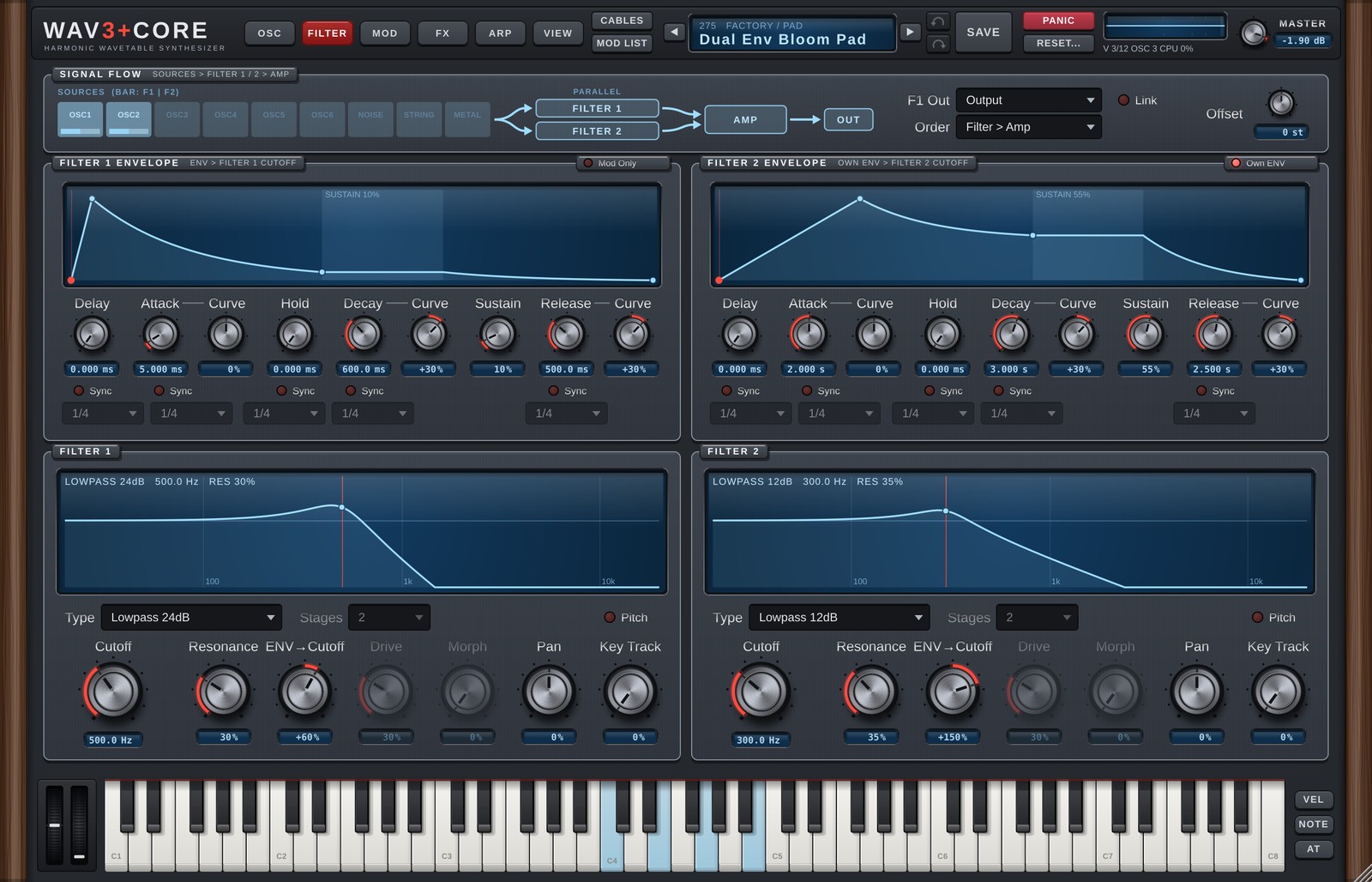
From top to bottom the FILTER page shows SIGNAL FLOW (routing), the envelopes and the filters. The left column is Filter 1, the right column Filter 2.
SIGNAL FLOW
A picture of the routing from the sources through the filters to the AMP.
- The bar under each SOURCES box shows how much of that source goes to Filter 1 and Filter 2 (F1<>F2). Clicking a box takes you to that source on the OSC page.
- F1 Out:
Output= the two filters run in parallel.To Filter 2= Filter 1 feeds Filter 2 (series). - Order (under F1 Out): the order of the FILTER and the AMP (v1.6).
Filter > Amp(default) = as before, the AMP (amp envelope and level) comes after the filters.Amp > Filter= the AMP comes first, then the filters. The Drive distortion follows the rise and fall of the amp envelope, and resonance ringing is not cut when the amp envelope ends after you release the key; it dies away by itself (if it never dies away, e.g. self-oscillation, it is faded out after at most 8 seconds). Clicking the AMP box in the picture also swaps the order. Not automatable. - Link: Filter 2's cutoff follows Filter 1's cutoff.
- Offset: with Link on, how many semitones Filter 2's cutoff is shifted from Filter 1.
FILTER 1 / 2 ENVELOPE
Envelopes that move the filter cutoff over time. The screen shows the shape.
| Control | Details |
|---|---|
| Delay | Time from the key press until it starts. |
| Attack | Time to rise to the top. |
| Hold | Time it stays at the top. |
| Decay | Time to fall to Sustain. |
| Sustain | Level while the key is held. |
| Release | Time to fall after the key is released. |
| Curve | Curve of Attack / Decay / Release (straight to exponential). |
| Sync | Set the times in note values (1/4 etc.). |
How far the envelope moves the cutoff is set with ENV→Cutoff in the filter section.
Own ENV (right of the Filter 2 title): on = Filter 2 uses its own envelope. Off = it shares Filter 1's envelope (the own envelope is shown dimmed). The first time you turn it on, Filter 1's envelope values are copied. The Filter 2 envelope is also available as the Mod Matrix source ENV Filter 2.
Filter 1's envelope is the same as the FILTER tab on the MOD page (editing either changes both).
FILTER 1 / 2
The screen shows the filter's frequency response. Drag horizontally for Cutoff and vertically for Resonance. When the cutoff is modulated, its current position is shown too.
| Control | Details |
|---|---|
| Type | Filter type (table below). |
| Stages | Number of Allpass stages (1-32). More stages delay the lows more, for a laser-like zap. |
| Pitch | Puts the cutoff exactly on the played note (following pitch bend and glide). The Cutoff knob then becomes Offset (semitones from the note; 12 = one octave up) and Key Track is disabled. |
| Cutoff | Cutoff frequency. |
| Resonance | Emphasis around the cutoff. |
| ENV→Cutoff | How much the envelope moves the cutoff. |
| Drive | Saturation inside the filter. Works with Ladder / Diode / Scream / Formant / Vowel / Comb / Phaser / Allpass (dimmed for other types). On Ladder, Diode and Scream, Drive above 30% now distorts much harder (v1.5; up to 30% it is unchanged). |
| Morph | Type-dependent shaping (table below). Dimmed for types where it has no effect. |
| Pan | Left/right position. |
| Key Track | How much the cutoff follows the played pitch (100% = one semitone per semitone, reference C4). |
Filter types
| Type | Details |
|---|---|
| Lowpass 24dB / 12dB | Removes highs (24 dB is steeper). |
| Highpass 24dB / 12dB | Removes lows. |
| Bandpass | Keeps only the area around the cutoff. |
| Notch | Removes only the area around the cutoff. |
| Peak | Boosts the area around the cutoff. |
| Allpass | Shifts the phase without changing the level (Stages; Morph = dry/wet). |
| Ladder | Analog-style ladder lowpass. |
| Diode | Diode ladder; good for 303-style bass. |
| Scream | Heavily driven, screaming filter. |
| Formant | Vowel-like filter. |
| Morph | The Morph knob moves LP → BP → HP → Notch. |
| Comb + / Comb - | Comb filters (Morph = damping). |
| Dual Peak / Dual Notch | Two peaks / notches (Morph = spacing). |
| Vowel | Vowel filter (Morph = A → E → I → O → U). |
| Phaser | Phaser-style (Morph = stage spread). |
With Formant / Vowel selected, a Voice slider appears in place of Stages. It sets the voice size (left = child, about 1/4 = woman, middle = man, right = large).
6. MOD page
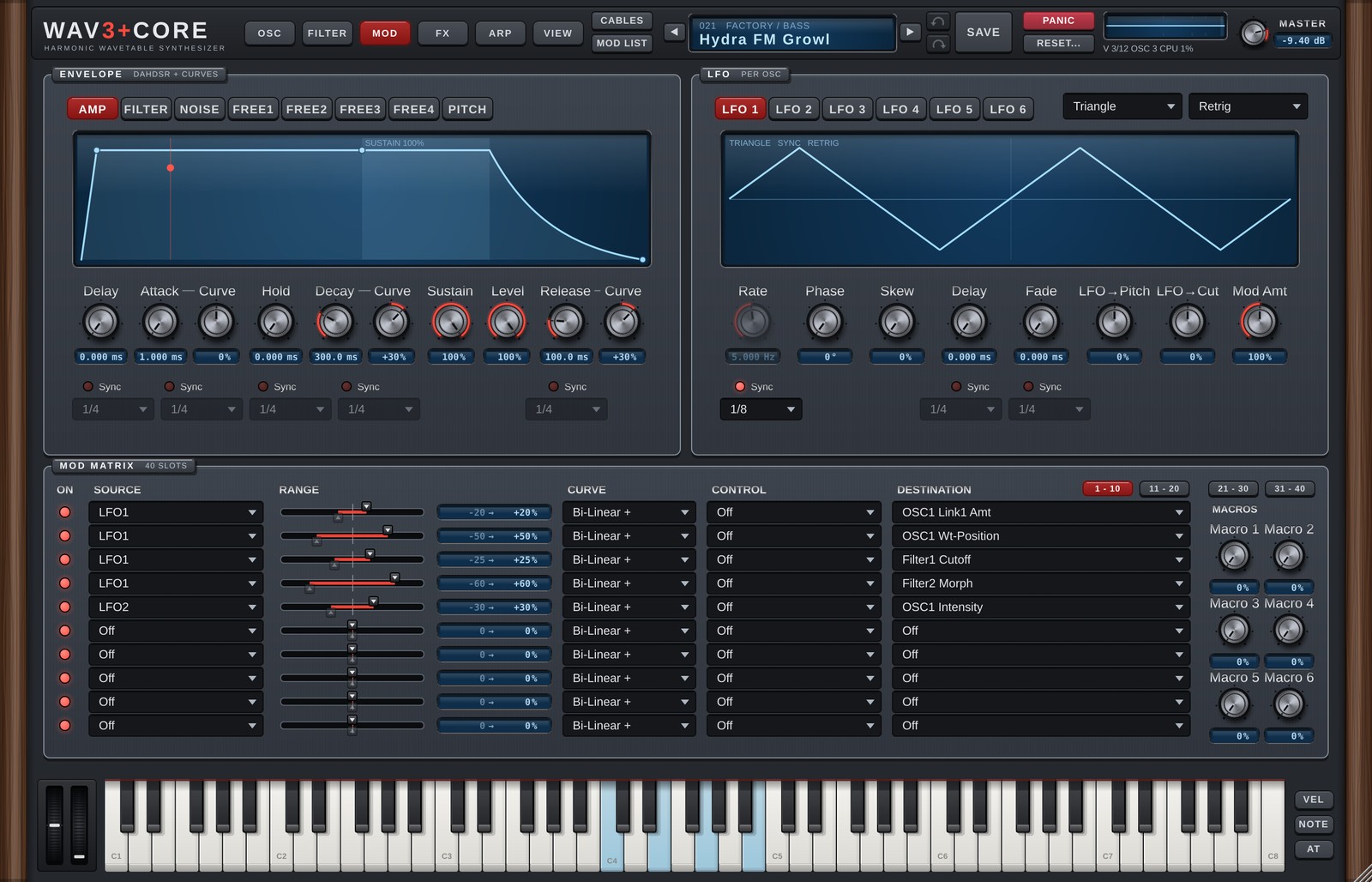
The MOD page holds everything that adds movement: envelopes, LFOs, the Mod Matrix and macros.
ENVELOPE
Choose the envelope with the tabs.
| Tab | Details |
|---|---|
| AMP | Volume envelope. |
| FILTER | Filter 1 cutoff envelope (the same one as on the FILTER page). |
| NOISE | NOISE volume envelope. Not used while Follow AMP ENV is on in NOISE on the OSC page (the knobs are dimmed). Sustain defaults to 1.0 (full). |
| FREE1-4 | General-purpose envelopes, used as Mod Matrix sources and by OSC TRIGGER. |
| PITCH | Pitch envelope. |
The controls are Delay / Attack / Hold / Decay / Sustain / Release (DAHDSR) plus a Curve for Attack / Decay / Release. The AMP tab also has Level right of Sustain (the volume of each voice, 0-100%, default 100% = the sound as before; 1.6). The Mod Matrix destination Voice Level is added to this knob. Turn on Sync for a stage to set its time in note values (1/4 etc.). An Attack turned fully left rises in 0.1 ms (with 0.1ms Attack On on the GLOBAL page; 1 ms when Off). Whether a retriggered note restarts from zero or continues from the current level is set with Env Start on the GLOBAL page (chapter 9). You can also edit on the screen:
- Drag a point horizontally to change that stage's time (Delay / Attack / Hold / Decay / Release).
- Drag the Sustain point vertically to change the Sustain level.
- Drag a line (Attack / Decay / Release) up or down to change that segment's curve (pull up to bulge upward).
- Synced stages do not move horizontally, because their time is set by the note value.
FREE ENV Custom (MSEG)
FREE1-4 switch between ADSR (set with the knobs) and Custom (draw your own).
| Action | Result |
|---|---|
| Click an empty spot | Adds a point (up to 128). |
| Drag a point | Moves it. The end points move vertically only. |
| Drag the ◆ between points up / down | Changes that segment's curve. |
| Right-click a point | Sustain point (holds here while the key is down) / Loop start (repeats from here to the sustain point) / Delete point |
| Right-click menu | Load shape (ADSR / Pluck / Swell / Ramp Up / Ramp Down / Gate 1/16 x4 / Wobble Loop), No sustain (one-shot), No loop |
With Sync on, the time axis is in beats, you can pick the length (1/16 to 8 Bars) and points snap to the beat grid (hold Shift to move freely). Without Sync, hold Shift to snap to the grid.
LFO
There are six LFOs, one for each of OSC1-6 (LFO 1 = OSC1's LFO). The Wave and Mode drop-downs sit at the right end of the LFO 1-6 tab row (1.6; they belong to the LFO that is open).
| Control | Details |
|---|---|
| Wave | Sine / Triangle / Square / Saw / S&H / Reverse Saw / Smooth Rnd / Noise / Custom |
| Rate | Speed (Hz). |
| Phase | Start position (0-360°). |
| Skew | Leans the wave forward (Triangle → Saw). 0% = unchanged. |
| Delay | Time from the key press until the LFO starts. |
| Fade | Time for the LFO to fade in. |
| LFO→Pitch | How much this LFO moves the pitch of its OSC directly (±100% = ±12 st, default 0 = the sound as before; 1.6). For vibrato. The Mod Matrix destination LFOn > Pitch Amt is added to this knob. |
| LFO→Cut | How much this LFO moves the filter cutoff directly. |
| Mod Amt | Overall depth of this LFO's modulation. |
| Mode | Free (runs freely) / Retrig (restarts on each note) / Host (locked to the DAW bar position) / One Shot (plays once per note) |
| Sync | Set the speed in note values (1/8 etc.). |
| Step: Instant | Right of Division. In Mode Host while playing, when the division changes (the Division knob, automation or a Mod Matrix Step): off (Wait, default) waits for a bar-aligned point, on switches at once (1.6, see "Modulating tempo-synced rates and times" below). |
| Sync (under Delay / Fade) | Set Delay / Fade in note values. |
With Custom you can draw one LFO cycle on the screen.
- Double-click an empty spot to add a point; double-click a point to delete it.
- Drag a point to move it; drag a line up or down to change its curve.
- Two points at the same position make a jump (a square-wave-like step).
- Right-click for
Load Shape(Triangle / Sine / Saw Down / Ramp Up / Square / Pulse 1/4 / Steps / Decay),Grid(snap),Flip VerticalandReverse (Mirror).
MOD MATRIX
A table that sets what moves (source), what is moved (destination) and by how much (range). There are 40 slots, shown 10 rows at a time; switch pages with 1 - 10 / 11 - 20 / 21 - 30 / 31 - 40 at the top right. A small dot on a page button means that hidden page has slots in use. When ASSIGN or the right-click Modulate with creates a slot, the table switches to the page with that slot. The page you were on is remembered when you close and reopen the window (it is not saved in the song).
Slots 21-40 were added in 1.6. Songs and presets from 1.5 and earlier load with slots 21-40 all Off (the sound does not change). AI SOUND can use all slots 1-40 when PARAMS is Full or higher (chapter 11).
| Column | Details |
|---|---|
| ON | Turns the slot on/off without losing its settings. Off keeps the source, range and destination but stops the modulation (the row is dimmed), handy for A/B-ing a single slot. |
| SOURCE | What does the moving (table below). |
| RANGE | How much. The upper handle on the slider sets the top of the range, the lower handle the bottom (double-click = automatic). The amount is shown on the right. |
| CURVE | How the source is used: Bi-Linear + (−1 to +1 as it is) / Bi-Linear - (inverted) / Uni-Linear + (0 to 1) / Uni-Linear - (1 to 0, strongest when the source is 0). Below the curves, the CURVE menu also has Sync: how this slot moves a tempo-synced rate or time (see "Modulating tempo-synced rates and times" below). When the destination is such a knob, a small tag on the right of the box shows the current Sync (SM / ST / ST. / STT / ALL). |
| CONTROL | A second source that scales this slot (e.g. the LFO only works as far as the Mod Wheel is raised). |
| DESTINATION | What is moved: almost any parameter of the oscillators, filters, envelopes, EQ, effects and more. A click opens the picker window (below). |
Choosing a CURVE: for sources that go from 0 to 1 (envelopes, Velocity, Mod Wheel, Aftertouch, Macros), use
Uni-Linear +: nothing moves at 0, and the destination moves by up to Range. WithBI-LINEARthe destination stays shifted by −Range while the source is 0 (on pitch, the note stays out of tune). Sources that swing up and down, such as LFOs, stay onBi-Linear +and move ±Range around the knob value.
The ◀ ▶ that appear at the edges of a drop-down while hovering, and the mouse wheel over it, step to the previous / next item. The SOURCE and CONTROL menus are grouped by type (LFO ▸, ENV ▸, MIDI ▸ …).
The DESTINATION picker (1.6): there are more than 380 destinations, so a click on DESTINATION opens a small window with a search field next to the row instead of a long menu.
- Left = the groups (OSC 1–6, OSC 1-6 (All), LFO, Filter 1 / 2, Noise, String, Metal, ENV, Voice, FX, Master, in the same order as the old menu). Right = the items of the selected group.
- You can type into the search field right away (e.g.
cut,osc 2 pitch,delay). It searches all groups and shows the group name next to each hit. While the search field is empty, ← → switch groups. - The current destination is filled and marked on the left. Destinations that other slots already use get a small dot and the slot numbers (
#2 #5); their groups get a dot too. - Click an item, or select it with ↑↓ and press Enter (or OK), to set it and close the window. The Off button clears the destination.
- Esc, ×, Cancel or a click outside the window change nothing. Undo takes one step back, the same as choosing from the menu.
Modulating tempo-synced rates and times (Sync)
When an LFO Rate, an FX Rate / Time / Decay, an envelope Attack / Decay / Release or an LFO Delay / Fade has Sync on (set in note values such as 1/4), each slot decides how the Mod Matrix moves it. Open the CURVE drop-down: the five Sync choices are below the curves.
| Sync | What it does |
|---|---|
| Smooth | A smooth multiplier, faster / slower (longer / shorter). Range ±100% = ±4 octaves (1/16 to 16 times). It leaves the note grid (no longer on the beat). |
| Step | Jumps between note values (1/4 → 1/8 → 1/16 …, straight notes only). About one step (×2) per 25% of Range. |
| Step + Dot | Straight and dotted notes (1/8. etc.). |
| Step + Triplet | Straight notes and triplets (1/8T etc.). |
| Step (All) | Straight, dotted and triplet notes (the finest steps). The default for new slots. |
- Destinations: the LFO Rate of OSC 1–6 (also OSC1-6 LFO Rate (All)), the Rate of Chorus / Hyper / Flanger / Phaser / Pan, Delay 1–3 Time, Reverb / Reverb 2 Decay and the FX Filter LFO Rate.
- With Sync off (Hz or ms knobs) the knob moves as before, whatever is chosen here.
- With Step on an envelope Attack / Decay / Release, the length is decided when the stage starts and does not change during the stage (a change made mid-stage applies from the next stage, so there is no click). The LFO Delay is decided when the key is pressed and the Fade when the fade starts; both stay for the rest of the note. Smooth changes them smoothly at any time, as before. When a Free ENV uses a Custom shape, which has no note lengths, Step works as the same multiplier as Smooth.
- On a Delay, Step switches with a short crossfade (20 ms), so there is no click (Smooth glides like the Time knob, so the pitch bends).
- LFOs that follow the song position (LFO Mode Host, Pan, the FX Filter LFO) stay on the bar with Step; Smooth drifts off the beat.
- For these LFOs, Step: Instant (right of Division, per LFO; 1.6) sets what happens when the division changes, whether by a Mod Matrix Step, the Division knob or automation. Off (Wait, default) keeps the old division until a point where both cycles start on the bar grid, so the movement joins smoothly. On (Instant) switches at once; the phase is recalculated from the song position, so it may jump, but this is the one for wobble basses where the switch itself makes the rhythm ("faster from this beat"). Songs and presets from before 1.6 (and factory 001–340) load with Instant, so they switch at once as before.
Songs and presets from before 1.6 load with every Sync set to
Smooth. OSC LFO Rates sound as before. FX Rates / Times used to ignore the Mod Matrix while Sync was on; songs with such a slot start moving (as Smooth) in 1.6.
Sources
| Source | Details |
|---|---|
| LFO1-6 | The per-OSC LFOs. |
| ENV Amp / ENV Filter / ENV Filter 2 / ENV Noise / ENV Pitch / Free ENV1-4 | Envelopes. |
| Velocity / Note / Aftertouch | Key velocity / pitch / aftertouch. |
| Mod Wheel / Pitch Bend / Expression | Wheels and pedal (Expression = CC#11; CC#4 is accepted too). |
| OSC1-6 Out | The oscillator's audio output itself. It moves at audio rate, giving FM-like effects. |
| Macro 1-6 | The macro knobs. |
| Random | A random value per note (fixed while the note plays). |
| Alternate | +1 / −1, swapping on every note. |
| Gate | 1 while a key is held, 0 when released. |
| Constant (On) | Always 1. Use it to offset a destination by the Range, or together with CONTROL. |
| Arp Mod 1-4 | The current value of the MOD lanes (FREE MOD) on the ARP page. |
| External | The level of the sidechain input (0 to 1). Route another track to this plugin's sidechain input in your DAW and set Attack / Release / Gain in EXTERNAL INPUT in MIDI (SOURCES on the OSC page, chapter 10). Open the filter with a kick, widen the Detune on a snare and so on. It is a 0-to-1 source, so use a UNI-LINEAR curve. |
Assigning by clicking knobs (ASSIGN)
Right-click an LFO / ENV tab (LFO 1, AMP, FREE1 …) for this menu (macros have the same items on the knob's right-click menu). A left-click on a tab still just opens that tab.
Since 1.6 the other sources shown on screen have the same menu:
| Right-click | Source |
|---|---|
| An OSC 1-6 row in SOURCES on the OSC page | OSC1-6 Out (the rest of the menu is the OSC copy / paste as before) |
| The two wheels left of the keyboard | Pitch Bend (left) / Mod Wheel (right). A right-click does not move the wheel |
| The VEL / NOTE / AT buttons at the right end of the keyboard (a click opens the same menu) | Velocity / Note / Aftertouch |
| The MOD1-4 tabs in the ARP page display (and the top of the right-click menu inside a MOD lane) | Arp Mod 1-4 |
| EXTERNAL INPUT under MIDI in SOURCES on the OSC page (Level meter, hint text, empty part of the panel) | External |
A right-click on the keys themselves still latches (holds) that key as before (Velocity / Note / Aftertouch are on the three buttons to the right).
| Item | Details |
|---|---|
| Assign LFO1 to Knobs | Enters the assign mode for that source. A banner appears at the top; on any page, clicking a knob connects it through a free Mod Matrix slot (the knob's value does not move; the amount is the Default Amount of Modulate with, initially 0%, shown as a dashed ring and cable). Drag a knob up / down to set that slot's amount. Choose the item again (Stop Assigning), press Esc or click the banner to finish. |
| Remove All Assignments of LFO1 (n) | Removes every slot of that source (one ↶ brings them back). |
| Show Mod List... | Opens the MOD LIST window (below). |
The LFO tab menu continues with copy / paste / swap / reset for the LFO.
- Shift+click a per-OSC knob (Level, Pan, Pitch, Unison, Wt-Pos, LFO→Pitch …) to connect it to the OSC1-6 (All) destination instead of only that knob's OSC (e.g.
OSC1-6 Level (All)). A plain click always uses only that knob's OSC (it works even when an All slot already exists). - In a knob's right-click Modulate with, Apply to chooses
This OSC(the knob's OSC) orAll OSCs(OSC1-6 together); it is remembered until the window is closed. Knobs without an All destination do not show it. - The points in the PARAMETRIC EQ graph on the FX page are destinations too. Right-click a point and choose Freq / Gain / Q to get that band knob's right-click menu (Modulate with etc.). In assign mode the points light up as well; click a point and choose Freq / Gain / Q to connect it (clicking the band's Freq / Gain / Q knob does the same).
- Since 1.6 every Mod Matrix destination can be made with a knob's (or EQ point's) right-click and the assign mode (new knobs: OSC Pitch, LFO LFO→Pitch, AMP Level; GLOBAL Analog and the EQ knobs are now connected).
Cables and MOD LIST
You can see which knob is moved by which source as slightly sagging cables (display only, the sound does not change). Cable colours follow the kind of source (LFO = purple, ENV = green, MACRO = amber, others = blue-grey). An end on a page that is not shown goes to a tag under that page's button in the header (▲ MOD etc.).
| How | Cables shown |
|---|---|
| Hold Ctrl (no click) over a knob | The cables connected to that knob, with an amount label (e.g. LFO1 → Filter1 Cutoff 35%). |
| Hold Ctrl over an LFO / ENV tab or a macro knob | All cables from that source. The LFO / ENV tab button lights up in the cable colour. |
| Hold Ctrl over an OSC 1-6 row, a wheel, an ARP MOD1-4 tab, the EXTERNAL INPUT meter or the VEL / NOTE / AT buttons right of the keyboard (1.6) | All cables from that source. The OSC row, the MOD tab and the VEL / NOTE / AT button light up. With the keyboard set to Hide in VIEW, Velocity / Note / Aftertouch cables start, like the wheels', at that slot's SOURCE in the Mod Matrix (the ▲ MOD tag on other pages). |
| Hold Ctrl for 0.4 s away from knobs and sources | All cables of the current page. They disappear when you release Ctrl (a quick tap such as Ctrl+Z in your DAW shows nothing). |
| Turn on CABLES in the header | All cables of the current page stay visible (remembered per computer). Ctrl + a knob on top of that shows that knob's cables strong with labels and dims the others. |
A slot with 0% amount (connected, but not changing the sound yet) is shown as a thin dashed cable and a dashed ring around the knob. When all cables are shown, labels appear only on the cable near the mouse so that many cables stay readable. "Cables of the current page" are those with at least one end visible on that page (cables with both ends on other pages are not shown).
MOD LIST (header button, right-click on a macro knob, or right-click on an LFO / ENV tab) is a window with one row per Mod Matrix slot in use (SOURCE and DESTINATION both not Off), in slot order. It scrolls when there are many rows.
| Column | Details |
|---|---|
| Number | The slot number (the dot shows the cable colour). Click it to go to that row of the MOD MATRIX on the MOD page. |
| Small knob | The slot's RANGE (upper end). Drag to change, double-click for 0%. |
| Source → destination | Click the destination name to go to the page (and tab) of its knob. Destinations without a knob go to the MOD MATRIX row. |
| % / curve | The amount ("low..high%" when the lower end is set by hand) and the CURVE (BI + / UNI + etc.). For a tempo-syncable rate or time, the Sync below it (Smooth / Step / Step . / Step T / Step All). |
| × | Removes the slot (undo with ↶). |
Hovering a row shows that slot's cable even when CABLES is off. Slots whose ON is off are shown dimmed. Drag the title to move the window; × at the top right closes it.
MACROS
Six macro knobs. Assign one macro to several Mod Matrix slots and one knob moves many parameters together. Double-click a name to rename it (saved with the preset).
7. FX page
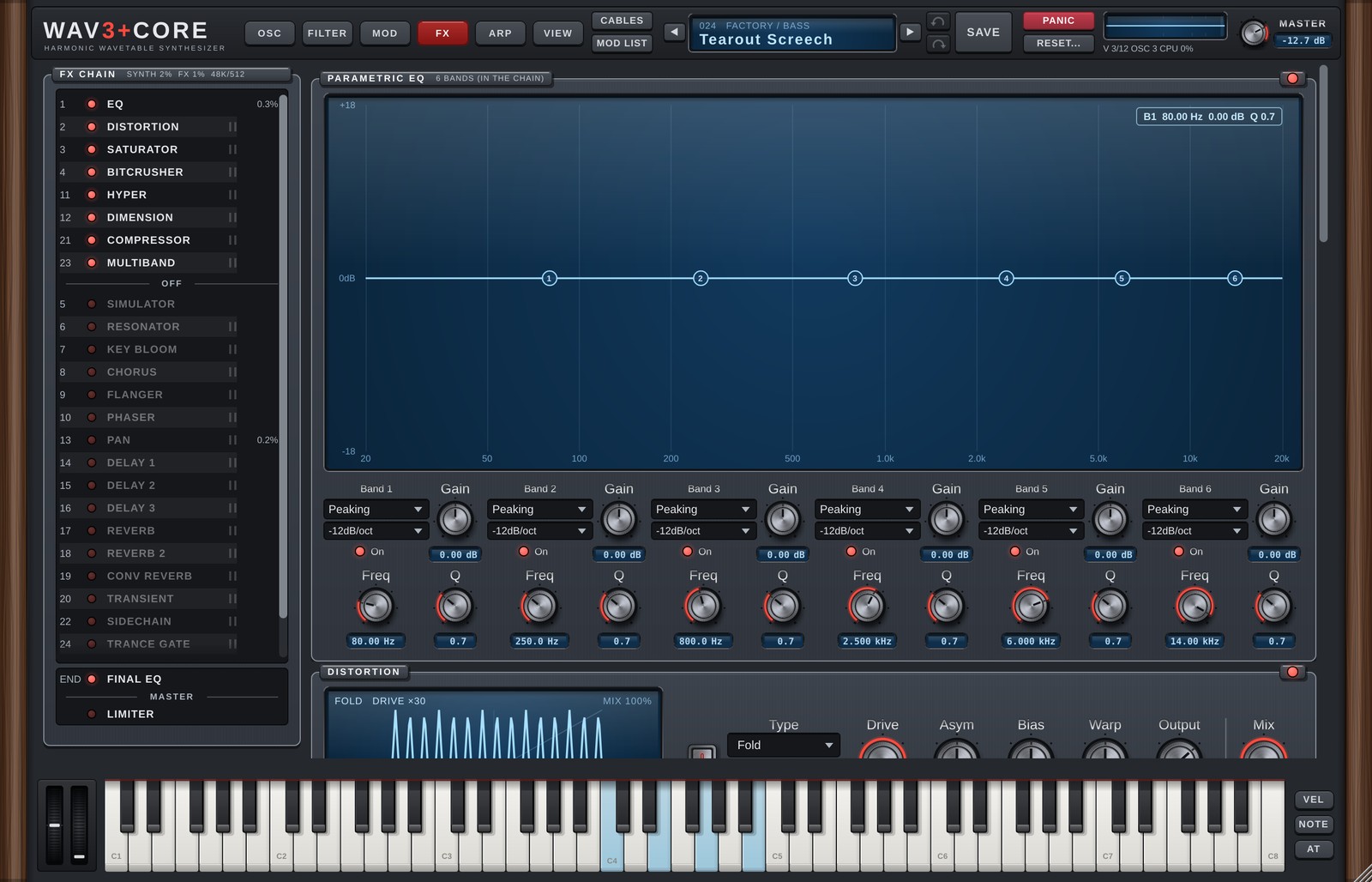
FX CHAIN
The FX CHAIN on the left lists the 26 effects in the order the sound passes through them.
- Click a row to show that effect's panel on the right (the rack scrolls to it, see below).
- The dot at the left of a row turns the effect on or off.
- Drag a row to change the order.
- (v1.6) On on top, off below: the effects that are on are listed first, in the order the sound passes through them. Below a thin OFF line come the effects that are off (dimmed, in their chain order). Turning an effect on moves it to the end of the on group (the last effect before FINAL EQ); turning it off moves it to the top of the off group. Dragging an off effect up into the on group turns it on at that place; dragging an on effect below the OFF line turns it off. Off effects pass no sound, so this regrouping never changes the sound. The number at the left of a row is its position in the chain (the same number as "From #N" in an oscillator's FX In; sources that enter the chain in the middle are moved along so that they still pass the same effects).
- (v1.6) Opening an older song or preset does not reorder anything. If its chain mixes on and off effects, the list only shows them grouped; the stored order changes the first time you turn an effect on or off or drag a row.
- (v1.6) The list is 25 rows tall and scrolls when there are more rows (mouse wheel, or the slim bar at the right edge). While dragging a row, move it near the top or bottom edge of the list to scroll automatically. When an effect is selected from somewhere else, the list scrolls so that its row is visible. The FINAL EQ / MASTER / LIMITER box at the bottom does not scroll.
- "‖" at the right of a row puts that effect in parallel with the one above it. Parallel effects receive the same signal and their outputs are added (the dry signal is mixed in only once). (v1.6) A parallel block moves as one: dragging any of its rows, or turning it on or off, moves the whole block. A block counts as on while at least one of its effects is on. The first row of the off group has no "‖" (on and off effects are not joined).
- The % at the right end of a row is an estimate of that effect's CPU use. The title shows the load of the whole synth and of all effects.
- The box at the bottom is the fixed final stage after all effects (it cannot be moved). From top to bottom it follows the signal: FINAL EQ → MASTER (volume) → LIMITER (v1.5). Click a row to show its panel, and use the dot to turn it on or off.
The rack (v1.6)
The right side of the FX page is a rack: the panels of all effects that are on are stacked from top to bottom in chain order (the Parametric EQ is one of them). Below them, after an END line, FINAL EQ and LIMITER are always shown (dimmed while they are off). With no effect on, the rack says "Turn on an effect in the FX CHAIN list" above the END section.
- Scroll with the mouse wheel or the slim bar at the right edge.
- Click a row in the FX CHAIN and the rack scrolls to that panel, which lights up briefly. If the effect is off, its panel appears dimmed at its place in the chain, so you can look at it and switch it on. It goes away when you select another effect; if you turn it on, it stays as a normal panel.
- Each panel has an on/off dot at the right of its title. It works like the dot in the list (turning on moves the effect to the end of the on group).
- Mouse wheel over knobs: once the rack is scrolling, knobs and drop-down lists under the mouse are not changed for about 0.5 seconds after the last wheel movement, so you can scroll past them. After you have stopped for 0.5 seconds, the wheel over a knob or drop-down changes it as usual.
- Jumping to an FX knob (clicking a destination in MOD LIST, the Mod Matrix, a cable) opens the FX page and scrolls the rack to that knob. Modulation cables to a knob that is scrolled out of view point to a tag at the top or bottom edge of the rack (for example "▲ DELAY 1"); cables to an effect that is off and not in the rack point to its row in the FX CHAIN.
Effects that are off use almost no CPU. Most effects have a Mix control (blend with the dry sound).
Heavy effects: Conv Reverb, Key Bloom and Multiband use a lot of CPU. If things get heavy, use fewer effects or lower Quality (Live) or FX Quality in GLOBAL (SOURCES on the OSC page).
The effects
EQ (parametric EQ)
A 6-band EQ. Because it sits inside the FX chain, it can be moved and modulated from the Mod Matrix (destinations EQ1-6 Freq / Gain / Q).
Drag the numbered points on the screen to change frequency and gain. Below, choose each band's type (Off / Low Pass / Band Pass / High Pass / Notch / Low Shelf / Peaking / High Shelf), slope (−12 / −24 / −48 dB/oct) and on/off.
The EQ panel shows the EQ inside the FX CHAIN (CHAIN EQ). (v1.6) Like the other effects, the EQ has an on/off switch (the dot in the FX CHAIN row and at the right of its panel title); when it is off, the sound passes the EQ unchanged. Each band's own On works as before. Songs and presets made before v1.6 open with the EQ on. The FINAL EQ at the end has its own panel in the END section of the rack; click the FINAL EQ row at the bottom of the FX CHAIN to go there (v1.6).
Distortion
| Effect | Main controls | Details |
|---|---|---|
| Distortion | Type (Soft Clip / Hard Clip / Tube / Fold / Custom), Drive, Output, Mix, Asym, Bias, Warp | Distortion. With Custom you draw your own curve with points on the screen (right-click to copy the curve of another Type). Asym = different distortion for the upper and lower halves, Bias = adds DC to push it to one side, Warp = lifts quiet parts (+, harder) or pushes them down (−, softer). These three work with every Type. |
| Saturator | Type (Tape / Tube / Transformer / Warm), Drive, Tone, Output, Mix | Gentle saturation that makes the sound fuller and warmer. |
| Bitcrusher | Bits, Downsample, Mix | Gritty sound from lower bit depth and sample rate. |
| Simulator | Mode, Size, Tone, Mix, Output | Adds the character of a speaker or device (table below). Load a User IR with Load IR.... |
Cleaner distortion (v1.1): Distortion and Saturator follow FX Quality in GLOBAL (default
×2): they run at 2x / 4x internally and use anti-aliased curves (ADAA). The harsh, unrelated grit that distortion normally adds (aliasing) is greatly reduced, so even high notes stay clean when pushed hard. If things get heavy, set FX Quality toOfffor the original, lighter processing (chapter 9).
Simulator modes:
| Group | Modes |
|---|---|
| Cabinet | Speaker 8in / Speaker 10in / Combo 1×12 / Cabinet 2×12 / Cabinet 4×12 / Bass 1×15 / Bass 2×15 / Open Back |
| Device | Small Radio / AM Radio / Telephone / Cell Phone / Megaphone / Walkie-Talkie / TV Speaker / Laptop / Earbuds |
| Bandwidth | Bandwidth 16k / 11k / 5.5k / 3k |
| Tone | Loudness / Smile / Mid Push / Air / Bandpass / High Only / Valleys / Hollow / Resonant Tube |
| User | User IR (your own WAV, such as a cabinet IR) |
Resonance
| Effect | Main controls | Details |
|---|---|---|
| Resonator | Type (String / Tube / Plate / Membrane), Pitch (Played Notes / Fixed), Note, Decay, Damping, Mix, Output | A pitched resonating body, tuned to the notes you play or to a fixed Note. |
| Key Bloom | Source (Scale / Played Notes), Key, Scale, Bloom, Tightness, Low / High, Fine, Octaves, Octave Shift, Octave Tilt, Output | Pitched resonance that makes the sound ring in a key and scale (or with the notes you play). It can turn noise or wobbling sounds into something that follows the song's key. Bloom = blend of dry and resonance (above 100% the resonance gets even stronger), Tightness = sharpness of the resonance (higher = clearer pitch and longer ring), Low / High = note range, Octaves = which octaves ring (All / Played Oct / Played ±1 / Played ±2). |
Modulation and width
| Effect | Main controls | Details |
|---|---|---|
| Chorus | Rate, Shape, Voices, Depth, Delay, Feedback, Spread, Mix | Chorus. Shape (v1.5) = the LFO waveform. Sine = the original smooth movement / Triangle = a linear sweep / Soft Tri = a triangle with rounded corners / Square = a rounded square (jumps between two values) / Saw Up, Saw Down = ramps / Random = glides to a new random target every cycle / Custom = draw your own. With Custom the LCD on the left becomes the drawing screen (same as the LFO Custom on the MOD page: drag points, double-click to add or remove a point, drag a segment up or down to curve it, right-click for templates, grid and flips). The drawn shape is saved with the preset and the song. Voices (v1.6) = the number of chorus lines (1 / 2 / 3 / 4 / 6 / 8). 1 = the original single line (the classic vintage design; old songs and presets keep their sound). More voices layer lines with evenly spaced LFO phases and slightly different delay times, for a thicker modern ensemble. With 2 or more voices, Spread also sets how far the lines are spread from left to right (0% = all in the centre, 100% = hard left to hard right). The level is matched to the single line, and Feedback is applied to the average of all lines, so more voices never make it run away (it just gets smoother). Changing the number while a sound is playing switches smoothly. |
| Hyper | Rate, Shape, Unison, Detune, Retrig, Mix | Stacks and moves copies of the sound for thickness. Shape (v1.5): the same 8 shapes as the Chorus; Random moves every voice differently, Custom is drawn on the LCD. |
| Flanger | Rate, Shape, Depth, Delay, Feedback, Spread, Mix | Flanger. Shape as on the Chorus. |
| Phaser | Stages (2-12), Rate, Shape, Depth, Center, Feedback, Spread, Mix | Phaser. Shape as on the Chorus. |
| Dimension | Size, Mix | Natural stereo width. |
| Pan | Position, Depth, Rate, Sync, Step: Instant, Shape, Phase | Auto-pan. Step: Instant (v1.6), right of Division: when the division changes while Sync is on (the Division knob, automation or a Mod Matrix Step), off (Wait) waits for a bar-aligned point and on switches at once (chapter 6, "Modulating tempo-synced rates and times"; turn it on when the switch itself makes the rhythm, as in a wobble). |
Effects with a Rate can be synced to note values with Sync. With FX Quality at ×2 / ×4, Chorus and Flanger use a more accurate interpolation while modulating (the highs stay brighter).
Delay and reverb
| Effect | Main controls | Details |
|---|---|---|
| Delay 1-3 | Time (or a note value with Sync), Feedback, Ping-Pong, Offset, Stereo Offset, Filter (Type / Cutoff / Resonance), Swap L/R, Mix | Three delays. Ping-Pong bounces left and right; Swap L/R swaps the sides. Offset moves the delay time earlier or later (it works with Sync too, for repeats that push or lay back while staying in time). Stereo Offset gives the two sides different times for a blurred width. New in v1.1: Position (where the Filter sits: Out = on the output only / Loop = inside the feedback, so each repeat gets darker with LP or thinner with HP; inside the loop the Resonance is tamed so the repeats never build up), Mod (tape-style pitch wobble, a mix of slow and fast movement), Diffuse (smears the repeats; it gets denser with every pass and melts into a reverb-like wash), Drive (gentle saturation inside the feedback; louder repeats get rounded off and stay under control). New sounds start slightly analog (Position Loop, Mod 12%, Drive 15%); older songs and presets load with the original values (Out, 0, 0). |
| Reverb / Reverb 2 | Type, Pre-Delay, Size, Decay (can sync), Damp, Mod, Width, Low Cut, High Cut, Filter, Mix | Two reverbs. Type (v1.1): Smooth = a smooth, warm reverb with a diffused onset, highs that fade naturally ahead of the Decay, and movement inside the tail / Classic = the original reverb. Mod = how much the tail moves (higher gives a chorus-like width). On Classic, 25% is the original (very subtle) movement; above 25% it gets deeper and faster (v1.1.1; 25% and below sound exactly as before). Higher Damp makes the highs fade sooner for a darker tail. New sounds start with Smooth and Mod 35%; older songs and presets load as Classic with Mod 25% (the original movement). |
| Conv Reverb | IR (Room / Hall / Plate / Cathedral / Spring / User File), Pre-Delay, Low Cut, High Cut, Mix, Output | Reverb using the response of a real space (IR). Load your own IR (WAV / AIFF / FLAC) with the Load IR... button; the IR then switches to User File. |
Dynamics
| Effect | Main controls | Details |
|---|---|---|
| Transient | Attack, Sustain, Speed, Length, Output, Mix | Strengthens or softens the attack and the tail. |
| Compressor | Threshold, Ratio, Attack, Release, Makeup, Knee, Mix | Compressor. Knee (v1.1) = the compression eases in over this range (dB) around the Threshold (0 = a hard knee, as before). The curve on the screen rounds off by the same amount. |
| Multiband | Depth, Time, Upward, Downward, In / Out Gain, Low / Mid / High Gain, Low / High Crossover | 3-band compressor that lifts quiet parts and holds down loud ones, for a bright, dense sound. |
| Sidechain | Source (Internal / External), Depth, Rate, Curve, Attack, Release, Threshold, Ratio, Ext Release | Rhythmic volume ducking ("pumping"). Internal follows the song tempo automatically (Rate = interval, Release = recovery length, Curve = recovery shape). External follows the DAW's sidechain input, such as a kick (Threshold / Ratio / Ext Release). Attack and Depth are used by both. |
| Pre Limiter | On, Input, Ceiling, Release, Attack, Soft Clip, Auto Release, Stereo Link, Look / Look Time | (v1.5) A second limiter you can place inside the FX CHAIN, with the same controls and behaviour as the final LIMITER. The whole FX CHAIN comes before the MASTER volume, so you can set the ceiling with Pre Limiter and then the overall level with MASTER (the usual "limiter → volume" order of most synths). Like any other effect, drag it anywhere or put it in parallel (it starts second to last, just before FILTER; in v1.5 it was last). Off by default. If Look (lookahead) is on in both Pre Limiter and the final LIMITER, the delay is the sum of both. (v1.6) When Look is on, everything that does not pass through Pre Limiter (sources whose FX In is Direct Out, sources that enter the chain after Pre Limiter, and the other effects and the dry signal of a parallel (‖) block) is delayed by the same amount, so all sounds stay in time (in v1.5 these sounded early by the lookahead time). Tempo-synced effects placed after Pre Limiter (such as Trance Gate) still run early by the lookahead time (up to 5 ms). (v1.6) Pre Limiter Input / Ceiling / Release / Soft Clip are Mod Matrix destinations (FX ▸ Pre Limiter). Moving Input with an LFO or envelope changes how hard it squashes (loudness), and moving Ceiling downwards turns the limiter into a level wobble (tremolo- or ducking-like). |
TRANCE GATE
A step gate that chops the sound. While the song plays, it follows the song's beat.
| Control | Details |
|---|---|
| Rate | Length of one step (note value). |
| Steps | Number of steps (1-32). |
| Length | How much of each step sounds. |
| Depth | Depth of the chop. |
| Attack / Release | How each step starts and ends. |
| Mix | Blend with the dry sound. |
On the screen, click a step to turn it on/off and drag up/down to change its level. Right-click for patterns (Default / All On / Clear / 1/8 Pulse / Offbeat / Invert / Random). The step pattern is saved with the sound.
FILTER (v1.6)
A filter you can place in the FX CHAIN. It is the same filter as Filter 1 / 2 on the FILTER page: with the same Type, Cutoff, Resonance, Drive and Morph it sounds the same (the same 19 types). It works on the mixed (stereo) sound, not per voice. Its default position is last (after Pre Limiter), and it is off by default.
| Control | Description |
|---|---|
| Type | Filter type (Lowpass / Highpass / Ladder / Diode / Scream / Comb / Vowel / Phaser and more, as on the FILTER page) |
| Cutoff / Resonance | Cutoff and resonance. The display on the left shows the frequency response (and, while the LFO or ENV moves it, the current cutoff as a line and a dot) |
| Input | How hard the sound hits the filter (−12 to +24 dB, default 0 dB). The sound is boosted before the filter and the same gain is taken off after it, so the volume stays about the same and only the Drive / resonance saturation changes. The FX chain receives a quieter signal than Filter 1 / 2 on the FILTER page, so if the same Drive sounds weaker here, raise Input (with one note, Ladder at Drive 60% and Input +11 dB sound almost the same as the voice Filter 1; chords reach the FX louder, so use less). Even with heavy saturation (e.g. Ladder at a high Drive) the level is matched automatically, so changing Input keeps the volume about the same and only changes the saturation. Types that do not saturate (Lowpass etc.) sound the same, so the knob is dimmed like Drive. The envelope follower (ENV) and the dry part of Mix use the sound before Input |
| Drive / Morph | As on the FILTER page (the knob is dimmed for types where it has no effect) |
| Stages / Voice | The same type-specific settings as on the FILTER page, to the right of Morph. With Allpass: Stages (1-32 stages, default 2; more stages delay the lows more, for a laser-like zap). With Formant / Vowel, a Voice slider in the same place (voice size: left = child, about 1/4 = woman, middle = man (default), right = large). With other types, Stages is shown dimmed and cannot be used |
| Mix | Blend with the dry sound |
| LFO: Sync / Rate / Division | Speed of the LFO that moves the cutoff. With Sync on it follows the song tempo (Division = length of one cycle) and locks to the song position while playing |
| LFO: Step: Instant | (v1.6) Right of Division. When the division changes while playing (the Division knob, automation or a Mod Matrix Step), off (Wait, default) waits for a bar-aligned point and joins smoothly, on switches at once (the phase may jump; turn it on for wobbles that switch "faster from this beat". Chapter 6) |
| LFO: Shape | Sine / Triangle / Soft Tri / Square / Saw Up / Saw Down / Random |
| LFO: Depth | How far the LFO moves the cutoff (+/- octaves) |
| LFO: Phase | Offset of the right channel's LFO (0° = both sides together, 180° = opposite; a stereo movement) |
| ENV: Attack / Release | Speed of the envelope follower (it follows the level of the sound coming into this effect) |
| ENV: Amount | How far a loud input moves the cutoff (+/- octaves; + opens like an auto-wah, - closes) |
| ENV: Gain | Sensitivity of the follower (level x Gain = 1 gives the full Amount) |
The Mod Matrix has the destinations FX Filter Cutoff / Resonance / Drive / Morph / Mix / LFO Rate / LFO Depth / ENV Amount / Input (FX ▸ Filter).
FINAL EQ / LIMITER
| Details | |
|---|---|
| FINAL EQ | A 6-band EQ after all effects and before the MASTER volume, for final shaping. It can be turned off. The graph is on the left (drag the points); type, slope and on/off for each band are on the right. |
| LIMITER | The very last limiter, after the MASTER volume. Keeps the output from getting too loud. Input, Ceiling, Release, Attack, Soft Clip, Auto Release, Stereo Link and Look / Look Time. Attack sets how fast the level starts to go down (0 = instant, which can distort low notes). A little slower means less distortion and more punch at the start of each note (the very start may go slightly above Ceiling; the always-on safety limiter at the end protects you). New sounds start at 2 ms; older songs and presets load with 0. With Look (lookahead) on, the sound is delayed by Look Time (0.1 to 5 ms) so the limiter can start turning down before a peak arrives (the least distortion). The plugin reports this delay to your DAW, which compensates for it automatically. However, when you switch Look on or off or change Look Time, some DAWs may drop out for a moment or only apply the new delay after you restart playback, so it is best to set it while building the sound and not change it during playback. When you play live, the sound is delayed by Look Time. |
8. ARP page
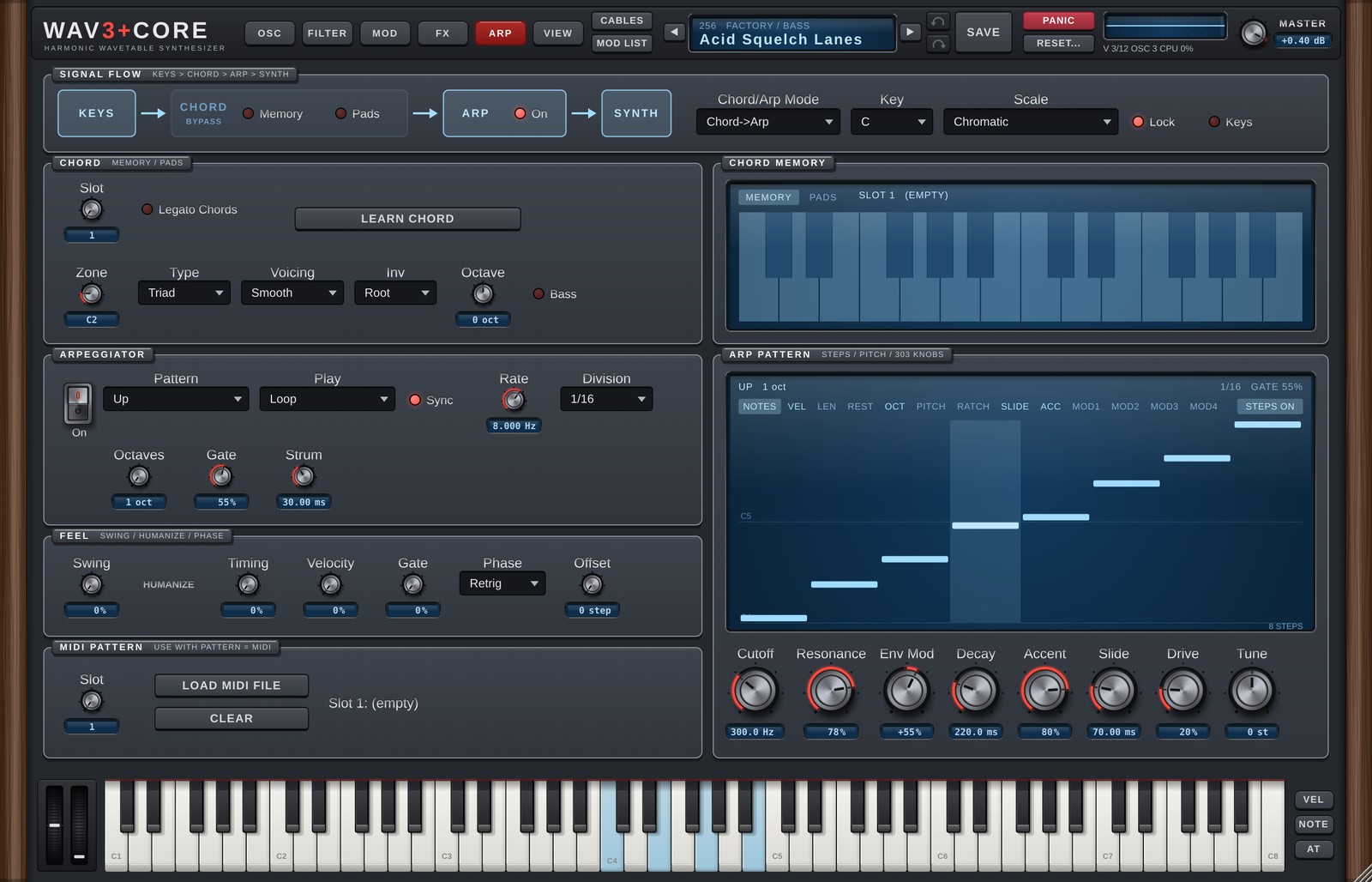
The ARP page brings together the chord functions (CHORD) and the arpeggiator (ARP) that process the notes you play.
SIGNAL FLOW
The strip at the top shows the flow: keys → CHORD → ARP → SYNTH.
| Part | Details |
|---|---|
| CHORD: Memory / Pads | Turn the chord functions on or off (see CHORD below). |
| ARP: On | Turn the arpeggiator on or off. |
| Chord/Arp Mode | Chord -> Arp = chords made by the chord functions are passed to the arpeggiator. Independent = they run separately. |
| Key / Scale | The song's key and scale, used by the chord pads and to snap arpeggiator notes to the scale. Chromatic = no snapping (as before). |
| Lock | Scale Lock. On (default): arpeggiator notes snap to the scale, the chord pads use chords of the scale, and keys outside the scale are greyed out on the on-screen keyboard. Off: the Scale is not used (the same as Chromatic; the chord pads use major chords of the Key, and no keys are greyed out). |
With Lock on, while a chord is sounding from the chord pads or Chord Memory, a scale that fits that chord is used instead (for both the arpeggiator snapping and the greyed-out keys). If all of the chord's notes are in the Key / Scale, nothing changes. If not (a borrowed chord, for example), it uses the scale starting on the chord's root that contains all of its notes and shares the most notes with the song's scale (for example, E in A minor → E Phrygian Dominant, B♭ in C major → B♭ Lydian). When you release the chord, it goes back to the Key / Scale.
Turn on Keys (with Lock on) and the notes you play on the keyboard that do not go through the pads, Chord Memory or the arpeggiator also snap to the current scale (to the chord's scale while a pad is held). Notes outside the scale move to the nearest scale note (down when equally close). Off by default.
There are 33 scales: the basics (Major, Minor, Dorian…) plus Japanese (In), Hirajoshi, Ryukyu, Pelog, Iwato, Kumoi, Epic, Romantic and more. The list is in the appendix.
When a scale is selected (and Lock is on), the arpeggiator's notes (after the OCT / PITCH lanes) snap to it. Notes shifted up snap up, notes shifted down snap down, and unshifted notes go to the nearest scale note. Notes you play with the arpeggiator off sound as played (greyed-out keys still play).
CHORD
Memory (chord lock)
Plays a stored chord shape from a single key, transposed so that the key you press is the root.
- Choose a slot with Slot.
- Press LEARN CHORD, then play the chord on the keyboard.
- Turn Memory on: one key now plays that chord.
The stored chord appears on the MEMORY tab of the CHORD MEMORY screen on the right.
Turn on Legato Chords (right of Slot) and pressing another key stops the previous key's chord and replaces it with the new one (notes that belong to both chords keep ringing). Releasing the key whose chord was replaced does not stop the chord that is sounding. Off (the default): chords stack until each key is released. The chord pads always replace the previous chord, whatever this switch is set to.
Pads (chord pads)
Turns one octave of the keyboard (12 keys) into pads that play the chords of the scale.
| Control | Details |
|---|---|
| Zone | The first key of the pad octave (default C2). The zone is coloured on the keyboard at the bottom. |
| Type | Triad / 7th / 9th |
| Voicing | Smooth = moves to the closest shape from the previous chord (voice leading). Fixed = keeps the shape set by Inv. |
| Inv | Inversion (Root / 1st / 2nd / 3rd). |
| Octave | Pitch (the root starts around C3). |
| Bass | Adds the root an octave lower. |
- Pressing the next pad stops the previous chord (shared notes are not restarted).
- The
PADStab of the CHORD MEMORY screen shows the chords on the 12 pads. Click to audition, right-click to choose a different chord (Auto / Scale Chords / 20 types per root / Reset All). Re-chosen chords are stored as semitones from the key, so they transpose when you change Key.
ARPEGGIATOR
| Control | Details |
|---|---|
| Pattern | Note order (table below). |
| Play | Loop = repeats / One Shot = stops after one cycle / One Shot + Hold = holds the last note until the key is released. |
| Sync | On = speed in note values (Division); off = Rate in Hz. |
| Rate / Division | Speed. |
| Octaves | How many octaves it spans. |
| Gate | Length of each note within its step. |
| Strum | Spread time for the Strum patterns (0-200 ms). |
Patterns:
| Pattern | Details |
|---|---|
| Up / Down / Up/Down / Up/Down (Repeat) | Rising / falling / back and forth (with or without repeating the end notes). |
| As Played | In the order played. |
| Random | Random. |
| Chord | All held notes together. |
| MIDI Pattern | Plays a loaded MIDI file pattern (see MIDI PATTERN). |
| Converge / Diverge | Outside in / inside out. |
| Thumb / Pinky | The lowest / highest note alternates with the others. |
| Trill | Alternates neighbouring notes. |
| Strum Up / Strum Down / Strum Up/Down | Notes slightly staggered, like a guitar strum. |
FEEL
| Control | Details |
|---|---|
| Swing | Delays the off-beats for a swung rhythm. |
| HUMANIZE: Timing / Velocity / Gate | Small random variations of timing / velocity / length for a human feel. |
| Phase | Retrig = restart on every key press / Host = follow the song's bar position / Free = keep running. |
| Offset | Shifts the starting step. |
ARP PATTERN (step lanes)
The screen on the right lets you draw per-step values in lanes. Switch lanes with the tabs.
| Lane | Details |
|---|---|
| NOTES | Shows the notes the arpeggiator plays. |
| VEL | Velocity (0-100%). |
| LEN | Length (10-200%, multiplied by Gate). |
| REST | Rests. |
| OCT | Octave (−2 to +2). |
| PITCH | Semitones (−12 to +12). |
| RATCH | Plays a step 1-4 times. |
| SLIDE | Connects smoothly to the next step (with Mono it glides with portamento). |
| ACC | Accent: louder, with a deeper filter envelope (amount = the Accent knob). |
| MOD1-4 | FREE MOD: moves any parameter by step values (below). |
- Click / drag to draw. Right-click for the menu (Steps 1-32 / Reset / Randomize / Shift / Copy Steps 1-4 to All / Reset All).
- Each lane can have its own length (1-32). Lanes of different lengths drift against each other (polymeter).
- STEPS ON/OFF at the top right turns all lanes off. When off, the lanes have no effect (the sound is the same as the defaults) and only NOTES is shown.
- Lane values are saved with the sound.
FREE MOD (MOD1-4)
The MOD lanes move a parameter with per-step values. At the top right of the lane, choose the destination (the same list as the Mod Matrix) and the amount (−100 to +100%). Glide moves smoothly to the next step. The MOD lane values can also be used as the Mod Matrix sources Arp Mod 1-4 and by OSC TRIGGER.
303 knobs
The row at the bottom of the screen is a set of shortcuts for 303 style bass.
| Knob | What it actually moves |
|---|---|
| Cutoff / Resonance | Filter 1 Cutoff / Resonance |
| Env Mod / Decay | Filter 1 ENV→Cutoff / filter envelope Decay |
| Accent | Strength of the ACC lane |
| Slide | Portamento time (works with Mono + the SLIDE lane) |
| Drive | Filter 1 Drive (dimmed for filter types where it has no effect) |
| Tune | Overall transpose (Master Transpose) |
Set Filter 1 to Diode or Ladder and turn on Mono in GLOBAL (SOURCES on the OSC page) for a classic 303 sound.
MIDI PATTERN
MIDI file patterns used when Pattern is MIDI Pattern.
- Choose a slot with Slot.
- LOAD MIDI FILE loads a MIDI file (.mid).
- CLEAR empties the slot.
The pattern is transposed so that the lowest note in the MIDI file lands on the lowest key you hold. Patterns are saved with the sound.
9. GLOBAL
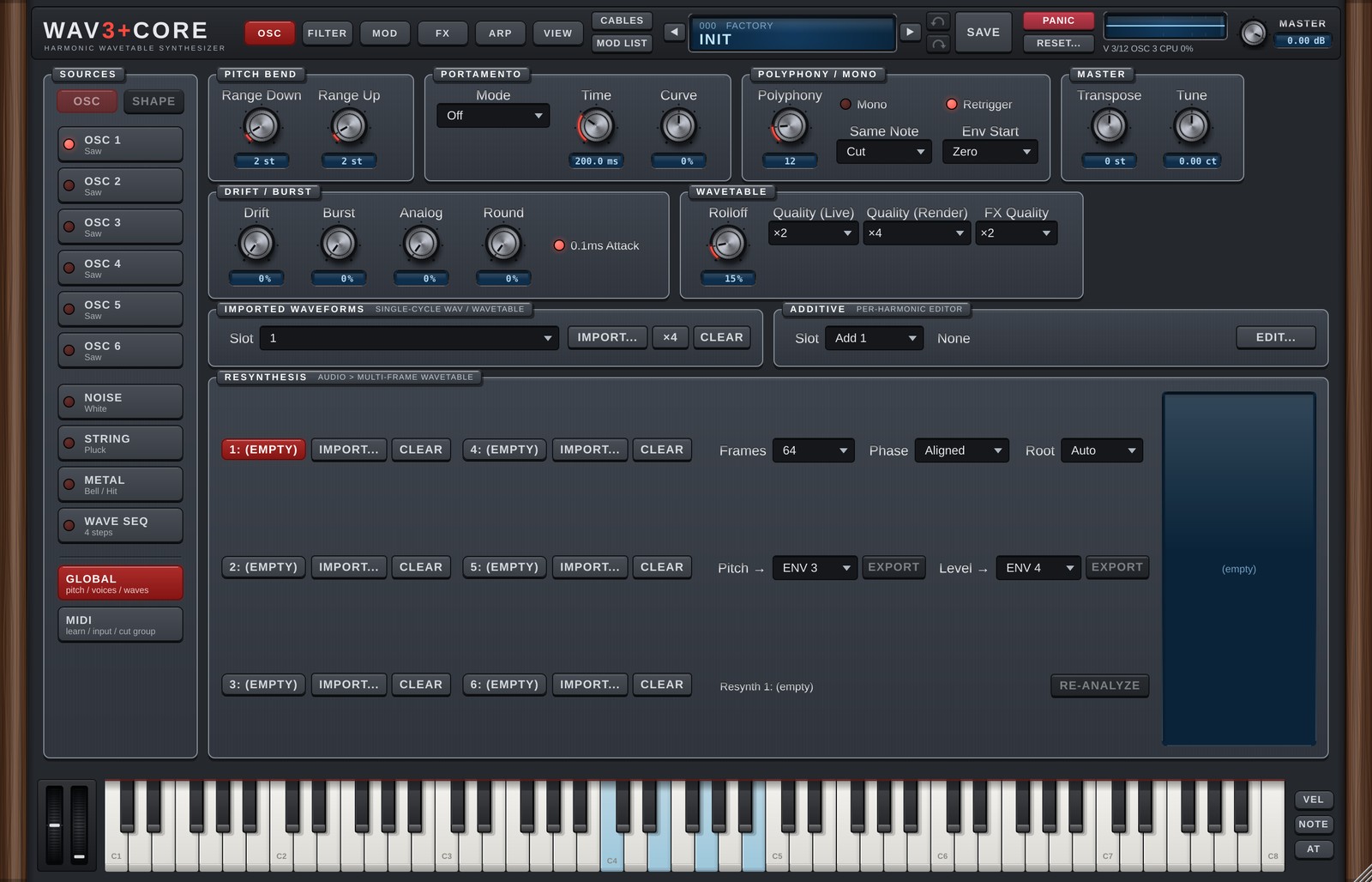
GLOBAL opens on the right of the OSC page when you click GLOBAL at the bottom of SOURCES (below the divider; since 1.6, before it was the GLOBAL page). MIDI MONITOR and CUT GROUP moved to MIDI (chapter 10). GLOBAL holds settings for the whole sound and the tools for making your own waves (import, additive and resynthesis).
PITCH BEND
| Control | Details |
|---|---|
| Range Down / Range Up | How many semitones pitch bend moves down / up (0-24). |
PORTAMENTO
Glides the pitch from one note to the next.
| Control | Details |
|---|---|
| Mode | Off / Norm, Fix / Norm, Var / Fing, Fix / Fing, Var |
| Time | Glide time (0-10 s). |
| Curve | Shape of the glide. |
Norm= always glides.Fing= glides only when you play the next key while still holding the previous one (legato).Fix= the same time whatever the interval.Var= longer for larger intervals.
DRIFT / BURST
| Control | Details |
|---|---|
| Drift | Slow random pitch drift per oscillator, for analog-style instability. |
| Burst | Adds a short "pop" at the moment of each note-on. |
| 0.1ms Attack | (v1.1) When On, an envelope Attack turned fully left rises in 0.1 ms instead of 1 ms, for snappier kicks and plucks. New sounds start On; older songs and presets load Off. |
POLYPHONY / MONO
| Control | Details |
|---|---|
| Polyphony | How many notes can play at once (1-64). |
| Mono | Single-note playing (for bass and leads). |
| Retrigger | In Mono, the next note restarts the envelopes. Off = legato playing continues the envelopes. |
| Same Note | When the same key is played again: Cut = stop the previous note / Overlap = let its tail ring on. |
| Env Start | (v1.1) When a note is retriggered while still sounding: Zero = envelopes restart from zero, and the oscillator phase and Retrig / One Shot LFOs restart too (after a 3 ms fade, so it does not click) / Level = envelopes continue from the current level (as before). New sounds start with Zero; older songs and presets load with Level. |
MASTER
| Control | Details |
|---|---|
| Transpose | Overall transpose (semitones). |
| Tune | Overall fine tuning (cents). |
WAVETABLE (quality)
| Control | Details |
|---|---|
| Rolloff | Slightly softens the very highest harmonics to reduce harshness and aliasing (default 15%). |
| Quality (Live) | Oversampling while playing (Off / ×2 / ×4). The waveforms are already built so the highs do not alias, so Off is usually enough. Higher settings use more CPU (a safety net for extreme sound design). |
| Quality (Render) | Quality when rendering offline (Same as Live / ×2 / ×4). While rendering, the higher of Live and Render is used. |
| FX Quality | (v1.1) How much faster Distortion / Saturator run internally (Off / ×2 / ×4, default ×2). At ×2 and above they also use anti-aliased curves, and Chorus / Flanger use a more accurate interpolation. While rendering, ×2 becomes ×4 automatically. Use ×4 for an even cleaner lead, or Off (the original processing) if things get heavy. Saved with each sound. Older songs and presets also load at ×2 (less grit from Distortion / Saturator, almost no change in level). |
If it feels heavy: first try Quality (Live) at
Off, then FX Quality atOffif it is still heavy. Rendered audio is set by Quality (Render), so lowering Live does not change your bounces.
IMPORTED WAVEFORMS
Eight slots for single-cycle WAVs (one period of a waveform). Since 1.6 this is a single row: choose a slot (with its name) in the Slot drop-down; the buttons work on that slot. Imported waves are used as User 1-8 on the oscillators.
| Button | Details |
|---|---|
| IMPORT... | Load a WAV file. |
| ×4 / ×3 / ×2 | Extract several cycles from one file into this and the following slots (for Wave A-D morphing). |
| CLEAR | Empty the slot. |
ADDITIVE OSCILLATORS
An additive editor where you draw the level and phase of each harmonic (8 slots). Since 1.6 GLOBAL only shows one row (Slot drop-down, name, EDIT...); EDIT... opens the editor in a window (close it with ×, Esc or a click outside). When an oscillator's Wave A is Add 1-8, the EDIT button at the top right of its waveform display opens it too. In the window: The waves are used as Add 1-8 on the oscillators.
| Part | Details |
|---|---|
| Slot / Name | Slot and name. |
| PRESET | Load a preset harmonic layout. |
| CLEAR | Clear everything. |
| AMP / PHASE | Draw harmonic levels / phases. |
| Smooth | Smooths the drawn harmonics. |
| ANTI-RING | Reduces overshoot (ringing) at the corners of the wave. Turn it off if the sound gets muddy. |
The screen shows harmonics 1-128; drag with the mouse to draw.
RESYNTHESIS
Analyses a recording (WAV) into a wavetable with many frames that change over time (6 slots). The results are used as Resynth 1-6 on the oscillators and on NOISE.
| Part | Details |
|---|---|
| IMPORT... / CLEAR | Load a sound / empty the slot. |
| Frames | Number of frames for the next import or re-analysis. |
| Phase | Aligned = harmonic phases locked to the fundamental (smooth morphing). |
| Root | Original pitch of the sound. Auto = detect. |
| Pitch → / Level → EXPORT | Export the recording's pitch / level movement to a Free ENV (Custom) and connect it in a free Mod Matrix slot. |
The screen on the right shows how harmonics 1-64 and the level change over time.
When you use a recording, please make sure you have the right to use it.
10. MIDI
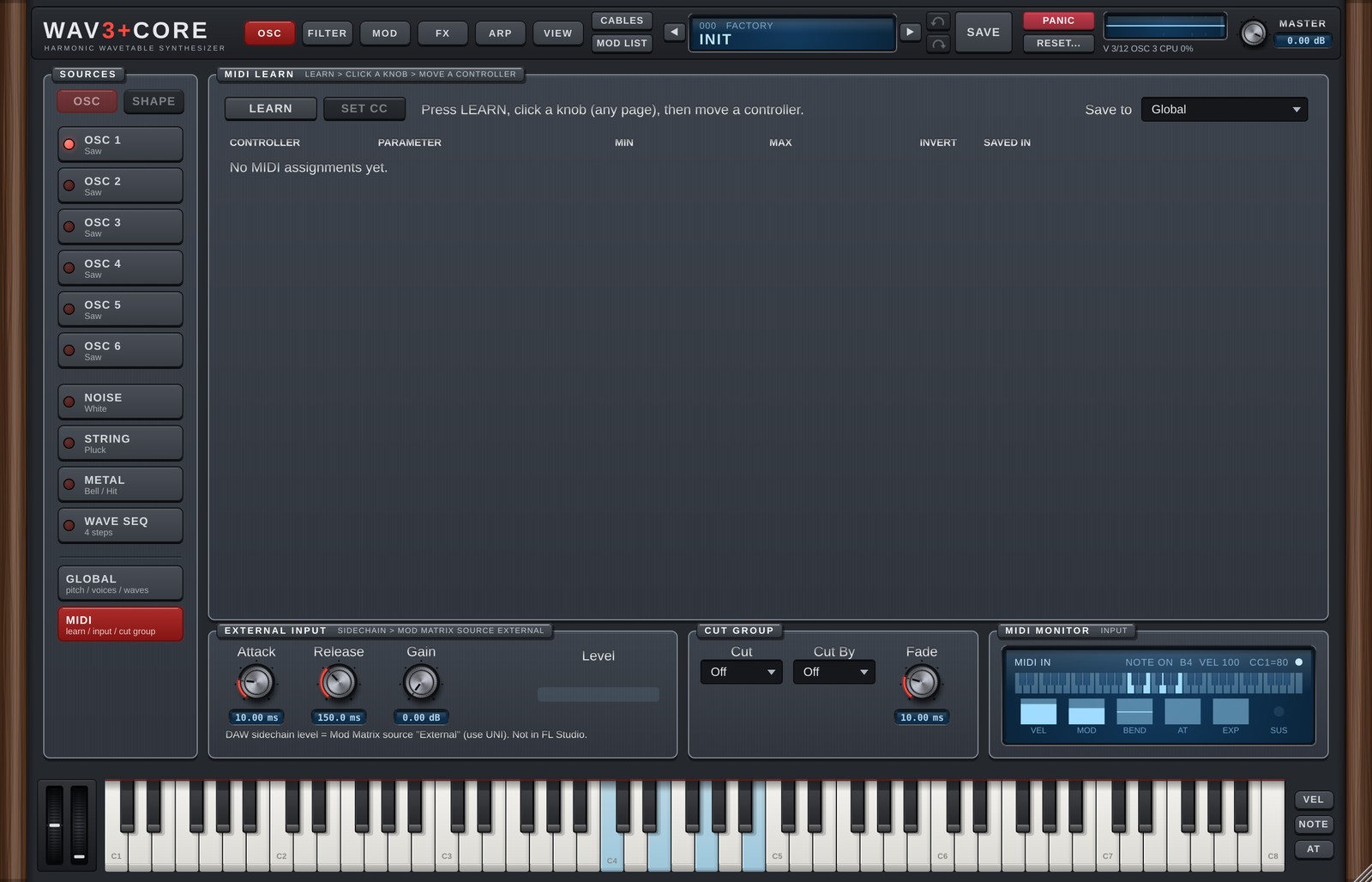
MIDI opens on the right of the OSC page when you click MIDI at the bottom of SOURCES (since 1.6, before it was the MIDI page). It holds MIDI LEARN, EXTERNAL INPUT, MIDI MONITOR (shows incoming MIDI) and CUT GROUP (moved from chapter 9). MIDI LEARN assigns the knobs and faders (CCs) of your MIDI controller to WAV3+CORE's knobs (MIDI Learn).
Assigning
- Press LEARN.
- Click the knob you want, on any page.
- Move a knob on your MIDI controller.
You can also right-click a knob, choose MIDI Learn and then move the controller.
Without a controller at hand, SET CC... lets you pick the CC number from a list.
The assignment list
| Column | Details |
|---|---|
| CONTROLLER | CC number. |
| PARAMETER | The assigned parameter. |
| MIN | Parameter position when the controller is at 0. |
| MAX | Parameter position when the controller is at 127. |
| INVERT | Reverses the direction. |
| SAVED IN | Global = the same assignment in every project and preset. This Preset = saved with the preset, and overrides a Global assignment of the same CC. |
| X | Removes the assignment. |
Save to at the top right chooses where new assignments are saved (Global / This Preset).
Assigning CC 1 (Mod Wheel) does not stop it from working as the Mod Matrix source Mod Wheel.
Global assignments are saved in %APPDATA%\WAV3PLUSCORE.
EXTERNAL INPUT (external input modulation)
At the bottom of MIDI. Route another track (a kick, for example) to this plugin's sidechain input in your DAW, and its level becomes the Mod Matrix source External (0 to 1). Only the level is read (no pitch tracking), so it is light; it uses the same input as the SIDECHAIN effect (External).
| Control | Details |
|---|---|
| Attack | How fast the value follows a rising level (ms). Shorter = snappier. |
| Release | How fast it falls back when the level drops (ms). |
| Gain | Boost for the measured level (dB), so a quiet input can still reach 1. Anything above 1 is clamped. |
| Level | The current value of External (meter). It stays still while nothing is connected. |
How to use it: in the Mod Matrix on the MOD page, set SOURCE to External, DESTINATION to e.g. Filter1 Cutoff, CURVE to Uni-Linear + and set the RANGE.
- How to connect a sidechain depends on the DAW (some DAWs do not support sidechain inputs on instruments).
- Not available in FL Studio. FL Studio does not pass audio input to instrument plugins (not even through Patcher). The same applies to
Externalin the SIDECHAIN effect. - While nothing is connected External is 0, so existing songs sound the same as before.
- While no voice is sounding, External cannot move FX knobs (the voices carry the value, like Macros).
CUT GROUP
Stops other WAV3+CORE instances in the same DAW (like an open / closed hi-hat).
| Control | Details |
|---|---|
| Cut | The group this instance stops when it plays (Off / 1-16). |
| Cut By | The group that stops this instance (Off / 1-16). Match another instance's Cut number and it stops this one when it plays. |
| Fade | Fade time when stopping. |
With Cut and Cut By set to the same number, an instance stops its own previous note (choke). It does not work if the DAW runs the plug-in in a separate process (bridged).
MIDI MONITOR
Shows incoming MIDI from your keyboard or DAW: the last note, velocity and CC, plus the current VEL / MOD / BEND / AT (aftertouch) / EXP / SUS values.
11. AI SOUND
AI SOUND lets you describe a sound in words; an AI then chooses the parameters and builds the patch. It can also make arpeggiator steps, chord progressions and MIDI phrases.
No AI is built into WAV3+CORE. You connect it to your own AI: a cloud AI used with your own API key, or a local LLM running on your computer (BYOK = Bring Your Own Key).
AI SOUND is a tab of the preset window: click the preset display (LCD) in the header and choose AI SOUND (or use AI Sound... in the LCD right-click menu, chapter 2). If you used the AI SOUND tab last time, the next click on the LCD opens it again. Esc, the × at the top right, or a click on the dark area outside closes the window. While the AI is working, a click outside or on another tab does not close it (use Stop, or Esc / × to stop and close).
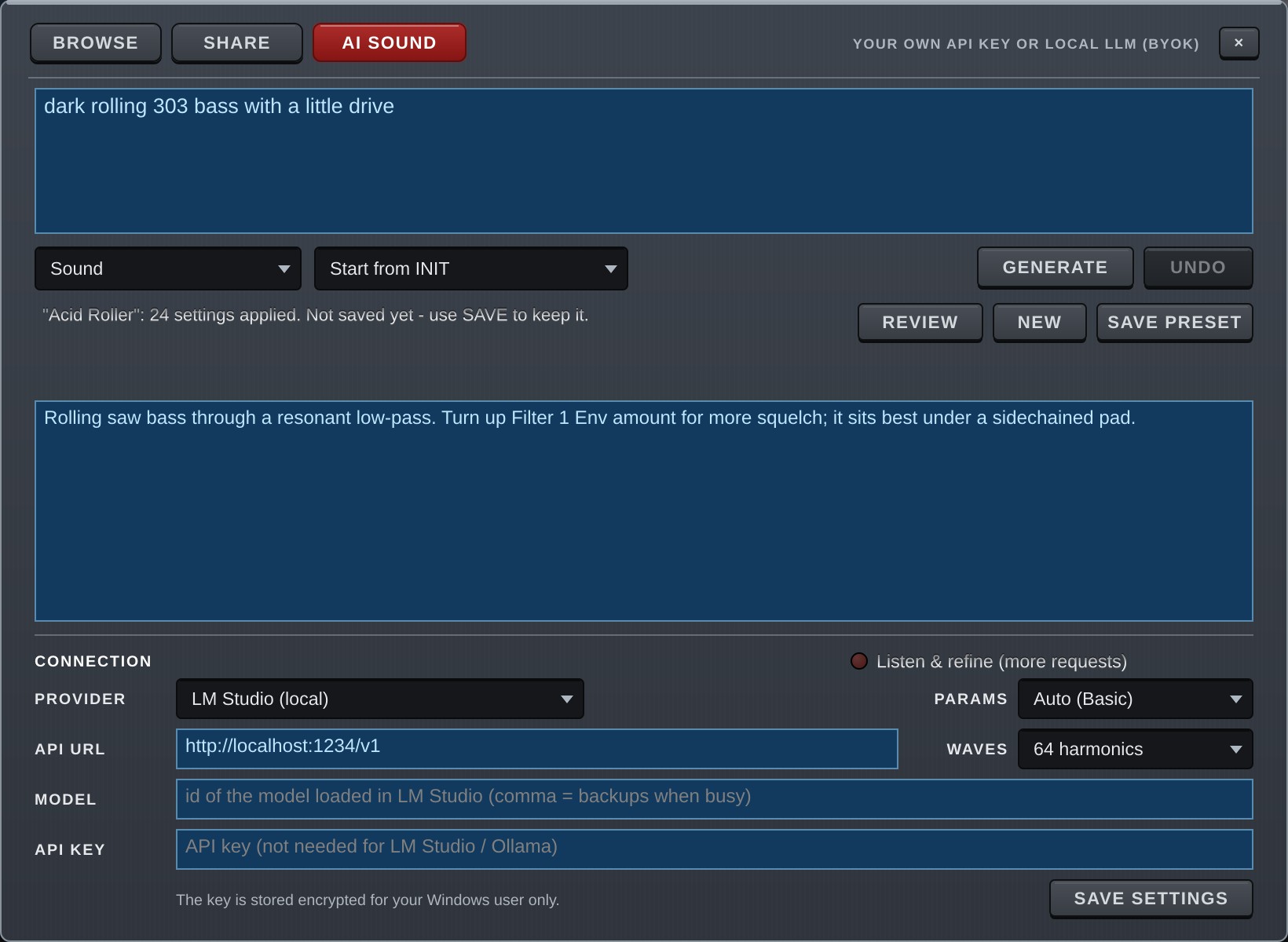
What is sent
When you make a request, the following is sent to the provider you set up (a cloud AI or a local LLM):
- The text of your request.
- A description of WAV3+CORE and the list of parameters the AI may change (the range is set with PARAMS).
- The values of the current sound's parameters (only those that differ from the defaults).
- With Listen & refine on, the results of measuring the sound (numbers such as brightness and length; no audio is sent).
Depending on the provider, sent data may be stored or used to improve their services. Please check each provider's terms.
Connecting
Set it up under CONNECTION at the bottom of the window.
| Field | Details |
|---|---|
| PROVIDER | OpenAI / Anthropic (Claude) / Google Gemini / LM Studio (local) / Ollama (local) / Custom (OpenAI-compatible) |
| API URL | Filled in for the chosen provider. Enter it yourself for Custom. |
| MODEL | The model ID (see your provider's documentation). List backups separated by commas and the next one is tried when the first is busy (e.g. model-a, model-b). |
| API KEY | Your key for a cloud AI. Leave it empty for a local LLM. |
| PARAMS | Which parameters the AI may change (see "PARAMS"). |
SAVE SETTINGS saves them.
- The API key is stored encrypted, readable only by your Windows user, in
%APPDATA%\WAV3PLUSCORE. It is never written into presets or project files. - The key is never sent over
http://(unencrypted) to anything other than your own computer (you get an error). Usehttps://for cloud AIs. - Never show your API key to anyone or paste it into chats or social media.
Setup examples
If you are not sure which AI to use, these two are the easiest to try.
| Google Gemini | LM Studio | |
|---|---|---|
| Runs on | The cloud (Google) | Your own computer |
| Cost | Free tier (no card needed) | Free |
| Sound design quality | High | Depends on your computer and model |
| You need | A Google account | A computer with enough memory |
| Data | Sent to Google | Stays on your computer |
Screens, names, free-tier terms and model names of these services can change. This section reflects October 2026.
Google Gemini (try it on the free tier)
1. Create an API key
- Open Google AI Studio (https://aistudio.google.com) in your browser and sign in with your Google account. Accept the terms the first time.
- Click Get API key at the bottom left, then Create API key.
- Copy the new key.
2. Set up WAV3+CORE
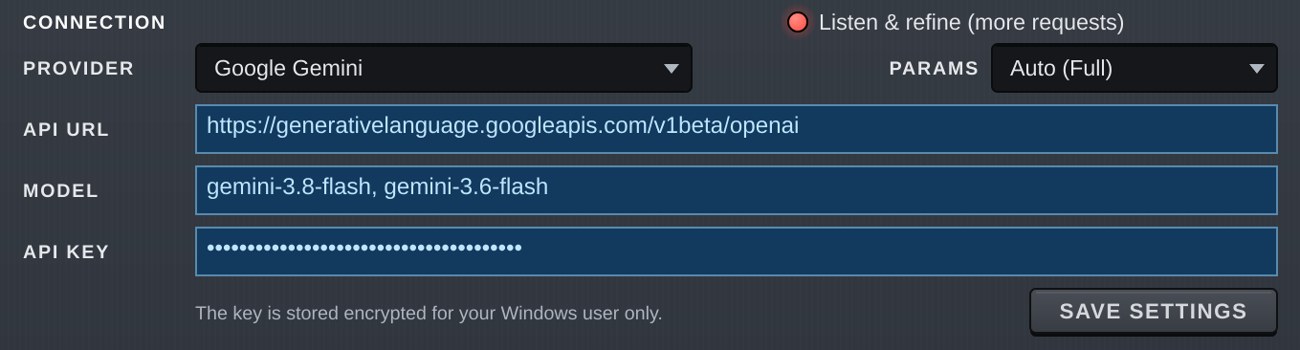
- Click the preset display (LCD) and open the AI SOUND tab.
- Choose
Google Geminiunder PROVIDER (the API URL is filled in). - Enter
gemini-3.8-flashunder MODEL. Adding a backup after a comma helps when the first is busy (e.g.gemini-3.8-flash, gemini-3.6-flash). - Paste the key under API KEY.
- Click SAVE SETTINGS. PARAMS can stay at
Auto(Full for cloud AIs). - Describe a sound in the box at the top and click GENERATE (e.g.
bright supersaw trance lead).
About the free tier
- The free tier needs no card. Requests per minute and per day are limited; see the limits in AI Studio.
- Content sent on the free tier may be used to improve Google's products (per Google's pricing page). If that matters to you, use the paid tier (set up Billing) or a local LLM.
- If you get "503" or similar busy errors, wait a little or add a backup model in MODEL.
LM Studio (run it on your computer)
LM Studio is a free app that runs an AI (a local LLM) on your own computer. There are no fees and no data leaves your machine.
1. Prepare LM Studio
- Download and install LM Studio from https://lmstudio.ai.
- Find and download a model on the Discover screen. Start with a small one (e.g. Gemma 4 E4B =
google/gemma-4-e4b) that fits in your computer's memory (VRAM). - Open the Developer screen (Local Server in older versions), load the model and start the server. Keep the default port
1234. - In the load settings, set Context Length (how much the AI can read at once) to about
16384. If it is too short you get "The AI ran out of room…". - For models with a thinking / reasoning feature, turning it off makes them more reliable.
2. Set up WAV3+CORE
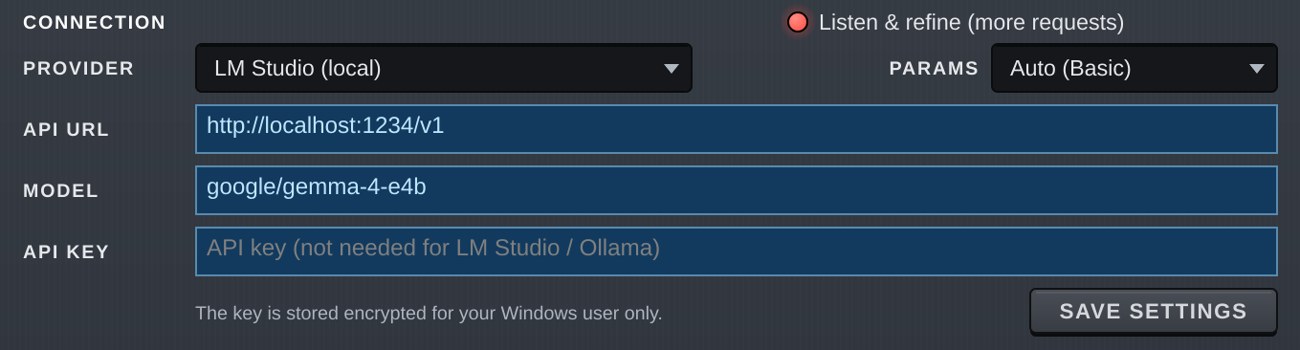
- Choose
LM Studio (local)under PROVIDER (the API URL becomeshttp://localhost:1234/v1). - Enter the model identifier exactly as LM Studio shows it under MODEL (e.g.
google/gemma-4-e4b). Copy and paste it to avoid typos. - Leave API KEY empty.
- Click SAVE SETTINGS. Leaving PARAMS at
Auto(Basic for local models) is recommended. - With the LM Studio server running, click GENERATE.
If it does not work
- "Set the model id.": MODEL is empty.
- "HTTP 400", "HTTP 404" and so on: check that MODEL matches the identifier shown in LM Studio, and that the model is loaded and the server is running.
- "The AI ran out of room…": increase Context Length.
- No reply / very slow: the model may be too large. Use a smaller model, or set PARAMS to Basic.
Others
- OpenAI / Anthropic (Claude): create an API key in their developer consoles (OpenAI Platform / Claude Console), choose the PROVIDER and enter MODEL and API KEY. Paid per use.
- Ollama: install a model with
ollama pull <model name>, chooseOllama (local)under PROVIDER and enter the model name under MODEL (the API URL ishttp://localhost:11434/v1).
What to make (modes)
Choose what to make in the box at the bottom left.
| Mode | Makes |
|---|---|
| Sound | A sound (parameters). |
| Arp Steps | ARP step lanes (VEL / OCT / PITCH / SLIDE / ACC…). |
| Chord Progression | A chord progression, placed on the chord pads and also saved as a MIDI file. |
| MIDI Pattern | A MIDI phrase, put into the ARP's MIDI Pattern slot and also saved as a MIDI file. |
MIDI files made by the AI are saved in Documents\WAV3PLUSCORE\MIDI\AI. The MIDI FOLDER button (shown for Chord Progression / MIDI Pattern) opens the folder so you can drag the files into your DAW.
The AI is instructed not to copy existing songs.
Drawing waves (WAVES)
Set WAVES in the settings area to 32 harmonics, 64 harmonics or 128 harmonics and, in Sound mode, the AI can draw its own waves to fit the sound. With Off it uses only the built-in waves.
- The AI draws a single-cycle wave by listing harmonic strengths. More harmonics give more detailed, brighter waves, but a longer reply that uses more tokens (cost).
- Up to 4 waves per reply, placed in Wave A-D of the oscillators (OSC1-6 when PARAMS is Full or above, otherwise OSC1-4).
- Each wave is stored, with a name, in an Add slot of ADDITIVE OSCILLATORS (chapter 9). Empty Add slots are used first; when none are free, a slot is overwritten.
- When a built-in wave is good enough, the AI picks it instead of drawing one.
- UNDO goes back to the sound before the AI changed it, drawn waves included.
Drawing LFO shapes (Custom)
The AI can also draw the Custom LFO shape (the shape you draw yourself). This works in Sound mode at any WAVES setting.
- It can draw the LFOs whose shape PARAMS lets it choose: the OSC LFOs (OSC1-6 at Full and above, otherwise OSC1-4) and, from Standard, the Shape of Chorus / Flanger / Phaser / Hyper.
- The AI draws one cycle as points (position, height and the bend to the next point). The LFO it draws is set to Custom, and the shape is saved with the preset.
- When a built-in shape is enough, the AI picks it instead of drawing.
- If the points are unusable (too few, or flat with no movement), a sine-like shape is used.
- UNDO goes back to the sound before the AI changed it, drawn shapes included.
Making a request
- Describe the sound you want in the box at the top. Any language is fine.
- Choose Start from INIT (build from the initial state) or Change the current sound (edit what you have).
- Press GENERATE (it turns into STOP while working).
The AI replies with a short comment, in the language you wrote in.
- Pressing GENERATE again continues the conversation, so you can ask for changes ("brighter", for example).
- NEW forgets the conversation and starts over.
- UNDO returns to the sound before the AI changed it.
- REVIEW asks the AI for its opinion of the current sound and how to improve it. Nothing is changed.
- SAVE PRESET saves the AI's sound as a preset (with the AI's name and category, in the
AIfolder).
Arpeggiator and chords: the AI does not touch the arpeggiator or chord settings unless you ask. Even with Start from INIT, your current arpeggiator, chord and MIDI pattern setup is kept.
Tips
- Mention the kind of sound (lead, pad, bass…), brightness, thickness, movement and effects. Example:
bright supersaw trance lead with a little delay - Movement (LFOs and so on) is only added if you ask. Write things like
slowly evolvingorwobblewhen you want it. - You can ask by effect or knob name too, such as "add Conv Reverb" or "cut the lows with the EQ" (within the PARAMS range).
Listen & refine
When on, after a Sound is made the sound is played in the background and measured, and the AI sees the results and fixes the patch (up to 2 rounds).
- For the measurement the arpeggiator and chord functions are switched off; C3 is held for 1.5 s, then a C major chord at C4 for 1.5 s.
- "Listened and checked: the AI is happy…" in the status line means the AI accepted the sound.
- It uses more requests, so it uses more tokens (cost).
PARAMS
Choose which parameters the AI may change. A wider range allows finer sound design but makes the description sent to the AI longer.
| PARAMS | Range |
|---|---|
| Basic | Main controls (OSC1-4, filters, envelopes, main effects, Mod Matrix 1-6…). For local LLMs. |
| Standard | Basic + EQ (also the EQ On and each band's On and Slope) and all effects (also FX Filter and PRE LIMITER). |
| Full | Standard + wave shaping (Wave B-D, Intensity, Wave Effects, harmonic EQ), OSC5-6, all Mod Matrix slots 1-40 (with Sync), envelope details, Free ENVs, NOISE / STRING / METAL / WAVE SEQ, macros, UNISON CHORD, Harmonic morph, Pitch Quantize, the OSC Pitch and LFO→Pitch, the AMP ENV Level, the Filter ENV Mod Only, Analog / Round. |
| Everything | Almost everything, except the LIMITER, the PRE LIMITER lookahead, sidechain, FX order and parallel routing, Cut Group and quality settings. |
| Auto | Full for cloud AIs, Basic for local LLMs. |
More parameters make it easier for the AI to get lost, so Auto (Full) is recommended for everyday use. Choose Everything when Full is not enough.
Whatever the range:
- The MASTER volume is never raised above its current value. The FX LIMITER is always switched on (Ceiling −1 dB or lower). Separately, the last-stage safety limiter that protects ears and speakers (SAFE, chapter 1) is always active.
- When the AI does not set a mod matrix CURVE, it is chosen from the source (Uni-Linear + for envelopes, Velocity, Macros and so on; Bi-Linear + for LFOs and the like; chapter 6).
- A mod matrix slot the AI creates (in an empty slot, or by giving a slot a new source or destination) gets the same default Sync as ASSIGN (Step (All); chapter 6) unless the AI sets one. Slots where the AI only adjusts Range and the like, and slots it leaves alone, keep their Sync.
- Empty (reserved) choices and choices that load your own files (Conv Reverb's User File, Simulator's User IR) are never chosen.
- Every value the AI writes is checked first: numbers outside the range are clamped to the range, and unknown choice names or unreadable values are ignored (that control keeps its current value).
Tokens and cost
The status line shows the tokens used (the amount of text the AI read and wrote):
Tokens 21,505 in (88% cached) / 1,056 out · Session 85,038 / 1,402
| Item | Meaning |
|---|---|
| in / out | Sent to the AI / returned by the AI this time. |
| cached | Share of what was sent that matched the previous request (cache). Cached input is charged at a lower rate (depending on the provider). |
| Session | Totals since the window was opened. |
Prices depend on the provider and model. Please check their price lists.
Troubleshooting
| Message | What to do |
|---|---|
| HTTP 401 etc. | Check your API key and URL. |
| Busy (503 etc.) | Wait a little, or add backup models in MODEL. |
| The AI ran out of room… | Increase the local LLM's context length. |
| The AI did not write a patch… | Try again or rephrase (one automatic retry is already made). |
A log of the communication is kept in %APPDATA%\WAV3PLUSCORE\AI.log (plain text; the API key and anything after "?" in URLs are not written). It helps when something goes wrong.
12. Sound design examples
Here are three walk-throughs that start from the initial state. The numbers are only starting points; adjust them by ear.
To return to the initial state: press ALL in the header. Every parameter goes back to its default (only OSC1's Saw is playing).
Example 1: trance supersaw lead
A bright lead built from a thick unison and a tempo-synced delay.
- Press ALL to start from the initial state.
- On the OSC page, select OSC1 (Saw) and turn on Unison in UNISON.
- Start with Voices
9, Detune around30ct, Spread80%, Mix50%.
- Start with Voices
- In SOURCES, turn on OSC2, set Wave A to
Sawand PITCH Oct to+1. Set its OUTPUT Level to about0.5. - On the FILTER page, check that Filter 1's Type is
Lowpass 24dBand lower Cutoff a little (around 6-8 kHz). - In the AMP envelope on the MOD page, set Release to about
0.4s. - On the FX page, turn on Delay 1, turn on Sync, set the time to
1/8.(dotted eighth) and Mix to about20%. - Turn on Reverb with Mix at
20-25%.
For more width, add Hyper or Dimension in the FX. If the centre feels thin, raise the UNISON Mix.
Example 2: 303-style acid bass
A squelchy bass made with the arpeggiator lanes and the 303 knobs.
- Press ALL to start from the initial state.
- In GLOBAL (SOURCES on the OSC page), turn on Mono in POLYPHONY / MONO.
- On the FILTER page, set Filter 1's Type to
Diode. - On the ARP page, turn on ARP On in SIGNAL FLOW.
- Pattern
Up, Sync on, Division1/16, Octaves1.
- Pattern
- In ARP PATTERN on the right, click a few steps in the ACC lane for accents, and add two or three steps in the SLIDE lane.
- Move the 303 knobs at the bottom:
- Cutoff around
300Hz, Resonance high, Env Mod50%, Decay0.2s, Accent about80%. - Add a little grit with Drive.
- Cutoff around
- Hold a low key (around C2) and the phrase keeps playing.
For a fatter sound, add Distortion (
Tube, for example) or Saturator in the FX.
Example 3: slowly morphing pad
A pad whose character changes over time, made by moving the Wave A-D morph with an LFO.
- Press ALL to start from the initial state.
- In WAVETABLE on the OSC page, set Wave A to
Saw, Wave B toVox A, Wave C toChoir Ahand Wave D toOrgan(any waves you like will do). - Turn on UNISON with Voices
5and Detune around15ct. - In the AMP envelope on the MOD page, set Attack to about
1s and Release to about2s. - On the LFO 1 tab, slow the Rate down to about
0.1-0.2Hz. - Right-click the OSC1 Wt-Pos knob and choose Modulate with ▸ LFO ▸ LFO1. LFO1 → OSC1 Wt-Position goes into the Mod Matrix; set its Range to about
50%. - On the FX page, turn on Reverb 2 or Conv Reverb (
Hall) with Mix around35%.
For more movement, add the Harmonic EQ or Wave Effects on the SHAPE tab and vary how much they apply per frame with Shape Amt A-D.
Start with AI, finish by hand
It also works well to get a rough sound from AI SOUND (chapter 11) and finish it yourself.
- Describe the sound you want in AI SOUND (e.g.
dark, slowly evolving pad). - If you like it, save it with SAVE PRESET.
- Add movement with Modulate with from the knob menus, swap effects and so on.
- When you are done, save again with SAVE in the header.
13. Appendix
Built-in waves
| Family | Waves |
|---|---|
| Basic | Sine / Saw / Pulse / Tri / Ramp / Noise |
| Analog | Warm Saw / Saw+Square / Warm Square / Saw+Tri / Pulse 25 / Pulse 12 / Pulse 5 / Soft Pulse / Organ |
| Sync / reso | Sync Saw 2.5 / Sync Saw 3.7 / Sync Square / Reso Saw Lo / Reso Saw Hi |
| FM | FM 1:1 Soft / FM 1:1 Hard / FM 1:2 / FM 1:3 / FM 2:1 / FM 1:4 Bright / FM 3:2 / FM Feedback |
| Phase distortion | PD Saw / PD Reso / PD Reso Tri |
| Digital / experimental | Step Sine / Stair 8 / Comb 3rd / Buzz Odd / Buzz 64 / Fold Sine 2 / Fold Sine 5 / Fold Tri 3 / Clip Sine / Tanh Saw / Half Rect / AM 7 / Cheby Mix / Asym Fold / Grit Spectrum / Glitch 16 / Crush Sine / Metallic / Sine Burst |
| Vocal | Vox A / Vox E / Vox I / Vox O / Vox U / Choir Ah / Vox AE / Nasal / Vox OI / Throat |
| Bass / growl | Growl FM / Growl Saw / Reese Core / Wobble Sub / Yoi / Neuro Fold / Tear / Bark / Screech / Talk Bass |
| Organ / keys (v1.1) | Drawbar 888 / Drawbar Full / Drawbar Mellow / Drawbar Bright / Drawbar Perc / Combo Organ / Reed Organ / EP Tine / EP Reed / Clav |
| Pipe organ (v1.1) | Principal 8' / Stopped Flute / Open Flute / Gamba / Trumpet Stop / Oboe Stop / Vox Humana / Principal Chorus / Full Organ / Cornet |
| Acoustic (v1.1) | Trumpet / Horn / Trombone / Clarinet / Oboe / Sax / Flute / Violin / Cello / Harpsichord / Nylon Guitar / Piano |
| Bell / mallet (v1.1) | Glass / Bell / Tubular / Marimba / Xylophone / Vibes / Celesta / Music Box / Steel Drum / Gong Tone |
| Spectral (v1.1) | Saw 2H / Saw 4H / Saw 8H / Saw 16H / Even Only / Octaves / Octaves+5ths / Formant 4 / Formant 8 / Formant 16 / Formant 32 / Comb 4 |
| Chip / bass (v1.1) | Chip Tri / Chip Saw / Chip Wave / Chip Pulse 33 / Chip Bass / Sub Octave / Soft Square / Fat Bass / Pluck Bass / Boom Sine |
| Growl (v1.1) | Grind / Gnash / Mangle / Chew / Shred / Riddim / Gurgle / Snarl / Crunch Saw / Filth / Rip / Belch / Hydra / Scrape / Wreck / Chaos FM |
| Your own | User 1-8 / Add 1-8 / Resynth 1-6 |
Scales (Scale on the ARP page)
Chromatic / Major / Minor / Harmonic Minor / Melodic Minor / Dorian / Phrygian / Lydian / Mixolydian / Locrian / Major Pentatonic / Minor Pentatonic / Blues / Japanese (In) / Hirajoshi / Ryukyu / Whole Tone / Phrygian Dominant / Hungarian Minor / Double Harmonic / Neapolitan Minor / Lydian Dominant / Altered / Diminished (H-W) / Diminished (W-H) / Bebop Dominant / Major Blues / Egyptian / Pelog / Iwato / Kumoi / Epic / Romantic
Key Bloom (FX) has its own list: Major / Minor / Harmonic Minor / Melodic Minor / Dorian / Phrygian / Lydian / Mixolydian / Locrian / Major Penta / Minor Penta / Blues / Whole Tone / Chromatic
Note values (Sync choices)
From 16/1 to 1/64, with dotted (.) and triplet (T) values. Examples: 1/4 = quarter note, 1/8. = dotted eighth, 1/16T = sixteenth triplet.
Mod Matrix destinations
There are 385 destinations, grouped by target in the menu (OSC 1 ▸, Filter 1 ▸, ENV ▸, FX ▸ …). The main ones:
- Per OSC: Pitch / Level / Pan / Uni Detune / Uni Spread / Uni Mix / Filter Blend / Link1 and Link2 Amt / Wt-Position / Intensity and more
- OSC1-6 together (All): Pitch / Level / Pan / Uni Detune / Uni Spread / Uni Mix / Filter Blend
- LFO: LFO > Pitch Amt / LFO > Cutoff Amt (1-6, and all together)
- Filters: Cutoff / Reso / ENV Amt / Drive / Pan / Morph
- Envelopes: times and Sustain
- EQ1-6: Freq / Gain / Q
- Effect controls, NOISE / STRING / METAL, Voice Level
Troubleshooting
| Problem | What to do |
|---|---|
| A note keeps sounding | Press PANIC in the header. It can rarely happen, for example while turning knobs as you play. |
| CPU is too high | Lower Quality (Live) or FX Quality in GLOBAL (SOURCES on the OSC page) / use fewer heavy effects (Conv Reverb, Key Bloom, Multiband) / fewer unison Voices / lower Polyphony. |
| Too loud or distorted | Lower MASTER. If the strip at the right edge of the scope turns red (clipping), check the LIMITER's Ceiling on the FX page. If SAFE appears at the top right of the scope, the sound went above +18 dBFS and the safety limiter that protects ears and speakers acted (chapter 1). Check settings with very high level, drive, resonance or feedback. The display clears when you change the sound or press PANIC. |
| Presets do not appear | Check that Documents\WAV3PLUSCORE\Presets can be written (chapter 2, "Where files are kept"). |
| A factory sound was deleted | Restore Factory Presets... in the preset menu brings it back. |
| AI SOUND cannot connect | See chapter 11, "Troubleshooting", and %APPDATA%\WAV3PLUSCORE\AI.log. |
| The window looks blurry in FL Studio | Open the gear (wrapper settings) on the plug-in window, turn on DPI aware, then save the song and restart FL Studio. |
File locations
| What | Where |
|---|---|
| Plug-in | C:\Program Files\Common Files\VST3\WAV3PLUSCORE.vst3 |
| Presets | Documents\WAV3PLUSCORE\Presets |
| MIDI made by the AI | Documents\WAV3PLUSCORE\MIDI\AI |
| Settings (skin, zoom for new instances, MIDI Learn, AI) | %APPDATA%\WAV3PLUSCORE |
| AI communication log | %APPDATA%\WAV3PLUSCORE\AI.log |
Terms of use and disclaimer
- Using your sounds: sounds made with WAV3+CORE and its factory presets may be used freely in your music and other works, commercial or not. No credit or notice is required.
- Redistribution: please do not redistribute or sell WAV3+CORE itself without permission. It is distributed only through the official website (wav3pluscore.com).
- AI SOUND: the AI services used with AI SOUND (OpenAI, Anthropic, Google and others) are subject to their own terms of use and pricing.
- Disclaimer: WAV3+CORE is provided as is. W3PC Audio accepts no liability for any damage arising from its use.
Watch your volume WAV3+CORE gives you a lot of freedom, so some settings can produce very loud sounds, strong bass, frequencies too high or too low to hear, or strong resonance. These can damage speakers, amplifiers, headphones, audio interfaces and other equipment, and your hearing. Start sound design at a low volume. Keeping the final LIMITER (chapter 7) on is recommended.
Licenses and credits
- WAV3+CORE © W3PC Audio
- Made with JUCE.
- VST is a registered trademark of Steinberg Media Technologies GmbH.
- Other company and product names are trademarks or registered trademarks of their respective owners.
Version history
| Version | Date | Changes |
|---|---|---|
| 1.6.0 | 2026-11-08 | A new look (metal knobs, an LCD value window under every knob (click once to type a value), lit select buttons and On rockers; the header has six pages OSC / FILTER / MOD / FX / ARP / VIEW, a RESET... dialog and ↶ ↷, and a faint level meter behind the scope; GLOBAL and MIDI moved to SOURCES on the OSC page). VIEW page (five skins Graphite / Snow / Vintage 70s / Vintage 80s / Warm Graphite, Zoom, keyboard Normal / Compact / Hide). Preset window (click the LCD: BROWSE (search, ALL / FACTORY / USER, categories) / SHARE (coming soon) / AI SOUND). Mod Matrix: 40 slots, a destination picker with search, Sync per slot (modulation now works on Rate / Time / lengths while they are tempo-synced; Step snaps to note lengths; per-LFO Step: Instant chooses whether a song-locked LFO waits for the bar or switches at once), cables (Ctrl) and MOD LIST, a pop-up on modulated knobs, and ASSIGN mode. More sources by right-click (the VEL / NOTE / AT buttons right of the keyboard, the OSC rows, the wheels, ARP MOD, External). New knobs OSC Pitch, LFO→Pitch and AMP Level. FX Filter (the 26th FX, with Stages / Voice), the FX page as a scrolling rack, Chorus Voices (1 to 8 lines), and Chroma renamed KEY BLOOM. Undo / Redo, the FILTER / AMP order, Filter ENV Mod Only, Analog (experimental), Pre Limiter as a Mod Matrix destination, a new EQ knob layout, mouse wheel on drop-downs, and Import WAV... / New Additive... in the Wave A–D menus. AI SOUND knows the new features (it can also draw LFO Custom shapes). Older songs and presets load with the same sound (exception: in songs where the Mod Matrix modulates a tempo-synced FX Rate / Time, that modulation did nothing before and now moves, as Smooth). KEY BLOOM Played Notes now rings over the release of the whole chord, and factory preset 277 has a deep Smooth reverb. Many fixes, including FX / MASTER values that stayed modulated after setting the Mod Matrix Range to 0. |
| 1.5.0 | 2026-11-01 | UNISON CHORD (rebuilt UNISON ARP: spread the unison voices over chord tones with Chord, or over the keys you hold with Played; Strum / Converge / Arp Link / Arp; an On switch per plate). Harmonic morphing (Morph = Harmonic). External input modulation (the sidechain level as the Mod Matrix source External; not available in FL Studio). Pitch Quantize per oscillator. PRE LIMITER (a second limiter you can place anywhere in the FX CHAIN, before the MASTER volume), and FINAL EQ moved to the bottom of the FX CHAIN. LFO shapes for Chorus / Flanger / Phaser / Hyper (8 shapes and a hand-drawn Custom), an On switch per Mod Matrix slot, Legato Chords in Chord Memory. VIEW: Remember Page (reopen on the page you left), Frame Rate (60 fps) and GPU Rendering. Raising the filter Drive no longer lowers the volume, and Ladder / Diode / Scream distort much harder above 30% (Ladder / Formant / Vowel / Diode / Allpass; older songs and presets that use Drive get louder, and the factory presets were re-levelled). REVERB Classic Mod; CHROMA / RESONATOR now hear the whole chord even at polyphony 1. Many fixes, including the comb-like sound of distortion in parallel blocks, ARP Sync note bursts, recovery from NaN and safer loading. |
| 1.1.0 | 2026-10-25 | 80 new built-in waves and presets that use them. REVERB Type (Smooth) and Mod, DELAY F.Pos (Loop), Mod, Diffuse and Drive, oversampling and anti-aliasing for Distortion / Saturator (FX Quality on the GLOBAL page), COMPRESSOR Knee, LIMITER Attack and lookahead (Look), Env Start, 0.1ms Attack, Scale Lock and Keys, NOISE Follow AMP ENV, MIDI Learn from a knob's right-click menu, AI SOUND can draw waves (WAVES). A last-stage safety limiter that protects ears and speakers (+18 dBFS, SAFE under the meter). Faster preset switching, new knob and ENV panel design, and window resizing that follows the DAW. Fixed combo boxes for choices with reserved slots (Conv Reverb IR, Distortion / Saturator Type…) selecting the wrong item, and places that could crash. Info-only dialogs now have just an OK button. Older songs and presets load with their original sound (only Distortion / Saturator get cleaner with FX Quality 2x). |
| 1.0.1 | 2026-10-20 | Fixed the pitch of 41 factory presets (mod matrix CURVE). AI SOUND now picks the CURVE from the source. Added the website and contact e-mail to the plugin info, and a thumbnail for DAW plug-in browsers. |
| 1.0.0 | 2026-10-18 | First public release |
14. Parameter list
All 2003 WAV3+CORE parameters. Repeated sets, such as OSC1-6 or the Mod Matrix slots, are shown once with the number replaced by n (an inner number by k). "Count" is how many parameters the row stands for.
- ID is the name used in preset files and in the DAW.
- Parameters marked × under Automation cannot be automated from the DAW (chapter 1, "DAW automation").
Reservedchoices (empty slots kept for the future) are left out.- Times are in seconds. Envelope Attack ranges from 0.001 to 20 s, but with 0.1ms Attack on (GLOBAL page) the far-left position is 0.1 ms (chapter 9).
LFO (per OSC)
| Name | ID | Count | Range / choices | Default | Automation |
|---|---|---|---|---|---|
| OSCn LFO Rate | oscNLfoRate |
6 | 0.02 to 200 | 5 | |
| OSCn LFO Waveform | oscNLfoWaveform |
6 | Sine / Triangle / Square / Saw / S&H / Reverse Saw / Smooth Rnd / Noise / Custom | Sine | |
| OSCn LFO Tempo Sync | oscNLfoSync |
6 | On / Off | Off | |
| OSCn LFO Sync Division | oscNLfoSyncDivision |
6 | note values (16/1 to 1/64T) | 1/4 | |
| OSCn LFO Phase | oscNLfoPhase |
6 | 0 to 360 | 0 | |
| OSCn LFO to Cutoff Amount | oscNLfoToCutoffAmount |
6 | -100 to 100 | 0 | |
| OSCn LFO Mod Amount | oscNLfoModAmount |
6 | 0 to 200 | 100 | |
| OSCn LFO Delay | oscNLfoDelay |
6 | 0 to 20 | 0 | |
| OSCn LFO Fade | oscNLfoFade |
6 | 0 to 20 | 0 | |
| OSCn LFO Delay Tempo Sync | oscNLfoDelaySync |
6 | On / Off | Off | |
| OSCn LFO Delay Sync Division | oscNLfoDelaySyncDivision |
6 | note values (16/1 to 1/64T) | 1/4 | |
| OSCn LFO Fade Tempo Sync | oscNLfoFadeSync |
6 | On / Off | Off | |
| OSCn LFO Fade Sync Division | oscNLfoFadeSyncDivision |
6 | note values (16/1 to 1/64T) | 1/4 | |
| OSCn LFO Mode | oscNLfoMode |
6 | Free / Retrig / Host / One Shot | Free | |
| OSCn LFO Skew | oscNLfoSkew |
6 | 0 to 100 | 0 | |
| OSCn LFO to Pitch Amount | oscNLfoPitch |
6 | -100 to 100 | 0 | |
| OSCn LFO Step Instant | oscNLfoStepInstant |
6 | On / Off | Off |
OSC
| Name | ID | Count | Range / choices | Default | Automation |
|---|---|---|---|---|---|
| OSCn On | oscNOn |
6 | On / Off | On | |
| OSCn Waveform | oscNWaveform |
6 | Sine / Saw / Pulse / User 1 / User 2 / User 3 … 172 choices | Saw | |
| OSCn Pulse Width | oscNPulseWidth |
6 | 1 to 99 | 50 | |
| OSCn Round | oscNRound |
6 | 0 to 100 | 25 | |
| OSCn Level | oscNLevel |
6 | 0 to 1 | 1 | |
| OSCn Octave | oscNOctave |
6 | -6 to 6 | 0 | |
| OSCn Semitone | oscNSemitone |
6 | -12 to 12 | 0 | |
| OSCn Detune | oscNDetune |
6 | -100 to 100 | 0 | |
| OSCn Unison | oscNUnison |
6 | On / Off | Off | |
| OSCn Unison Detune | oscNUnisonDetune |
6 | 0 to 200 | 25 | |
| OSCn Unison Detune Curve | oscNUnisonDetuneCurve |
6 | -1 to 1 | 0 | |
| OSCn Unison Voices | oscNUnisonVoices |
6 | 1 to 16 | 7 | |
| OSCn Unison Mix | oscNUnisonMix |
6 | 0 to 100 | 50 | |
| OSCn Unison Mix Curve | oscNUnisonMixCurve |
6 | -1 to 1 | 1 | |
| OSCn Phase Random | oscNPhaseRandom |
6 | 0 to 1 | 1 | |
| OSCn Stereo Spread | oscNStereoSpread |
6 | 0 to 1 | 0.8 | |
| OSCn Stereo Spread Curve | oscNStereoSpreadCurve |
6 | -1 to 1 | 0 | |
| OSCn Pan | oscNPan |
6 | -100 to 100 | 0 | |
| OSCn Pan to Unison | oscNPanUnisonFollow |
6 | 0 to 100 | 100 | |
| OSCn Filter Blend | oscNFilterBlend |
6 | 0 to 100 | 0 | |
| OSCn Filter Bypass | oscNFilterBypass |
6 | On / Off | Off | |
| OSCn Harmonic EQ k Position | oscNHarmonicEqKPosition |
36 | 1 to 64 | 1 | |
| OSCn Harmonic EQ k Gain | oscNHarmonicEqKGain |
36 | -24 to 24 | 0 | |
| OSCn Harmonic EQ k Width | oscNHarmonicEqKWidth |
36 | 0.3 to 16 | 3 | |
| OSCn Warp On | oscNWarpEnabled |
6 | On / Off | Off | |
| OSCn Warp Amount | oscNWarpAmount |
6 | 0 to 100 | 0 | |
| OSCn Twist On | oscNTwistEnabled |
6 | On / Off | Off | |
| OSCn Twist Amount | oscNTwistAmount |
6 | 0 to 100 | 0 | |
| OSCn Drive On | oscNDriveEnabled |
6 | On / Off | Off | |
| OSCn Drive Amount | oscNDriveAmount |
6 | 0 to 100 | 0 | |
| OSCn Window On | oscNWindowEnabled |
6 | On / Off | Off | |
| OSCn Window Amount | oscNWindowAmount |
6 | 0 to 100 | 0 | |
| OSCn Offset On | oscNOffsetEnabled |
6 | On / Off | Off | |
| OSCn Offset Amount | oscNOffsetAmount |
6 | 0 to 100 | 0 | |
| OSCn Wave On | oscNWaveEnabled |
6 | On / Off | Off | |
| OSCn Wave Amount | oscNWaveAmount |
6 | 0 to 100 | 0 | |
| OSCn Bit Reduction On | oscNBitReductionEnabled |
6 | On / Off | Off | |
| OSCn Bit Reduction Amount | oscNBitReductionAmount |
6 | 0 to 100 | 0 | |
| OSCn Shrink On | oscNShrinkEnabled |
6 | On / Off | Off | |
| OSCn Shrink Amount | oscNShrinkAmount |
6 | 0 to 100 | 0 | |
| OSCn Self Sync On | oscNSelfSyncEnabled |
6 | On / Off | Off | |
| OSCn Self Sync Amount | oscNSelfSyncAmount |
6 | 0 to 100 | 0 | |
| OSCn Multipoint On | oscNMultipointEnabled |
6 | On / Off | Off | |
| OSCn Multipoint Amount | oscNMultipointAmount |
6 | 0 to 100 | 0 | |
| OSCn LPF On | oscNLpfEnabled |
6 | On / Off | Off | |
| OSCn LPF Amount | oscNLpfAmount |
6 | 0 to 100 | 0 | |
| OSCn HPF On | oscNHpfEnabled |
6 | On / Off | Off | |
| OSCn HPF Amount | oscNHpfAmount |
6 | 0 to 100 | 0 | |
| OSCn Fold On | oscNFoldEnabled |
6 | On / Off | Off | |
| OSCn Fold Amount | oscNFoldAmount |
6 | 0 to 100 | 0 | |
| OSCn Spectrum On | oscNSpectrumEnabled |
6 | On / Off | Off | |
| OSCn Spectrum Amount | oscNSpectrumAmount |
6 | 0 to 100 | 0 | |
| OSCn Random All On | oscNRandomAllEnabled |
6 | On / Off | Off | |
| OSCn Random All Amount | oscNRandomAllAmount |
6 | 0 to 100 | 0 | |
| OSCn Random Odd On | oscNRandomOddEnabled |
6 | On / Off | Off | |
| OSCn Random Odd Amount | oscNRandomOddAmount |
6 | 0 to 100 | 0 | |
| OSCn Link k Source | oscNLinkKSource |
12 | None / OSC1 / OSC2 (Self) / OSC3 / OSC4 / OSC5 / OSC6 | None | |
| OSCn Link k Type | oscNLinkKType |
12 | FM / AM / Ring Mod / Sync | FM | |
| OSCn Link k Amount | oscNLinkKAmount |
12 | -100 to 100 | 0 | |
| OSCn Start Phase | oscNStartPhase |
6 | 0 to 360 | 0 | |
| OSCn Wave B | oscNWaveB |
6 | Off / Sine / Saw / Pulse / User 1 / User 2 … 173 choices | Off | |
| OSCn Wave C | oscNWaveC |
6 | Off / Sine / Saw / Pulse / User 1 / User 2 … 173 choices | Off | |
| OSCn Wave D | oscNWaveD |
6 | Off / Sine / Saw / Pulse / User 1 / User 2 … 173 choices | Off | |
| OSCn Wt-Position | oscNWtPosition |
6 | 0 to 100 | 0 | |
| OSCn Intensity | oscNIntensity |
6 | 0 to 100 | 0 | |
| OSCn Intensity Mode | oscNIntensityMode |
6 | Bend + / Bend - / Bend +/- / Formant / Spectrum / Mirror / Sync / Quantize | Bend + | |
| OSCn Morph Mode | oscNMorphMode |
6 | Mix / Harmonic | Mix | |
| OSCn Unison Tone | oscNUnisonTone |
6 | -100 to 100 | 0 | |
| OSCn Unison Arp Mode | oscNUniArpMode |
6 | Off / Strum / Converge / Arp Link / Arp | Off | |
| OSCn Unison Arp Strum Time | oscNUniArpStrumTime |
6 | 1 to 500 | 30 | |
| OSCn Unison Arp Order | oscNUniArpOrder |
6 | Up / Down / Center Out / Random | Up | |
| OSCn Unison Arp Range | oscNUniArpRange |
6 | 0 to 24 | 7 | |
| OSCn Unison Arp Steps | oscNUniArpSteps |
6 | 1 to 16 | 4 | |
| OSCn Unison Arp Rate | oscNUniArpRate |
6 | note values (16/1 to 1/64T) | 1/16 | |
| OSCn Unison Arp Shape | oscNUniArpShape |
6 | Spread / Alternate / Up / Down / Random | Spread | |
| OSCn Unison Arp Link Depth | oscNUniArpLinkDepth |
6 | 0 to 100 | 70 | |
| OSCn Unison Arp Loop | oscNUniArpLoop |
6 | On / Off | Off | |
| OSCn Unison Chord | oscNUniChord |
6 | Off / Octave / 5th / Maj / m / dim … 25 choices | Off | |
| OSCn Unison Chord On | oscNUniChordOn |
6 | On / Off | On | |
| OSCn Shape Amount A | oscNShapeAmtA |
6 | 0 to 100 | 100 | |
| OSCn Shape Amount B | oscNShapeAmtB |
6 | 0 to 100 | 100 | |
| OSCn Shape Amount C | oscNShapeAmtC |
6 | 0 to 100 | 100 | |
| OSCn Shape Amount D | oscNShapeAmtD |
6 | 0 to 100 | 100 | |
| OSCn Key Track | oscNKeyTrack |
6 | On / Off | On | |
| OSCn Unison Flip L/R | oscNUnisonFlip |
6 | On / Off | Off | |
| OSCn Pitch Quantize | oscNPitchQuantize |
6 | On / Off | Off | |
| OSCn Pitch Quantize Smooth | oscNPitchQuantizeSmooth |
6 | 0 to 200 | 0 | |
| OSCn Key Low | oscNKeyLow |
6 | 0 to 127 | C-1 | |
| OSCn Key High | oscNKeyHigh |
6 | 0 to 127 | G9 | |
| OSCn Key Fade | oscNKeyFade |
6 | 0 to 24 | 0 | |
| OSCn Harmonic Phase Random | oscNHarmPhaseRand |
6 | 0 to 100 | 0 | |
| OSCn FX In | oscNFxIn |
6 | All FX / From #2 / From #3 / From #4 / From #5 / From #6 … 27 choices | All FX | × |
| OSCn Resynth Play | oscNResyPlay |
6 | On / Off | Off | |
| OSCn Resynth Speed | oscNResySpeed |
6 | 0 to 400 | 100 | |
| OSCn Resynth Loop | oscNResyLoop |
6 | Off / Forward / Ping-Pong | Off | |
| OSCn Resynth Loop Start | oscNResyLoopStart |
6 | 0 to 100 | 0 | |
| OSCn Resynth Loop End | oscNResyLoopEnd |
6 | 0 to 100 | 100 | |
| OSCn Resynth Key Sync | oscNResyKeySync |
6 | On / Off | Off | |
| OSCn Resynth Reverse | oscNResyReverse |
6 | On / Off | Off | |
| OSCn Resynth Start | oscNResyStart |
6 | 0 to 100 | 0 | |
| OSCn Unison Even Phase | oscNUnisonEven |
6 | On / Off | Off | |
| OSCn Formant Shift | oscNFormantShift |
6 | -24 to 24 | 0 st | |
| OSCn Formant Track | oscNFormantTrack |
6 | 0 to 100 | 100 % | |
| OSCn Trigger | oscNTrigger |
6 | Key / Step / Arp Mod 1 / Arp Mod 2 / Arp Mod 3 / Arp Mod 4 / LFO 1 / LFO 2 / LFO 3 / LFO 4 / LFO 5 / LFO 6 | Key | × |
| OSCn Trigger Env | oscNTrigEnv |
6 | Free ENV 1 / Free ENV 2 / Free ENV 3 / Free ENV 4 | Free ENV 1 | × |
| OSCn Trigger Phase Reset | oscNTrigPhase |
6 | On / Off | On | |
| OSCn Pitch | oscNPitch |
6 | -24 to 24 | 0 |
NOISE
| Name | ID | Count | Range / choices | Default | Automation |
|---|---|---|---|---|---|
| Noise Type | noiseType |
1 | White / Pink / Brown / Blue / Digital / Crackle / Transient / Resynth 1 / Resynth 2 / Resynth 3 / Resynth 4 / Resynth 5 / Resynth 6 | White | |
| Noise Filter Blend | noiseFilterBlend |
1 | 0 to 100 | 0 | |
| Noise Filter Bypass | noiseFilterBypass |
1 | On / Off | Off | |
| Noise Level | noiseLevel |
1 | 0 to 1 | 0 | |
| Noise Delay | noiseDelay |
1 | 0 to 20 | 0 | |
| Noise Attack | noiseAttack |
1 | 0.001 to 20 | 0.001 | |
| Noise Hold | noiseHold |
1 | 0 to 20 | 0 | |
| Noise Decay | noiseDecay |
1 | 0.001 to 20 | 0.2 | |
| Noise Sustain | noiseSustain |
1 | 0 to 1 | 1 | |
| Noise Release | noiseRelease |
1 | 0.001 to 20 | 0.05 | |
| Noise Attack Curve | noiseAttackCurve |
1 | -1 to 1 | 0 | |
| Noise Decay Curve | noiseDecayCurve |
1 | -1 to 1 | 0.3 | |
| Noise Release Curve | noiseReleaseCurve |
1 | -1 to 1 | 0.3 | |
| Noise Delay Tempo Sync | noiseDelaySync |
1 | On / Off | Off | |
| Noise Delay Sync Division | noiseDelaySyncDivision |
1 | note values (16/1 to 1/64T) | 1/4 | |
| Noise Attack Tempo Sync | noiseAttackSync |
1 | On / Off | Off | |
| Noise Attack Sync Division | noiseAttackSyncDivision |
1 | note values (16/1 to 1/64T) | 1/4 | |
| Noise Hold Tempo Sync | noiseHoldSync |
1 | On / Off | Off | |
| Noise Hold Sync Division | noiseHoldSyncDivision |
1 | note values (16/1 to 1/64T) | 1/4 | |
| Noise Decay Tempo Sync | noiseDecaySync |
1 | On / Off | Off | |
| Noise Decay Sync Division | noiseDecaySyncDivision |
1 | note values (16/1 to 1/64T) | 1/4 | |
| Noise Release Tempo Sync | noiseReleaseSync |
1 | On / Off | Off | |
| Noise Release Sync Division | noiseReleaseSyncDivision |
1 | note values (16/1 to 1/64T) | 1/4 | |
| Noise On | noiseOn |
1 | On / Off | Off | |
| Noise Pan | noisePan |
1 | -100 to 100 | 0 | |
| Noise Width | noiseWidth |
1 | 0 to 100 | 0 | |
| Noise Color | noiseColor |
1 | -100 to 100 | 0 | |
| Noise Transient Decay | noiseTransientDecay |
1 | 1 to 500 | 20 | |
| Noise Key Low | noiseKeyLow |
1 | 0 to 127 | C-1 | |
| Noise Key High | noiseKeyHigh |
1 | 0 to 127 | G9 | |
| Noise Key Fade | noiseKeyFade |
1 | 0 to 24 | 0 | |
| Noise FX In | noiseFxIn |
1 | All FX / From #2 / From #3 / From #4 / From #5 / From #6 … 27 choices | All FX | × |
| Noise Resynth Follow | noiseResynthFollow |
1 | Auto / OSC 1 / OSC 2 / OSC 3 / OSC 4 / OSC 5 / OSC 6 | Auto | |
| Noise Follow AMP ENV | noiseEnvSyncAmp |
1 | On / Off | On | × |
STRING
| Name | ID | Count | Range / choices | Default | Automation |
|---|---|---|---|---|---|
| String On | stringOn |
1 | On / Off | Off | |
| String Level | stringLevel |
1 | 0 to 100 | 70 | |
| String Excite | stringExcite |
1 | Pluck / Bow / Reed (Wind) / Flute (Wind) | Pluck | |
| String Decay | stringDecay |
1 | 0.05 to 20 | 3 | |
| String Damping | stringDamping |
1 | 0 to 100 | 40 | |
| String Brightness | stringBrightness |
1 | 0 to 100 | 70 | |
| String Position | stringPosition |
1 | 1 to 50 | 20 | |
| String Body | stringBody |
1 | 0 to 100 | 30 | |
| String Octave | stringOctave |
1 | -3 to 3 | 0 | |
| String Pan | stringPan |
1 | -100 to 100 | 0 | |
| String Filter Blend | stringFilterBlend |
1 | 0 to 100 | 0 | |
| String Filter Bypass | stringFilterBypass |
1 | On / Off | Off | |
| String Key Track | stringKeyTrack |
1 | On / Off | On | |
| String Semi | stringSemi |
1 | -24 to 24 | 0 | |
| String Fine | stringFine |
1 | -100 to 100 | 0 | |
| String Body Type | stringBodyType |
1 | Classic / Guitar / Violin / Cello / Piano Board / Wood Box / Metal Can / Sitar | Classic | |
| String Body Size | stringBodySize |
1 | 50 to 200 | 100 | |
| String Key Low | stringKeyLow |
1 | 0 to 127 | C-1 | |
| String Key High | stringKeyHigh |
1 | 0 to 127 | G9 | |
| String Key Fade | stringKeyFade |
1 | 0 to 24 | 0 | |
| String FX In | stringFxIn |
1 | All FX / From #2 / From #3 / From #4 / From #5 / From #6 … 27 choices | All FX | × |
METAL
| Name | ID | Count | Range / choices | Default | Automation |
|---|---|---|---|---|---|
| Metal On | metalOn |
1 | On / Off | Off | |
| Metal Level | metalLevel |
1 | 0 to 100 | 70 | |
| Metal Model | metalModel |
1 | Random / Bell / Bar / Tube / Plate / Gong … 15 choices | Bell | |
| Metal Mode | metalMode |
1 | Hit / Sustain | Hit | |
| Metal Seed A | metalSeedA |
1 | 1 to 999 | 1 | |
| Metal Seed B | metalSeedB |
1 | 1 to 999 | 2 | |
| Metal Morph | metalMorph |
1 | 0 to 100 | 0 | |
| Metal Rich | metalRich |
1 | 0 to 100 | 70 | |
| Metal Stretch | metalStretch |
1 | -100 to 100 | 0 | |
| Metal Tilt | metalTilt |
1 | -12 to 12 | 0 | |
| Metal Hardness | metalHardness |
1 | 0 to 100 | 75 | |
| Metal Vel>Hard | metalVelHard |
1 | 0 to 100 | 40 | |
| Metal Position | metalPosition |
1 | 1 to 50 | 20 | |
| Metal Noise | metalNoise |
1 | 0 to 100 | 25 | |
| Metal Decay | metalDecay |
1 | 0.05 to 20 | 5 | |
| Metal Damp | metalDamp |
1 | 0 to 100 | 30 | |
| Metal Sustain | metalSustain |
1 | 0 to 100 | 60 | |
| Metal Release | metalRelease |
1 | 0.01 to 10 | 1.5 | |
| Metal Octave | metalOctave |
1 | -3 to 3 | 0 | |
| Metal Pan | metalPan |
1 | -100 to 100 | 0 | |
| Metal Filter Blend | metalFilterBlend |
1 | 0 to 100 | 0 | |
| Metal Filter Bypass | metalFilterBypass |
1 | On / Off | Off | |
| Metal Beat | metalBeat |
1 | 0 to 100 | 35 | |
| Metal Shimmer | metalShimmer |
1 | 0 to 100 | 20 | |
| Metal Glide | metalGlide |
1 | -100 to 100 | 0 | |
| Metal Width | metalWidth |
1 | 0 to 100 | 50 | |
| Metal Ring | metalRing |
1 | 0 to 100 | 0 | |
| Metal Ring Ratio | metalRingRatio |
1 | 0.25 to 8 | 1.414 | |
| Metal Key Track | metalKeyTrack |
1 | On / Off | On | |
| Metal Key Low | metalKeyLow |
1 | 0 to 127 | C-1 | |
| Metal Key High | metalKeyHigh |
1 | 0 to 127 | G9 | |
| Metal Key Fade | metalKeyFade |
1 | 0 to 24 | 0 | |
| Metal FX In | metalFxIn |
1 | All FX / From #2 / From #3 / From #4 / From #5 / From #6 … 27 choices | All FX | × |
WAVE SEQ
| Name | ID | Count | Range / choices | Default | Automation |
|---|---|---|---|---|---|
| Wave Seq On | waveSeqOn |
1 | On / Off | Off | |
| Wave Seq Rate | waveSeqRate |
1 | note values (16/1 to 1/64T) | 1/8 | |
| Wave Seq Steps | waveSeqSteps |
1 | 1 to 16 | 4 | |
| Wave Seq Crossfade | waveSeqCrossfade |
1 | 0 to 100 | 10 | |
| Wave Seq Retrigger | waveSeqRetrigger |
1 | On / Off | On | |
| Wave Seq Step n | waveSeqStepN |
16 | OSC 1 / OSC 2 / OSC 3 / OSC 4 / OSC 5 / OSC 6 | OSC 1 |
FILTER
| Name | ID | Count | Range / choices | Default | Automation |
|---|---|---|---|---|---|
| Filter1 Type | filter1Type |
1 | Lowpass 24dB / Highpass 24dB / Bandpass / Notch / Lowpass 12dB / Highpass 12dB … 19 choices | Lowpass 24dB | |
| Filter1 Resonance | filter1Resonance |
1 | 0 to 1 | 0 | |
| Filter1 Cutoff | filter1Cutoff |
1 | 20 to 24000 | 24000 | |
| Filter2 Type | filter2Type |
1 | Lowpass 24dB / Highpass 24dB / Bandpass / Notch / Lowpass 12dB / Highpass 12dB … 19 choices | Lowpass 24dB | |
| Filter2 Resonance | filter2Resonance |
1 | 0 to 1 | 0 | |
| Filter2 Cutoff | filter2Cutoff |
1 | 20 to 24000 | 24000 | |
| Filter1 Output | filter1Output |
1 | Output / To Filter 2 | Output | |
| Filter 1 Pan | filter1Pan |
1 | -100 to 100 | 0 | |
| Filter 2 Pan | filter2Pan |
1 | -100 to 100 | 0 | |
| Filter Link | filterLink |
1 | On / Off | Off | |
| Filter Link Offset | filterLinkOffset |
1 | -24 to 24 | 0 | |
| Filter 1 Drive | filter1Drive |
1 | 0 to 100 | 30 | |
| Filter 2 Drive | filter2Drive |
1 | 0 to 100 | 30 | |
| Filter 1 Morph | filter1Morph |
1 | 0 to 100 | 0 | |
| Filter 2 Morph | filter2Morph |
1 | 0 to 100 | 0 | |
| Filter 1 Allpass Stages | filter1AllpassStages |
1 | 1 / 2 / 4 / 8 / 16 / 32 | 2 | |
| Filter 2 Allpass Stages | filter2AllpassStages |
1 | 1 / 2 / 4 / 8 / 16 / 32 | 2 | |
| Filter 1 Key Track | filter1KeyTrack |
1 | 0 to 100 | 0 % | |
| Filter 2 Key Track | filter2KeyTrack |
1 | 0 to 100 | 0 % | |
| Filter 1 Pitch Mode | filter1PitchMode |
1 | On / Off | Off | |
| Filter 2 Pitch Mode | filter2PitchMode |
1 | On / Off | Off | |
| Filter 1 Formant Voice | filter1FormantVoice |
1 | 0 to 100 | Man x1.00 | |
| Filter 2 Formant Voice | filter2FormantVoice |
1 | 0 to 100 | Man x1.00 | |
| Filter 1 Pitch Offset | filter1PitchOffset |
1 | -48 to 48 | 0 st | |
| Filter 2 Pitch Offset | filter2PitchOffset |
1 | -48 to 48 | 0 st | |
| Filter Amp Order | filterAmpOrder |
1 | Filter > Amp / Amp > Filter | Filter > Amp | × |
Envelopes
| Name | ID | Count | Range / choices | Default | Automation |
|---|---|---|---|---|---|
| Filter2 ENV to Cutoff Amount | filter2EnvToCutoffAmount |
1 | -300 to 300 | 0 | |
| Delay | ampDelay |
1 | 0 to 20 | 0 | |
| Attack | ampAttack |
1 | 0.001 to 20 | 0.01 | |
| Hold | ampHold |
1 | 0 to 20 | 0 | |
| Decay | ampDecay |
1 | 0.001 to 20 | 0.15 | |
| Sustain | ampSustain |
1 | 0 to 1 | 0.7 | |
| Release | ampRelease |
1 | 0.001 to 20 | 0.3 | |
| Attack Curve | ampAttackCurve |
1 | -1 to 1 | 0 | |
| Decay Curve | ampDecayCurve |
1 | -1 to 1 | 0.3 | |
| Release Curve | ampReleaseCurve |
1 | -1 to 1 | 0.3 | |
| Filter Delay | filterEnvDelay |
1 | 0 to 20 | 0 | |
| Filter Attack | filterEnvAttack |
1 | 0.001 to 20 | 0.001 | |
| Filter Hold | filterEnvHold |
1 | 0 to 20 | 0 | |
| Filter Decay | filterEnvDecay |
1 | 0.001 to 20 | 0.25 | |
| Filter Sustain | filterEnvSustain |
1 | 0 to 1 | 0 | |
| Filter Release | filterEnvRelease |
1 | 0.001 to 20 | 0.2 | |
| Filter Attack Curve | filterEnvAttackCurve |
1 | -1 to 1 | 0 | |
| Filter Decay Curve | filterEnvDecayCurve |
1 | -1 to 1 | 0.3 | |
| Filter Release Curve | filterEnvReleaseCurve |
1 | -1 to 1 | 0.3 | |
| Free ENV n Delay | freeEnvNDelay |
4 | 0 to 20 | 0 | |
| Free ENV n Attack | freeEnvNAttack |
4 | 0.001 to 20 | 0.01 | |
| Free ENV n Hold | freeEnvNHold |
4 | 0 to 20 | 0 | |
| Free ENV n Decay | freeEnvNDecay |
4 | 0.001 to 20 | 0.15 | |
| Free ENV n Sustain | freeEnvNSustain |
4 | 0 to 1 | 0.7 | |
| Free ENV n Release | freeEnvNRelease |
4 | 0.001 to 20 | 0.3 | |
| Free ENV n Attack Curve | freeEnvNAttackCurve |
4 | -1 to 1 | 0 | |
| Free ENV n Decay Curve | freeEnvNDecayCurve |
4 | -1 to 1 | 0.3 | |
| Free ENV n Release Curve | freeEnvNReleaseCurve |
4 | -1 to 1 | 0.3 | |
| Free ENV n Amount | freeEnvNAmount |
4 | 0 to 200 | 100 | |
| Pitch ENV Delay | pitchEnvDelay |
1 | 0 to 20 | 0 | |
| Pitch ENV Attack | pitchEnvAttack |
1 | 0.001 to 20 | 0.01 | |
| Pitch ENV Hold | pitchEnvHold |
1 | 0 to 20 | 0 | |
| Pitch ENV Decay | pitchEnvDecay |
1 | 0.001 to 20 | 0.15 | |
| Pitch ENV Sustain | pitchEnvSustain |
1 | 0 to 1 | 0.7 | |
| Pitch ENV Release | pitchEnvRelease |
1 | 0.001 to 20 | 0.3 | |
| Pitch ENV Attack Curve | pitchEnvAttackCurve |
1 | -1 to 1 | 0 | |
| Pitch ENV Decay Curve | pitchEnvDecayCurve |
1 | -1 to 1 | 0.3 | |
| Pitch ENV Release Curve | pitchEnvReleaseCurve |
1 | -1 to 1 | 0.3 | |
| Pitch ENV Amount | pitchEnvAmount |
1 | 0 to 200 | 100 | |
| Amp Delay Tempo Sync | ampDelaySync |
1 | On / Off | Off | |
| Amp Delay Sync Division | ampDelaySyncDivision |
1 | note values (16/1 to 1/64T) | 1/4 | |
| Amp Attack Tempo Sync | ampAttackSync |
1 | On / Off | Off | |
| Amp Attack Sync Division | ampAttackSyncDivision |
1 | note values (16/1 to 1/64T) | 1/4 | |
| Amp Hold Tempo Sync | ampHoldSync |
1 | On / Off | Off | |
| Amp Hold Sync Division | ampHoldSyncDivision |
1 | note values (16/1 to 1/64T) | 1/4 | |
| Amp Decay Tempo Sync | ampDecaySync |
1 | On / Off | Off | |
| Amp Decay Sync Division | ampDecaySyncDivision |
1 | note values (16/1 to 1/64T) | 1/4 | |
| Amp Release Tempo Sync | ampReleaseSync |
1 | On / Off | Off | |
| Amp Release Sync Division | ampReleaseSyncDivision |
1 | note values (16/1 to 1/64T) | 1/4 | |
| Filter Delay Tempo Sync | filterEnvDelaySync |
1 | On / Off | Off | |
| Filter Delay Sync Division | filterEnvDelaySyncDivision |
1 | note values (16/1 to 1/64T) | 1/4 | |
| Filter Attack Tempo Sync | filterEnvAttackSync |
1 | On / Off | Off | |
| Filter Attack Sync Division | filterEnvAttackSyncDivision |
1 | note values (16/1 to 1/64T) | 1/4 | |
| Filter Hold Tempo Sync | filterEnvHoldSync |
1 | On / Off | Off | |
| Filter Hold Sync Division | filterEnvHoldSyncDivision |
1 | note values (16/1 to 1/64T) | 1/4 | |
| Filter Decay Tempo Sync | filterEnvDecaySync |
1 | On / Off | Off | |
| Filter Decay Sync Division | filterEnvDecaySyncDivision |
1 | note values (16/1 to 1/64T) | 1/4 | |
| Filter Release Tempo Sync | filterEnvReleaseSync |
1 | On / Off | Off | |
| Filter Release Sync Division | filterEnvReleaseSyncDivision |
1 | note values (16/1 to 1/64T) | 1/4 | |
| Free ENV n Delay Tempo Sync | freeEnvNDelaySync |
4 | On / Off | Off | |
| Free ENV n Delay Sync Division | freeEnvNDelaySyncDivision |
4 | note values (16/1 to 1/64T) | 1/4 | |
| Free ENV n Attack Tempo Sync | freeEnvNAttackSync |
4 | On / Off | Off | |
| Free ENV n Attack Sync Division | freeEnvNAttackSyncDivision |
4 | note values (16/1 to 1/64T) | 1/4 | |
| Free ENV n Hold Tempo Sync | freeEnvNHoldSync |
4 | On / Off | Off | |
| Free ENV n Hold Sync Division | freeEnvNHoldSyncDivision |
4 | note values (16/1 to 1/64T) | 1/4 | |
| Free ENV n Decay Tempo Sync | freeEnvNDecaySync |
4 | On / Off | Off | |
| Free ENV n Decay Sync Division | freeEnvNDecaySyncDivision |
4 | note values (16/1 to 1/64T) | 1/4 | |
| Free ENV n Release Tempo Sync | freeEnvNReleaseSync |
4 | On / Off | Off | |
| Free ENV n Release Sync Division | freeEnvNReleaseSyncDivision |
4 | note values (16/1 to 1/64T) | 1/4 | |
| Pitch ENV Delay Tempo Sync | pitchEnvDelaySync |
1 | On / Off | Off | |
| Pitch ENV Delay Sync Division | pitchEnvDelaySyncDivision |
1 | note values (16/1 to 1/64T) | 1/4 | |
| Pitch ENV Attack Tempo Sync | pitchEnvAttackSync |
1 | On / Off | Off | |
| Pitch ENV Attack Sync Division | pitchEnvAttackSyncDivision |
1 | note values (16/1 to 1/64T) | 1/4 | |
| Pitch ENV Hold Tempo Sync | pitchEnvHoldSync |
1 | On / Off | Off | |
| Pitch ENV Hold Sync Division | pitchEnvHoldSyncDivision |
1 | note values (16/1 to 1/64T) | 1/4 | |
| Pitch ENV Decay Tempo Sync | pitchEnvDecaySync |
1 | On / Off | Off | |
| Pitch ENV Decay Sync Division | pitchEnvDecaySyncDivision |
1 | note values (16/1 to 1/64T) | 1/4 | |
| Pitch ENV Release Tempo Sync | pitchEnvReleaseSync |
1 | On / Off | Off | |
| Pitch ENV Release Sync Division | pitchEnvReleaseSyncDivision |
1 | note values (16/1 to 1/64T) | 1/4 | |
| Free ENV n Mode | freeEnvNMode |
4 | ADSR / Custom | ADSR | |
| Free ENV n Custom Sync | freeEnvNMsegSync |
4 | On / Off | Off | |
| Free ENV n Custom Length | freeEnvNMsegLength |
4 | 1/16 / 1/8 / 1/4 / 1/2 / 1 Bar / 2 Bars / 4 Bars / 8 Bars | 1 Bar | |
| Filter 2 Own ENV | filter2EnvOwn |
1 | On / Off | Off | × |
| Filter 2 ENV Delay | filter2EnvDelay |
1 | 0 to 20 | 0 | |
| Filter 2 ENV Attack | filter2EnvAttack |
1 | 0.001 to 20 | 0.001 | |
| Filter 2 ENV Hold | filter2EnvHold |
1 | 0 to 20 | 0 | |
| Filter 2 ENV Decay | filter2EnvDecay |
1 | 0.001 to 20 | 0.25 | |
| Filter 2 ENV Sustain | filter2EnvSustain |
1 | 0 to 1 | 0 | |
| Filter 2 ENV Release | filter2EnvRelease |
1 | 0.001 to 20 | 0.2 | |
| Filter 2 ENV AttackCurve | filter2EnvAttackCurve |
1 | -1 to 1 | 0 | |
| Filter 2 ENV DecayCurve | filter2EnvDecayCurve |
1 | -1 to 1 | 0.3 | |
| Filter 2 ENV ReleaseCurve | filter2EnvReleaseCurve |
1 | -1 to 1 | 0.3 | |
| Filter 2 ENV Delay Tempo Sync | filter2EnvDelaySync |
1 | On / Off | Off | |
| Filter 2 ENV Delay Sync Division | filter2EnvDelaySyncDivision |
1 | note values (16/1 to 1/64T) | 1/4 | |
| Filter 2 ENV Attack Tempo Sync | filter2EnvAttackSync |
1 | On / Off | Off | |
| Filter 2 ENV Attack Sync Division | filter2EnvAttackSyncDivision |
1 | note values (16/1 to 1/64T) | 1/4 | |
| Filter 2 ENV Hold Tempo Sync | filter2EnvHoldSync |
1 | On / Off | Off | |
| Filter 2 ENV Hold Sync Division | filter2EnvHoldSyncDivision |
1 | note values (16/1 to 1/64T) | 1/4 | |
| Filter 2 ENV Decay Tempo Sync | filter2EnvDecaySync |
1 | On / Off | Off | |
| Filter 2 ENV Decay Sync Division | filter2EnvDecaySyncDivision |
1 | note values (16/1 to 1/64T) | 1/4 | |
| Filter 2 ENV Release Tempo Sync | filter2EnvReleaseSync |
1 | On / Off | Off | |
| Filter 2 ENV Release Sync Division | filter2EnvReleaseSyncDivision |
1 | note values (16/1 to 1/64T) | 1/4 | |
| Filter ENV Mod Only | filterEnvModOnly |
1 | On / Off | Off | × |
| Amp Level | ampLevel |
1 | 0 to 100 | 100 |
MOD MATRIX / MACROS
| Name | ID | Count | Range / choices | Default | Automation |
|---|---|---|---|---|---|
| Mod n Source | modNSource |
40 | Off / LFO1 / LFO2 / LFO3 / LFO4 / LFO5 … 43 choices | Off | × |
| Mod n Range | modNRange |
40 | -100 to 100 | 0 | |
| Mod n Curve | modNCurve |
40 | Bi-Linear + / Bi-Linear - / Uni-Linear + / Uni-Linear - | Bi-Linear + | |
| Mod n Control | modNControl |
40 | Off / LFO1 / LFO2 / LFO3 / LFO4 / LFO5 … 43 choices | Off | × |
| Mod n Destination | modNDestination |
40 | Off / OSC1 Pitch / OSC2 Pitch / OSC3 Pitch / OSC4 Pitch / OSC5 Pitch … 386 choices | Off | × |
| Mod n On | modNOn |
40 | On / Off | On | |
| Mod n Range Low | modNRangeLow |
40 | -100 to 100 | 0 | |
| Mod n Range Low Linked | modNRangeLink |
40 | On / Off | On | |
| Macro n | macroN |
6 | 0 to 100 | 0 | |
| Mod n Sync | modNSync |
40 | Smooth / Step / Step + Dot / Step + Triplet / Step (All) | Step (All) |
EQ / FINAL EQ
| Name | ID | Count | Range / choices | Default | Automation |
|---|---|---|---|---|---|
| EQ Band n Freq | eqBandNFreq |
6 | 20 to 20000 | 80 | |
| EQ Band n Q | eqBandNQ |
6 | 0.1 to 10 | 0.7 | |
| EQ Band n Gain | eqBandNGain |
6 | -18 to 18 | 0 | |
| EQ Band n Type | eqBandNType |
6 | Off / Low Pass / Band Pass / High Pass / Notch / Low Shelf / Peaking / High Shelf | Peaking | |
| EQ Band n Slope | eqBandNSlope |
6 | -12dB/oct / -24dB/oct / -48dB/oct | -12dB/oct | |
| EQ Band n On | eqBandNOn |
6 | On / Off | On | |
| Final EQ On | finalEqOn |
1 | On / Off | Off | |
| Final EQ Band n Freq | finalEqBandNFreq |
6 | 20 to 20000 | 80 | |
| Final EQ Band n Q | finalEqBandNQ |
6 | 0.1 to 10 | 0.7 | |
| Final EQ Band n Gain | finalEqBandNGain |
6 | -18 to 18 | 0 | |
| Final EQ Band n Type | finalEqBandNType |
6 | Off / Low Pass / Band Pass / High Pass / Notch / Low Shelf / Peaking / High Shelf | Peaking | |
| Final EQ Band n Slope | finalEqBandNSlope |
6 | -12dB/oct / -24dB/oct / -48dB/oct | -12dB/oct | |
| Final EQ Band n On | finalEqBandNOn |
6 | On / Off | On |
FX
| Name | ID | Count | Range / choices | Default | Automation |
|---|---|---|---|---|---|
| FX Distortion On | fxDistortionOn |
1 | On / Off | Off | |
| FX Distortion Type | fxDistortionType |
1 | Soft Clip / Hard Clip / Tube / Fold / Custom | Soft Clip | |
| FX Distortion Drive | fxDistortionDrive |
1 | 1 to 50 | 1 | |
| FX Distortion Output | fxDistortionOutput |
1 | -24 to 12 | 0 | |
| FX Distortion Mix | fxDistortionMix |
1 | 0 to 100 | 100 | |
| FX Bitcrusher On | fxBitcrusherOn |
1 | On / Off | Off | |
| FX Bitcrusher Bits | fxBitcrusherBits |
1 | 1 to 16 | 16 | |
| FX Bitcrusher Downsample | fxBitcrusherDownsample |
1 | 1 to 50 | 1 | |
| FX Bitcrusher Mix | fxBitcrusherMix |
1 | 0 to 100 | 100 | |
| FX Chorus On | fxChorusOn |
1 | On / Off | Off | |
| FX Chorus Shape | fxChorusShape |
1 | Sine / Triangle / Soft Tri / Square / Saw Up / Saw Down / Random / Custom | Sine | |
| FX Chorus Rate | fxChorusRate |
1 | 0.05 to 10 | 0.8 | |
| FX Chorus Depth | fxChorusDepth |
1 | 0 to 100 | 50 | |
| FX Chorus Delay | fxChorusDelay |
1 | 1 to 50 | 20 | |
| FX Chorus Feedback | fxChorusFeedback |
1 | 0 to 90 | 0 | |
| FX Chorus Spread | fxChorusSpread |
1 | 0 to 100 | 50 | |
| FX Chorus Mix | fxChorusMix |
1 | 0 to 100 | 50 | |
| FX Flanger On | fxFlangerOn |
1 | On / Off | Off | |
| FX Flanger Shape | fxFlangerShape |
1 | Sine / Triangle / Soft Tri / Square / Saw Up / Saw Down / Random / Custom | Sine | |
| FX Flanger Rate | fxFlangerRate |
1 | 0.02 to 10 | 0.3 | |
| FX Flanger Depth | fxFlangerDepth |
1 | 0 to 100 | 70 | |
| FX Flanger Delay | fxFlangerDelay |
1 | 0.1 to 10 | 2 | |
| FX Flanger Feedback | fxFlangerFeedback |
1 | -95 to 95 | 50 | |
| FX Flanger Spread | fxFlangerSpread |
1 | 0 to 100 | 50 | |
| FX Flanger Mix | fxFlangerMix |
1 | 0 to 100 | 50 | |
| FX Phaser On | fxPhaserOn |
1 | On / Off | Off | |
| FX Phaser Shape | fxPhaserShape |
1 | Sine / Triangle / Soft Tri / Square / Saw Up / Saw Down / Random / Custom | Sine | |
| FX Phaser Stages | fxPhaserStages |
1 | 2 / 4 / 6 / 8 / 12 | 4 | |
| FX Phaser Rate | fxPhaserRate |
1 | 0.02 to 10 | 0.5 | |
| FX Phaser Depth | fxPhaserDepth |
1 | 0 to 100 | 60 | |
| FX Phaser Center | fxPhaserCenter |
1 | 100 to 5000 | 800 | |
| FX Phaser Feedback | fxPhaserFeedback |
1 | -95 to 95 | 30 | |
| FX Phaser Spread | fxPhaserSpread |
1 | 0 to 100 | 50 | |
| FX Phaser Mix | fxPhaserMix |
1 | 0 to 100 | 50 | |
| FX Hyper On | fxHyperOn |
1 | On / Off | Off | |
| FX Hyper Shape | fxHyperShape |
1 | Sine / Triangle / Soft Tri / Square / Saw Up / Saw Down / Random / Custom | Sine | |
| FX Hyper Rate | fxHyperRate |
1 | 0.05 to 10 | 0.5 | |
| FX Hyper Unison | fxHyperUnison |
1 | 1 to 8 | 4 | |
| FX Hyper Detune | fxHyperDetune |
1 | 0 to 100 | 15 | |
| FX Hyper Retrig | fxHyperRetrig |
1 | On / Off | Off | |
| FX Hyper Mix | fxHyperMix |
1 | 0 to 100 | 50 | |
| FX Dimension On | fxDimensionOn |
1 | On / Off | Off | |
| FX Dimension Size | fxDimensionSize |
1 | 0 to 100 | 50 | |
| FX Dimension Mix | fxDimensionMix |
1 | 0 to 100 | 50 | |
| FX Delay n On | fxDelayNOn |
3 | On / Off | Off | |
| FX Delay n Time | fxDelayNTime |
3 | 1 to 2000 | 350 | |
| FX Delay n Tempo Sync | fxDelayNSync |
3 | On / Off | Off | |
| FX Delay n Sync Division | fxDelayNSyncDivision |
3 | note values (16/1 to 1/64T) | 1/8 | |
| FX Delay n Feedback | fxDelayNFeedback |
3 | 0 to 95 | 35 | |
| FX Delay n Ping-Pong | fxDelayNPingPong |
3 | On / Off | Off | |
| FX Delay n Mix | fxDelayNMix |
3 | 0 to 100 | 30 | |
| FX Delay n Offset | fxDelayNOffset |
3 | -50 to 50 | 0 | |
| FX Delay n Stereo Offset | fxDelayNStereoOffset |
3 | -50 to 50 | 0 | |
| FX Reverb On | fxReverb1On |
1 | On / Off | Off | |
| FX Reverb Pre-Delay | fxReverb1PreDelay |
1 | 0 to 200 | 20 | |
| FX Reverb Size | fxReverb1Size |
1 | 0 to 100 | 50 | |
| FX Reverb Decay | fxReverb1Decay |
1 | 0.1 to 20 | 2 | |
| FX Reverb Damp | fxReverb1Damp |
1 | 0 to 100 | 30 | |
| FX Reverb Width | fxReverb1Width |
1 | 0 to 100 | 100 | |
| FX Reverb Mix | fxReverb1Mix |
1 | 0 to 100 | 25 | |
| FX Compressor On | fxCompressorOn |
1 | On / Off | Off | |
| FX Compressor Threshold | fxCompressorThreshold |
1 | -60 to 0 | -20 | |
| FX Compressor Ratio | fxCompressorRatio |
1 | 1 to 20 | 4 | |
| FX Compressor Attack | fxCompressorAttack |
1 | 0.1 to 100 | 10 | |
| FX Compressor Release | fxCompressorRelease |
1 | 5 to 1000 | 100 | |
| FX Compressor Makeup | fxCompressorMakeup |
1 | 0 to 24 | 0 | |
| FX Compressor Mix | fxCompressorMix |
1 | 0 to 100 | 100 | |
| FX Limiter On | fxLimiterOn |
1 | On / Off | Off | |
| FX Limiter Input | fxLimiterInput |
1 | 0 to 24 | 0 | |
| FX Limiter Ceiling | fxLimiterCeiling |
1 | -24 to 0 | -0.3 | |
| FX Limiter Release | fxLimiterRelease |
1 | 1 to 1000 | 50 | |
| FX Order n | fxOrderSlotN |
26 | EQ / Distortion / Bitcrusher / Chorus / Hyper / Flanger … 26 choices | EQ | × |
| FX Reverb Decay Tempo Sync | fxReverb1DecaySync |
1 | On / Off | Off | |
| FX Reverb Decay Sync Division | fxReverb1DecaySyncDivision |
1 | note values (16/1 to 1/64T) | 1/1 | |
| FX Chorus Rate Tempo Sync | fxChorusRateSync |
1 | On / Off | Off | |
| FX Chorus Rate Sync Division | fxChorusRateSyncDivision |
1 | note values (16/1 to 1/64T) | 1/4 | |
| FX Hyper Rate Tempo Sync | fxHyperRateSync |
1 | On / Off | Off | |
| FX Hyper Rate Sync Division | fxHyperRateSyncDivision |
1 | note values (16/1 to 1/64T) | 1/4 | |
| FX Flanger Rate Tempo Sync | fxFlangerRateSync |
1 | On / Off | Off | |
| FX Flanger Rate Sync Division | fxFlangerRateSyncDivision |
1 | note values (16/1 to 1/64T) | 1/4 | |
| FX Phaser Rate Tempo Sync | fxPhaserRateSync |
1 | On / Off | Off | |
| FX Phaser Rate Sync Division | fxPhaserRateSyncDivision |
1 | note values (16/1 to 1/64T) | 1/4 | |
| FX Delay n Filter Type | fxDelayNFilterType |
3 | Off / Lowpass / Highpass / Bandpass | Off | |
| FX Delay n Filter Cutoff | fxDelayNFilterCutoff |
3 | 20 to 20000 | 2000 | |
| FX Delay n Filter Resonance | fxDelayNFilterResonance |
3 | 0 to 100 | 20 | |
| FX Delay n Filter Position | fxDelayNFilterPos |
3 | Out / Loop | Loop | × |
| FX Delay n Mod | fxDelayNMod |
3 | 0 to 100 | 12 | |
| FX Delay n Diffuse | fxDelayNDiffuse |
3 | 0 to 100 | 0 | |
| FX Delay n Drive | fxDelayNDrive |
3 | 0 to 100 | 15 | |
| FX Reverb Filter Type | fxReverb1FilterType |
1 | Off / Lowpass / Highpass / Bandpass | Off | |
| FX Reverb Filter Cutoff | fxReverb1FilterCutoff |
1 | 20 to 20000 | 2000 | |
| FX Reverb Filter Resonance | fxReverb1FilterResonance |
1 | 0 to 100 | 20 | |
| FX Reverb 2 Filter Type | fxReverb2FilterType |
1 | Off / Lowpass / Highpass / Bandpass | Off | |
| FX Reverb 2 Filter Cutoff | fxReverb2FilterCutoff |
1 | 20 to 20000 | 2000 | |
| FX Reverb 2 Filter Resonance | fxReverb2FilterResonance |
1 | 0 to 100 | 20 | |
| FX Reverb 2 On | fxReverb2On |
1 | On / Off | Off | |
| FX Reverb 2 Pre-Delay | fxReverb2PreDelay |
1 | 0 to 200 | 20 | |
| FX Reverb 2 Size | fxReverb2Size |
1 | 0 to 100 | 50 | |
| FX Reverb 2 Decay | fxReverb2Decay |
1 | 0.1 to 20 | 2 | |
| FX Reverb 2 Decay Tempo Sync | fxReverb2DecaySync |
1 | On / Off | Off | |
| FX Reverb 2 Decay Sync Division | fxReverb2DecaySyncDivision |
1 | note values (16/1 to 1/64T) | 1/1 | |
| FX Reverb 2 Damp | fxReverb2Damp |
1 | 0 to 100 | 30 | |
| FX Reverb 2 Width | fxReverb2Width |
1 | 0 to 100 | 100 | |
| FX Reverb 2 Mix | fxReverb2Mix |
1 | 0 to 100 | 25 | |
| FX Transient On | fxTransientOn |
1 | On / Off | Off | |
| FX Transient Attack | fxTransientAttack |
1 | -100 to 100 | 0 | |
| FX Transient Sustain | fxTransientSustain |
1 | -100 to 100 | 0 | |
| FX Transient Speed | fxTransientSpeed |
1 | 0 to 100 | 70 | |
| FX Transient Length | fxTransientLength |
1 | 5 to 500 | 40 | |
| FX Transient Output | fxTransientOutput |
1 | -24 to 12 | 0 | |
| FX Transient Mix | fxTransientMix |
1 | 0 to 100 | 100 | |
| FX Reverb Low Cut | fxReverb1LowCut |
1 | 20 to 2000 | 20 | |
| FX Reverb High Cut | fxReverb1HighCut |
1 | 200 to 20000 | 20000 | |
| FX Reverb 2 Low Cut | fxReverb2LowCut |
1 | 20 to 2000 | 20 | |
| FX Reverb 2 High Cut | fxReverb2HighCut |
1 | 200 to 20000 | 20000 | |
| FX Reverb Type | fxReverb1Type |
1 | Classic / Smooth | Smooth | × |
| FX Reverb Mod | fxReverb1Mod |
1 | 0 to 100 | 35 | |
| FX Reverb 2 Type | fxReverb2Type |
1 | Classic / Smooth | Smooth | × |
| FX Reverb 2 Mod | fxReverb2Mod |
1 | 0 to 100 | 35 | |
| FX Multiband On | fxMultibandOn |
1 | On / Off | Off | |
| FX Multiband Depth | fxMultibandDepth |
1 | 0 to 100 | 100 | |
| FX Multiband Time | fxMultibandTime |
1 | 0 to 100 | 50 | |
| FX Multiband Upward | fxMultibandUpward |
1 | 0 to 100 | 100 | |
| FX Multiband Downward | fxMultibandDownward |
1 | 0 to 100 | 100 | |
| FX Multiband In Gain | fxMultibandInGain |
1 | -24 to 24 | 0 | |
| FX Multiband Out Gain | fxMultibandOutGain |
1 | -24 to 24 | 0 | |
| FX Multiband Low Gain | fxMultibandLowGain |
1 | -24 to 24 | 0 | |
| FX Multiband Mid Gain | fxMultibandMidGain |
1 | -24 to 24 | 0 | |
| FX Multiband High Gain | fxMultibandHighGain |
1 | -24 to 24 | 0 | |
| FX Multiband Low Crossover | fxMultibandLowCross |
1 | 40 to 1000 | 120 | |
| FX Multiband High Crossover | fxMultibandHighCross |
1 | 1000 to 12000 | 2500 | |
| FX Saturator On | fxSaturatorOn |
1 | On / Off | Off | |
| FX Saturator Type | fxSaturatorType |
1 | Tape / Tube / Transformer / Warm | Tape | |
| FX Saturator Drive | fxSaturatorDrive |
1 | 0 to 36 | 6 | |
| FX Saturator Tone | fxSaturatorTone |
1 | -100 to 100 | 0 | |
| FX Saturator Output | fxSaturatorOutput |
1 | -24 to 12 | 0 | |
| FX Saturator Mix | fxSaturatorMix |
1 | 0 to 100 | 100 | |
| FX Sidechain On | fxSidechainOn |
1 | On / Off | Off | |
| FX Sidechain Source | fxSidechainSource |
1 | Internal / External | Internal | |
| FX Sidechain Depth | fxSidechainDepth |
1 | 0 to 100 | 80 | |
| FX Sidechain Rate | fxSidechainRate |
1 | note values (16/1 to 1/64T) | 1/4 | |
| FX Sidechain Release | fxSidechainRelease |
1 | 5 to 100 | 60 | |
| FX Sidechain Curve | fxSidechainCurve |
1 | -100 to 100 | 30 | |
| FX Sidechain Attack | fxSidechainAttack |
1 | 0.1 to 200 | 1 | |
| FX Sidechain Threshold | fxSidechainThreshold |
1 | -60 to 0 | -24 | |
| FX Sidechain Ratio | fxSidechainRatio |
1 | 1 to 20 | 8 | |
| FX Sidechain Ext Release | fxSidechainExtRelease |
1 | 5 to 1000 | 120 | |
| FX Limiter Soft Clip | fxLimiterSoftClip |
1 | 0 to 100 | 0 | |
| FX Limiter Auto Release | fxLimiterAutoRelease |
1 | On / Off | Off | |
| FX Limiter Stereo Link | fxLimiterStereoLink |
1 | 0 to 100 | 100 | |
| FX Conv Reverb On | fxConvOn |
1 | On / Off | Off | |
| FX Conv Reverb IR | fxConvIr |
1 | Room / Hall / Plate / Cathedral / Spring / User File | Hall | |
| FX Conv Reverb Mix | fxConvMix |
1 | 0 to 100 | 30 | |
| FX Conv Reverb Pre-Delay | fxConvPreDelay |
1 | 0 to 200 | 0 | |
| FX Conv Reverb Low Cut | fxConvLowCut |
1 | 20 to 2000 | 20 | |
| FX Conv Reverb High Cut | fxConvHighCut |
1 | 200 to 20000 | 20000 | |
| FX Conv Reverb Output | fxConvOutput |
1 | -24 to 12 | 0 | |
| FX Key Bloom On | fxChromaOn |
1 | On / Off | Off | |
| FX Key Bloom Source | fxChromaSource |
1 | Scale / Played Notes | Scale | |
| FX Key Bloom Key | fxChromaKey |
1 | C / C# / D / D# / E / F / F# / G / G# / A / A# / B | C | |
| FX Key Bloom Scale | fxChromaScale |
1 | Major / Minor / Harmonic Minor / Melodic Minor / Dorian / Phrygian / Lydian / Mixolydian / Locrian / Major Penta / Minor Penta / Blues / Whole Tone / Chromatic | Major | |
| FX Key Bloom Amount | fxChromaColor |
1 | 0 to 200 | 100 | |
| FX Key Bloom Tightness | fxChromaTight |
1 | 0 to 100 | 50 | |
| FX Key Bloom Low | fxChromaLow |
1 | 12 to 120 | C2 | |
| FX Key Bloom High | fxChromaHigh |
1 | 12 to 120 | C7 | |
| FX Key Bloom Fine | fxChromaFine |
1 | -50 to 50 | 0 | |
| FX Key Bloom Output | fxChromaOutput |
1 | -24 to 12 | 0 | |
| FX Pan On | fxPanOn |
1 | On / Off | Off | |
| FX Pan Position | fxPanPosition |
1 | -100 to 100 | 0 | |
| FX Pan Depth | fxPanDepth |
1 | 0 to 100 | 50 | |
| FX Pan Rate | fxPanRate |
1 | 0.01 to 20 | 1 | |
| FX Pan Sync | fxPanSync |
1 | On / Off | On | |
| FX Pan Sync Division | fxPanSyncDivision |
1 | note values (16/1 to 1/64T) | 1/4 | |
| FX Pan Shape | fxPanShape |
1 | Sine / Triangle / Square / Saw / S&H / Reverse Saw / Smooth Rnd | Sine | |
| FX Pan Phase | fxPanPhase |
1 | 0 to 360 | 0 | |
| FX Gate On | fxGateOn |
1 | On / Off | Off | |
| FX Gate Rate | fxGateRate |
1 | note values (16/1 to 1/64T) | 1/16 | |
| FX Gate Steps | fxGateSteps |
1 | 1 to 32 | 16 | |
| FX Gate Length | fxGateLength |
1 | 5 to 100 | 75 | |
| FX Gate Depth | fxGateDepth |
1 | 0 to 100 | 100 | |
| FX Gate Attack | fxGateAttack |
1 | 0.1 to 50 | 1 | |
| FX Gate Release | fxGateRelease |
1 | 1 to 300 | 15 | |
| FX Gate Mix | fxGateMix |
1 | 0 to 100 | 100 | |
| FX Parallel n | fxParallelN |
25 | On / Off | Off | × |
| FX Distortion Asym | fxDistortionAsym |
1 | -100 to 100 | 0 | |
| FX Distortion Bias | fxDistortionBias |
1 | -100 to 100 | 0 | |
| FX Distortion Warp | fxDistortionWarp |
1 | -100 to 100 | 0 | |
| FX Simulator On | fxSimulatorOn |
1 | On / Off | Off | |
| FX Simulator Mode | fxSimulatorMode |
1 | Speaker 8in / Speaker 10in / Combo 1×12 / Cabinet 2×12 / Cabinet 4×12 / Bass 1×15 … 31 choices | Cabinet 4×12 | |
| FX Simulator Size | fxSimulatorSize |
1 | 50 to 200 | 100 | |
| FX Simulator Tone | fxSimulatorTone |
1 | -100 to 100 | 0 | |
| FX Simulator Mix | fxSimulatorMix |
1 | 0 to 100 | 100 | |
| FX Simulator Output | fxSimulatorOutput |
1 | -24 to 12 | 0 | |
| FX Key Bloom Octaves | fxChromaOctRange |
1 | All / Played Oct / Played ±1 / Played ±2 | All | |
| FX Key Bloom Octave Shift | fxChromaOctShift |
1 | -2 to 2 | 0 | |
| FX Key Bloom Octave Tilt | fxChromaOctTilt |
1 | -100 to 100 | 0 | |
| FX Resonator On | fxResonatorOn |
1 | On / Off | Off | |
| FX Resonator Type | fxResonatorType |
1 | String / Tube / Plate / Membrane | String | |
| FX Resonator Pitch | fxResonatorPitch |
1 | Played Notes / Fixed | Played Notes | |
| FX Resonator Note | fxResonatorNote |
1 | 24 to 96 | C3 | |
| FX Resonator Decay | fxResonatorDecay |
1 | 0.05 to 10 | 1.5 | |
| FX Resonator Damping | fxResonatorDamping |
1 | 0 to 100 | 40 | |
| FX Resonator Mix | fxResonatorMix |
1 | 0 to 100 | 50 | |
| FX Resonator Output | fxResonatorOutput |
1 | -24 to 12 | 0 | |
| FX Delay n Swap L/R | fxDelayNSwapLR |
3 | On / Off | Off | |
| FX Limiter Attack | fxLimiterAttack |
1 | 0 to 20 | 2 | |
| FX Limiter Lookahead | fxLimiterLookahead |
1 | On / Off | Off | × |
| FX Limiter Lookahead Time | fxLimiterLookaheadTime |
1 | 0.1 to 5 | 1.5 | × |
| FX Oversample | fxOversample |
1 | Off / ×2 / ×4 | ×2 | × |
| FX Compressor Knee | fxCompressorKnee |
1 | 0 to 24 | 0 | |
| FX Pre Limiter On | fxPreLimiterOn |
1 | On / Off | Off | |
| FX Pre Limiter Input | fxPreLimiterInput |
1 | 0 to 24 | 0 | |
| FX Pre Limiter Ceiling | fxPreLimiterCeiling |
1 | -24 to 0 | -0.3 | |
| FX Pre Limiter Release | fxPreLimiterRelease |
1 | 1 to 1000 | 50 | |
| FX Pre Limiter Soft Clip | fxPreLimiterSoftClip |
1 | 0 to 100 | 0 | |
| FX Pre Limiter Auto Release | fxPreLimiterAutoRelease |
1 | On / Off | Off | |
| FX Pre Limiter Stereo Link | fxPreLimiterStereoLink |
1 | 0 to 100 | 100 | |
| FX Pre Limiter Attack | fxPreLimiterAttack |
1 | 0 to 20 | 2 | |
| FX Pre Limiter Lookahead | fxPreLimiterLookahead |
1 | On / Off | Off | × |
| FX Pre Limiter Lookahead Time | fxPreLimiterLookaheadTime |
1 | 0.1 to 5 | 1.5 | × |
| FX Filter On | fxFilterOn |
1 | On / Off | Off | |
| FX Filter Type | fxFilterType |
1 | Lowpass 24dB / Highpass 24dB / Bandpass / Notch / Lowpass 12dB / Highpass 12dB … 19 choices | Lowpass 24dB | |
| FX Filter Cutoff | fxFilterCutoff |
1 | 20 to 24000 | 1000 | |
| FX Filter Resonance | fxFilterResonance |
1 | 0 to 1 | 0 | |
| FX Filter Drive | fxFilterDrive |
1 | 0 to 100 | 30 | |
| FX Filter Morph | fxFilterMorph |
1 | 0 to 100 | 0 | |
| FX Filter Mix | fxFilterMix |
1 | 0 to 100 | 100 | |
| FX Filter LFO Rate | fxFilterLfoRate |
1 | 0.01 to 20 | 1 | |
| FX Filter LFO Tempo Sync | fxFilterLfoSync |
1 | On / Off | Off | |
| FX Filter LFO Sync Division | fxFilterLfoSyncDivision |
1 | note values (16/1 to 1/64T) | 1/4 | |
| FX Filter LFO Shape | fxFilterLfoShape |
1 | Sine / Triangle / Soft Tri / Square / Saw Up / Saw Down / Random | Sine | |
| FX Filter LFO Depth | fxFilterLfoDepth |
1 | 0 to 4 | 0 | |
| FX Filter LFO Phase | fxFilterLfoPhase |
1 | 0 to 180 | 0 | |
| FX Filter ENV Attack | fxFilterEnvAttack |
1 | 0.1 to 500 | 10 | |
| FX Filter ENV Release | fxFilterEnvRelease |
1 | 1 to 2000 | 150 | |
| FX Filter ENV Amount | fxFilterEnvAmount |
1 | -6 to 6 | 0 | |
| FX Filter ENV Gain | fxFilterEnvGain |
1 | 0 to 48 | 6 | |
| FX EQ On | fxEqOn |
1 | On / Off | On | |
| FX Filter Input | fxFilterInput |
1 | -12 to 24 | 0 | |
| FX Chorus Voices | fxChorusVoices |
1 | 1 / 2 / 3 / 4 / 6 / 8 | 1 | |
| FX Filter Allpass Stages | fxFilterAllpassStages |
1 | 1 / 2 / 4 / 8 / 16 / 32 | 2 | |
| FX Filter Formant Voice | fxFilterFormantVoice |
1 | 0 to 100 | Man x1.00 | |
| FX Pan Step Instant | fxPanStepInstant |
1 | On / Off | Off | |
| FX Filter LFO Step Instant | fxFilterLfoStepInstant |
1 | On / Off | Off |
ARP / CHORD
| Name | ID | Count | Range / choices | Default | Automation |
|---|---|---|---|---|---|
| Arp On | arpOn |
1 | On / Off | Off | |
| Arp Pattern | arpPattern |
1 | Up / Down / Up/Down / As Played / Random / Chord … 16 choices | Up | |
| Arp Tempo Sync | arpSync |
1 | On / Off | On | |
| Arp Rate | arpRate |
1 | 0.5 to 20 | 8 | |
| Arp Rate Sync Division | arpRateSyncDivision |
1 | note values (16/1 to 1/64T) | 1/16 | |
| Arp Octaves | arpOctaves |
1 | 1 to 4 | 1 | |
| Arp Gate | arpGate |
1 | 1 to 100 | 80 | |
| Arp Swing | arpSwing |
1 | 0 to 100 | 0 | |
| Arp Humanize Timing | arpHumanizeTiming |
1 | 0 to 100 | 0 | |
| Arp Humanize Velocity | arpHumanizeVelocity |
1 | 0 to 100 | 0 | |
| Arp Humanize Gate | arpHumanizeGate |
1 | 0 to 100 | 0 | |
| Chord On | chordOn |
1 | On / Off | Off | |
| Chord Legato | chordMono |
1 | On / Off | Off | × |
| Chord Slot | chordSlot |
1 | 1 to 8 | 1 | |
| Chord/Arp Mode | chordArpMode |
1 | Chord -> Arp / Independent | Chord -> Arp | |
| Arp MIDI Pattern Slot | arpMidiPatternSlot |
1 | 1 to 4 | 1 | |
| Arp Phase Mode | arpPhaseMode |
1 | Retrig / Host / Free | Retrig | |
| Arp Phase Offset | arpPhaseOffset |
1 | 0 to 63 | 0 | |
| Arp Strum Time | arpStrumTime |
1 | 0 to 200 | 30 | |
| Arp Play Mode | arpPlayMode |
1 | Loop / One Shot / One Shot + Hold | Loop | |
| Arp Steps On | arpLanesOn |
1 | On / Off | On | |
| Scale Key | scaleKey |
1 | C / C# / D / D# / E / F / F# / G / G# / A / A# / B | C | |
| Scale Type | scaleType |
1 | Chromatic / Major / Minor / Harmonic Minor / Melodic Minor / Dorian … 33 choices | Chromatic | |
| Chord Pad On | chordPadOn |
1 | On / Off | Off | |
| Chord Pad Zone | chordPadZone |
1 | 21 to 97 | C2 | |
| Chord Pad Type | chordPadType |
1 | Triad / 7th / 9th | Triad | |
| Chord Pad Voicing | chordPadVoicing |
1 | Smooth / Fixed | Smooth | |
| Chord Pad Inversion | chordPadInversion |
1 | Root / 1st / 2nd / 3rd | Root | |
| Chord Pad Octave | chordPadOctave |
1 | -2 to 2 | 0 | |
| Chord Pad Bass | chordPadBass |
1 | On / Off | Off | |
| Arp Mod n Destination | arpModNDestination |
4 | Off / OSC1 Pitch / OSC2 Pitch / OSC3 Pitch / OSC4 Pitch / OSC5 Pitch … 386 choices | Off | × |
| Arp Mod n Amount | arpModNAmount |
4 | -100 to 100 | 100 | |
| Arp Mod n Glide | arpModNGlide |
4 | 0 to 100 | 0 | |
| Arp Mod n Unipolar | arpModNUnipolar |
4 | On / Off | Off | |
| Arp Accent | arpAccent |
1 | 0 to 100 | 50 % | |
| Scale Lock | scaleLock |
1 | On / Off | On | × |
| Scale Snap Keys | scaleSnapKeys |
1 | On / Off | Off | × |
GLOBAL and others
| Name | ID | Count | Range / choices | Default | Automation |
|---|---|---|---|---|---|
| Filter1 ENV to Cutoff Amount | filter1EnvToCutoffAmount |
1 | -300 to 300 | 0 | |
| Master Volume | masterVolume |
1 | -60 to 6 | 0 | |
| Pitch Bend Range Up | pitchBendRangeUp |
1 | 0 to 24 | 2 | |
| Pitch Bend Range Down | pitchBendRangeDown |
1 | 0 to 24 | 2 | |
| Portamento Mode | portamentoMode |
1 | Off / Norm, Fix / Norm, Var / Fing, Fix / Fing, Var | Off | |
| Portamento Time | portamentoTime |
1 | 0 to 10 | 0.2 | |
| Portamento Curve | portamentoCurve |
1 | -1 to 1 | 0 | |
| Drift | driftAmount |
1 | 0 to 100 | 0 | |
| Burst | burstAmount |
1 | 0 to 100 | 0 | |
| Wavetable Rolloff | wavetableRolloff |
1 | 0 to 100 | 15 | |
| Oversample | oversamplingMode |
1 | Off / ×2 / ×4 | ×2 | |
| Polyphony | polyphonyVoices |
1 | 1 to 64 | 12 | |
| Mono | monoMode |
1 | On / Off | Off | |
| Mono Retrigger | monoRetrigger |
1 | On / Off | On | |
| Master Transpose | masterTranspose |
1 | -24 to 24 | 0 | |
| Master Tune | masterTune |
1 | -100 to 100 | 0 | |
| Cut Group | cutGroup |
1 | Off / 1 / 2 / 3 / 4 / 5 … 17 choices | Off | |
| Cut By | cutBy |
1 | Off / 1 / 2 / 3 / 4 / 5 … 17 choices | Off | |
| Cut Fade | cutFade |
1 | 1 to 500 | 10 | |
| Render Quality | renderQuality |
1 | Same as Live / ×2 / ×4 | ×4 | |
| Ext In Attack | extInAttack |
1 | 0.1 to 500 | 10 | |
| Ext In Release | extInRelease |
1 | 1 to 2000 | 150 | |
| Ext In Gain | extInGain |
1 | 0 to 48 | 0 | |
| Voice Same Note | voiceSameNote |
1 | Cut / Overlap | Cut | |
| ENV Fast Min Attack | envFastAttack |
1 | On / Off | On | × |
| ENV Retrigger From Zero | envRetrigZero |
1 | On / Off | On | × |
| Analog | analogAmount |
1 | 0 to 100 | 0 | |
| Analog Round | analogRound |
1 | 0 to 100 | 0 |