4. OSC page
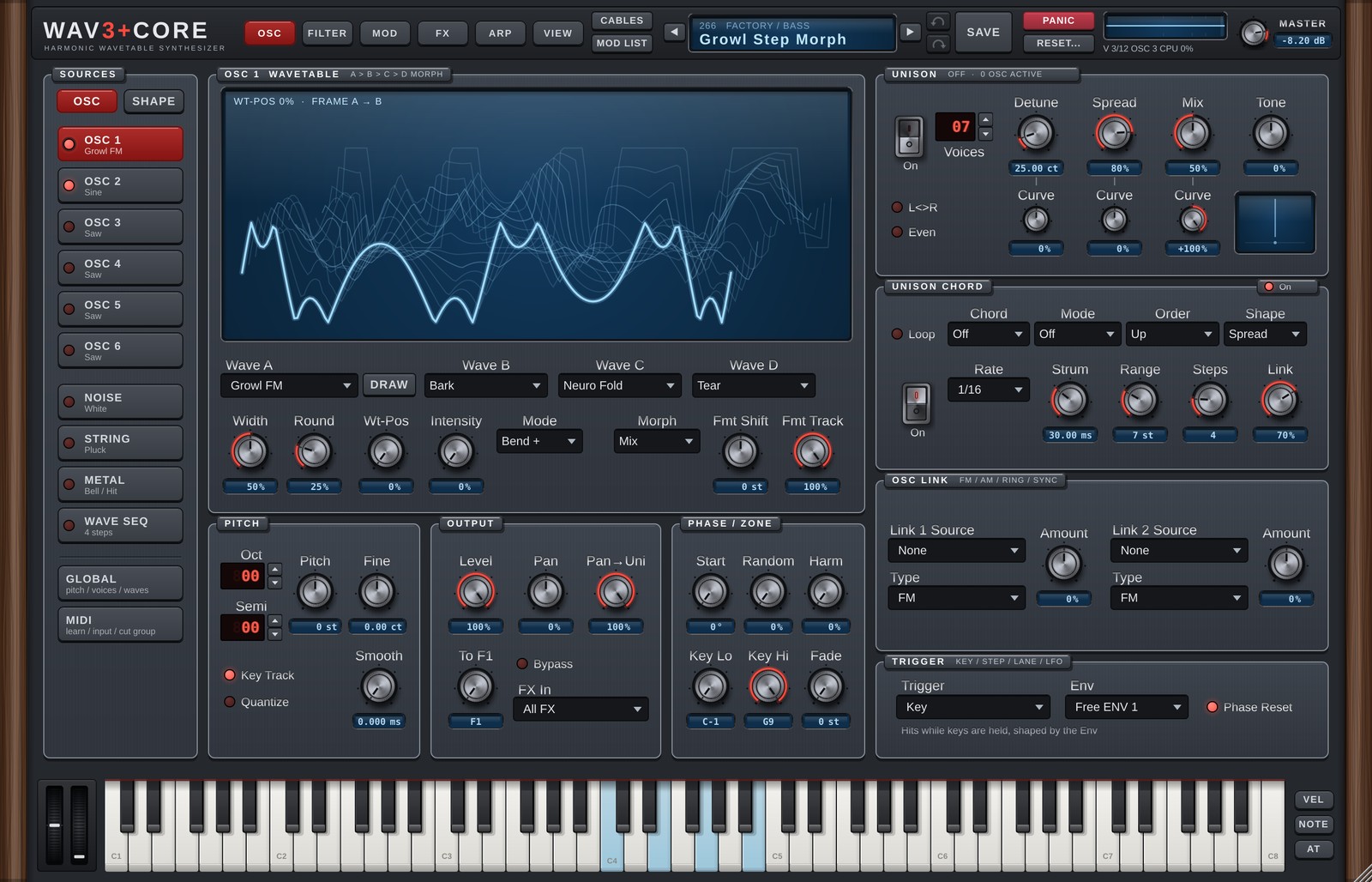
The OSC page is where the raw sound is made. Pick a source in SOURCES on the left and the right side shows its settings.
SOURCES
| Row | Details |
|---|---|
| OSC 1-6 | Wavetable oscillators. The current wave name is shown under each row. |
| NOISE | Noise (13 types). |
| STRING | Physical model of strings and winds. |
| METAL | Metallic sound model. |
| WAVE SEQ | Sequencer that switches between OSC1-6. |
- The round button at the left of each row turns that source on or off.
- The OSC / SHAPE tabs at the top switch between the oscillator's basic settings (OSC) and waveform shaping (SHAPE).
- Right-click an OSC row to copy, paste, copy to another OSC or swap. The top of that menu assigns the OSC's output (source OSCn Out: Assign OSC1 Out to Knobs etc., chapter 6; 1.6). Only the OSC settings are copied, not that OSC's LFO (v1.5; copy the LFO separately by right-clicking its LFO tab on the MOD page). An OSC Link Source set to the OSC itself (Self) stays Self when pasted.
WAVETABLE
Each oscillator holds four waves, Wave A to D, and Wt-Pos morphs smoothly between them. The screen shows the current wave frames layered.
| Control | Details |
|---|---|
| Wave A | The main wave. The ◀ ▶ that appear at its edges while hovering, and the mouse wheel, step through the waves (empty User / Add slots are skipped). |
| Wave B / C / D | Morph targets. Off = not used. |
| DRAW | Draw a wave by hand into a User slot (see "Drawing a wave"). |
| Width | For Pulse, the pulse width. For Sine / Saw / Tri / Ramp and the other built-in waves it makes the wave asymmetric (Sine: the length of each half cycle; Saw etc.: the ratio of the slopes). 50% = unchanged. No effect on User / Add / Resynth / Noise. |
| Round | Rounds the corners of Pulse (no effect on other waves). |
| Wt-Pos | Moves through the frames that are set, in the order A → B → C → D. Move it with an LFO or envelope in the Mod Matrix for a sound that keeps changing. |
| Morph | How the frames blend. Mix = crossfade the two waves (as before). Harmonic = interpolate the harmonics (level and phase), so waves with different phases do not cancel on the way and the overtones "migrate". Each wave's Harmonic EQ and Shape Amt apply before the interpolation; Wave Effects and formant lock apply after it. Not used for Resynth waves. |
| Intensity | Bends how the wave is read, changing the tone. Mode (to its right) picks how. |
| Mode | Bend + / Bend - / Bend +/- / Formant / Spectrum / Mirror / Sync / Quantize |
| Fmt Shift | Moves the formant (the vowel-like peaks) up or down without changing the pitch (±24 semitones). |
| Fmt Track | How much the formant follows the played pitch. 100% = follows it like an ordinary instrument; 0% = the peaks stay put (the same "mouth shape" on every note). |
Fmt Shift / Fmt Track (formant lock) work on User / Add / Resynth waves (not on built-in waves). The reference pitch is the analysed original pitch for Resynth and C4 for User / Add; playing at that pitch sounds like the original.
Wave types
The built-in waves include analog types (Saw, Pulse, Warm Saw…), sync, FM, phase distortion, folding and distortion, vocal (Vox A-U, Choir Ah…) and growl / wobble bass waves (Growl FM, Reese Core, Wobble Sub, Talk Bass…). Version 1.1 adds 80 more, 150 in total (organ / keys, pipe organ, acoustic instruments, bell / mallet, spectral, chip / bass and growl). The full list is in the appendix.
There are also slots for your own waves:
| Name | Contents | Made with |
|---|---|---|
| User 1-8 | A single-cycle WAV or a hand-drawn wave | IMPORTED WAVEFORMS in GLOBAL, or DRAW |
| Add 1-8 | A wave built from harmonic levels and phases (additive) | ADDITIVE OSCILLATORS in GLOBAL |
| Resynth 1-6 | A many-frame wavetable made by analysing a recording | RESYNTHESIS in GLOBAL |
When a Resynth wave is selected, the Wave B-D row turns into playback settings and Width / Round turn into Speed / Start / End.
| Control | Details |
|---|---|
| Play | Steps through the frames in the recording's own time. Wt-Pos then sets where playback starts. |
| Loop | Off / Forward (repeat) / Ping-Pong (back and forth). |
| Key Sync | Restarts playback on every key press. |
| Speed | Playback speed (0-400%). Also a Mod Matrix destination (OSCn Resynth Speed). |
| Start / End | Start and end of the loop. |
Only the analysis is saved in songs and presets; the original WAV file is not.
Drawing a wave (DRAW)
DRAW opens the drawing window. You can draw with points and curves, or freehand. Choose the User slot to write into and confirm; the wave becomes Wave A.
SHAPE tab
The SHAPE tab reshapes the waveform of the selected oscillator.
HARMONIC EQ
An EQ that raises or lowers harmonics by number (6 bands). Unlike a normal EQ it works on which harmonic rather than on frequency, so it hits the same harmonic on every note.
| Control | Details |
|---|---|
| Position | Which harmonic (1-64). |
| Gain | Boost or cut (±24 dB). |
| Width | How wide (0.3-16). |
Wave Effects (16 types)
Effects that reshape the waveform. Any number can be on at once. Each has an on/off switch and an Amount; at 0% nothing changes.
| Effect | Details |
|---|---|
| Warp | Blends reading the wave forwards and backwards. 100% gives the time-reversed shape (a Saw's rise and fall swap). |
| Twist | Little change up to about 30%, then a sharp spike grows inside the wave. At 100% it is close to Warp at 100%. |
| Drive | Boosts and hard-clips the wave (up to 16 times). |
| Window | Applies a triangular window that pulls both ends of the cycle to zero. |
| Offset | Shifts where the cycle starts. |
| Wave | Moves the wave towards a sine of the same period (stronger fundamental). |
| Bit Reduction | Lowers the amplitude bit depth (1 bit at 100%). |
| Shrink | Squeezes the cycle shorter and fills the rest with zero (pulse-like). |
| SelfSync | Repeats part of the cycle several times (hard-sync-like). |
| Multipoint | Zeroes the areas around three equally spaced points. |
| LPF | Smooths the wave, cutting high harmonics. |
| HPF | Subtracts the LPF result from the wave, emphasising edges. |
| Fold | Folds back whatever exceeds ±1 (wavefolding). |
| Spectrum | Raises and lowers even and odd harmonics alternately (a complex, phaser-like colour). |
| Random All | Randomises the level of every harmonic. |
| Random Odd | Randomises only the odd harmonics. |
Frame Shape (A-D)
Shape Amt A-D set how much of the harmonic EQ and Wave Effects is applied to each frame, Wave A to D. For example, A at 0% and D at 100% morphs from clean to shaped as Wt-Pos moves.
Harm (in PHASE / ZONE) randomises the phase of each harmonic: the same harmonic levels, but a different wave shape and drive response.
PITCH
| Control | Details |
|---|---|
| Oct | Octave (±6). |
| Semi | Semitones (±12). |
| Pitch | Smooth pitch offset (±24 st, default 0 = the sound as before; 1.6), added to Oct / Semi / Fine. It can sit between semitones and glides smoothly when turned. The Mod Matrix destination OSCn Pitch is added to this knob, so right-click Modulate with, the assign mode and the cables use it. |
| Fine | Fine tuning (±100 cents). |
| Key Track | Off = plays at C4 + Oct / Semi / Fine whatever key is pressed, ignoring pitch bend and glide. |
| Quantize | Pitch Quantize (v1.5). On = this oscillator's pitch movement (pitch bend, portamento (glide), LFOs and the Mod Matrix) snaps to the Key / Scale on the ARP page, so it moves in steps (a "robot voice" style effect). Off by default (the sound stays as before). |
| Smooth | Time to glide between the Quantize steps (ms). 0 = hard steps. |
- Quantize is per oscillator, so one oscillator can step while the others glide.
- The targets are the notes of the scale plus the played note itself, so a key outside the scale still sounds as played while nothing moves it. With a Chromatic scale the pitch snaps to semitones.
- Oct / Semi / Fine, unison Detune and the small Drift movement are not snapped (they apply on top). The Pitch knob is added in the same place as the Mod Matrix OSCn Pitch, so it is snapped.
- Try it: turn Quantize on and slowly move the pitch bend wheel while holding a key. Routing
LFO1 -> OSC1 Pitchwith a wide Range in the Mod Matrix also shows it.
OUTPUT
| Control | Details |
|---|---|
| Level | Volume. |
| Pan | Left/right position. |
| Pan→Uni | How much the unison spread moves with Pan. 100% = the whole spread moves to the Pan position; 0% = the spread stays as it is. |
| F1<>F2 | How much goes to Filter 1 and Filter 2 (left = Filter 1, right = Filter 2). |
| Bypass | Skip the filters and go straight to the AMP. |
| FX In | Where this source enters the FX chain. All FX = from the start; From #n = from slot n (earlier effects are skipped); Direct Out = no effects. |
PHASE / ZONE
| Control | Details |
|---|---|
| Start | Start phase (0-360°). |
| Random | Amount of random start phase. |
| Harm | Harmonic phase randomisation (see Frame Shape). |
| Key Lo / Key Hi | Key range this oscillator plays (key zone). |
| Fade | Fade-in width in semitones from each edge of the zone. Overlap two zones to crossfade. |
UNISON
Stacks copies of one oscillator for thickness and width.
| Control | Details |
|---|---|
| On | Unison on/off. |
| Voices | Number of copies (1-16). |
| Detune | Amount of detune. |
| Spread | Stereo width. |
| Mix | Balance between the centre voice and the outer voices. |
| Tone | Cuts (−) or lifts (+) the upper harmonics of the outer voices. |
| Curve (under Detune / Spread / Mix) | How Detune / Spread / Mix are distributed across the voices. |
| L<>R | Swaps left and right. |
| Even | Starts the voices with evenly spaced phases (never on top of each other), giving a strong sync-like sound. |
The small screen at the bottom right shows the position and level of each voice as bars.
Tip for Mix: lowering Mix hollows out the centre voice and makes the detune stand out. For a normal thick unison, start around 50%.
UNISON CHORD
Spreads the unison voices (up to 16) over the tones of a chord, so one key plays a chord. On top of that the voices can start one after another or move their pitch (the UNISON ARP of v1.1). Only works while UNISON is on.
| Control | Details |
|---|---|
| On | The switch at the right end of the title strip. Off = the whole UNISON CHORD rests (Chord and Mode do nothing; plain unison). The settings are kept, so turning it back on restores them. Can be automated to switch within a song. On by default. |
| Chord | Off = as before (every voice on the played note). Octave / 5th / 20 chord types (Maj to m9, the same as the ARP chord pads) / Scale (stacked thirds in the song Key / Scale, starting from the played note) / Played (the keys you hold = paraphonic, see below). |
| Mode | Off (the chord as is when a Chord is chosen) / Strum (tones start one after another) / Converge (the tones gather on the root) / Arp (the tones play one after another at Rate = an arpeggio from one key) / Arp Link (voice count and Detune change in a 4-step cycle on each note) |
| Order | Order for Strum / Arp (Up / Down / Center Out / Random). |
| Shape | How Converge gathers and how Arp plays (table below). |
| Loop | Repeat Strum / Converge / Arp. With Loop off, Arp plays Steps steps and then keeps the whole chord. |
| Rate | Step speed for Converge / Arp (note value). |
| Strum | Strum interval (ms). |
| Range / Steps | With Chord Off: Converge pitch range (semitones) / number of steps. With a chord selected, Range is how far up the chord is stacked (semitones), Steps is the number of Converge steps / the Arp pattern length. |
| Link | Depth of Arp Link. |
What Shape means with a chord selected:
| Shape | Converge (tones to the root) | Arp (which tones sound on each step) |
|---|---|---|
| Spread | Along the chord tones down to the root (all together) | One tone at a time, in Order |
| Alternate | Like Spread, but odd steps are mirrored below the root | The root stays on + one tone at a time |
| Up | The chord mirrored below the root rises to the root in semitones | Tones are added one by one (1, 2, ... all) |
| Down | From the chord tone down to the root in semitones | Starts with all tones and removes them one by one |
| Random | Each step jumps to some tone below its own | One random tone per step (Order is ignored) |
With Chord Off, Converge works exactly as in v1.1 (from the Range offsets back to the played note). Arp with Chord Off plays the detuned voices one at a time.
How voices are spread: the tones are filled from the lowest up, with the voices divided evenly (any remainder goes to the lower tones first). Voices on the same tone detune against each other (a tone with a single voice has no detune). For example 7 voices with Maj gives root x3, third x2, fifth x2.
Range: the basic chord (Maj = 0 / 4 / 7 semitones) always sounds. When Range is wider than that, the chord tones an octave up are added as far as Range allows (24 = up to two octaves; Scale keeps stacking thirds). At the default Range 7, Octave gives the root plus one octave up, and Maj gives just the basic chord.
The wavetable band is chosen from the highest chord tone, so stacking upwards does not alias.
Chord = Played (paraphonic): the unison voices are spread over the keys you are holding. While any oscillator is set to Played, the whole synth runs one voice only, however many keys you press, and the filter and envelopes are shared by the whole chord (like a vintage paraphonic synth).
- The first key starts the voice (that key is the root and sets the velocity).
- Adding keys adds their notes. With Retrigger on (POLYPHONY), each added key restarts the envelopes (pitch and velocity stay those of the first key); with it off, the envelopes do not restart (legato). Releasing a key redistributes the voices over the remaining keys. Even if you release the root key, only the keys still held sound.
- Releasing all keys starts the release (the last chord is kept during the release).
- Mono / voice count in POLYPHONY and Range are not used. Oscillators that are not set to
Playedplay the root key only. - Notes from the ARP, the chord pads and Chord Memory count as held keys, so a chord pad can play on a single voice.
OSC LINK
Modulates this oscillator with another one (2 slots).
| Control | Details |
|---|---|
| Link Source | None / OSC1 (Self) / OSC2-6. The oscillator's own number is shown as (Self). |
| Type | FM / AM / Ring Mod / Sync |
| Amount | Modulation depth. |
TRIGGER
Detaches the oscillator from the keys so it plays in rhythm: kicks, hi-hats, chopped synths and so on.
| Control | Details |
|---|---|
| Trigger | Key = normal (plays while a key is held). Step = every ARP step (with ARP off, every Division). Arp Mod 1-4 = every step of that ARP MOD lane (bar height = hit strength). LFO 1-6 = every LFO cycle. |
| Env | The Free ENV restarted on each hit; it shapes the oscillator's level. |
| Phase Reset | Restarts the wave at the Start phase on each hit (the same attack every time). |
With anything other than Key, the Env restarts on every hit while a key is held. Nothing sounds until the first hit. Mod Matrix routings that use the same Free ENV restart too, so you can use it for things like a kick's pitch drop.
NOISE
| Control | Details |
|---|---|
| Type | White / Pink / Brown / Blue / Digital / Crackle / Transient / Resynth 1-6 |
| Color | Brightness. |
| Width | Stereo width. |
| Level / Pan | Volume and position. |
| F1<>F2 / Bypass / FX In | As for the oscillators. |
| Follow AMP ENV | On: the noise follows only the AMP envelope (when you release a key it fades out with the AMP Release, together with the rest of the sound). Off: the noise uses its own envelope (ENVELOPE > NOISE on the MOD page). On for new sounds; songs and presets saved earlier (including the factory presets from 1.0) load with it off (they sound as before). While it is on, the knobs on the NOISE tab of ENVELOPE on the MOD page are dimmed. |
Transient starts from the same random seed on every note, so the attack noise is identical each time. Crackle is crackling noise; Digital is grainy digital noise.
Resynth plays the part of a sound analysed in RESYNTHESIS that harmonics cannot describe (breath, scraping and so on). Follow chooses which OSC's playback position it follows (Auto = the first OSC playing the same Resynth slot).
STRING
A physical model of strings and winds.
| Control | Details |
|---|---|
| Excite | How it is played: Pluck / Bow / Reed (Wind) / Flute (Wind) |
| Decay / Damping | Length of the ring / damping of the highs. |
| Brightness | Brightness. |
| Position | Where the string is plucked. |
| Body / Body Type / Body Size | Body resonance. Body Type: Classic / Guitar / Violin / Cello / Piano Board / Wood Box / Metal Can / Sitar. |
| Octave / Semi / Fine / Key Track | Pitch. |
| Level / Pan / F1<>F2 / Bypass / FX In | As for the oscillators. |
METAL
A model of metallic sounds such as bells, cymbals and gongs. The screen shows the partials (the components of the sound).
| Control | Details |
|---|---|
| Model | Random / Bell / Bar / Tube / Plate / Gong / Cymbal / China / Crash / Sizzle / Snare Wire / Membrane / Wood / Glass / Plastic |
| Seed A / B / Morph | Two seeds for the partial layout, and a blend between them. |
| Rich / Stretch / Tilt | Number of partials / stretching of their spacing / level of the upper partials. |
| Hardness / Vel>Hard / Position / Noise | Strike hardness / velocity to hardness / strike position / strike noise. |
| Mode | Hit (decays after the strike) / Sustain (keeps ringing). |
| Decay / Damp / Sustain / Release | Length and decay of the ring. |
| Beat / Shimmer / Glide / Width | Beating / shimmer / pitch drift / width. |
| Ring / Ring Ratio | Ring modulation amount and ratio. |
| Octave / Key Track / Level / Pan / F1<>F2 / Bypass / FX In | As for the oscillators. |
WAVE SEQ
Switches which of OSC1-6 plays, in up to 16 steps.
| Control | Details |
|---|---|
| On | On/off. |
| Steps | Number of steps (1-16). |
| Step 1-16 | The OSC for each step. |
| Rate | Switching speed (note value). |
| Crossfade | Smoothness of the switch. |
| Retrigger | On = restart on every note; off = follow the song's bars. |
Version 1.6.0 · 2026-11-08 · W3PC Audio · wav3pluscore.com