5. FILTER page
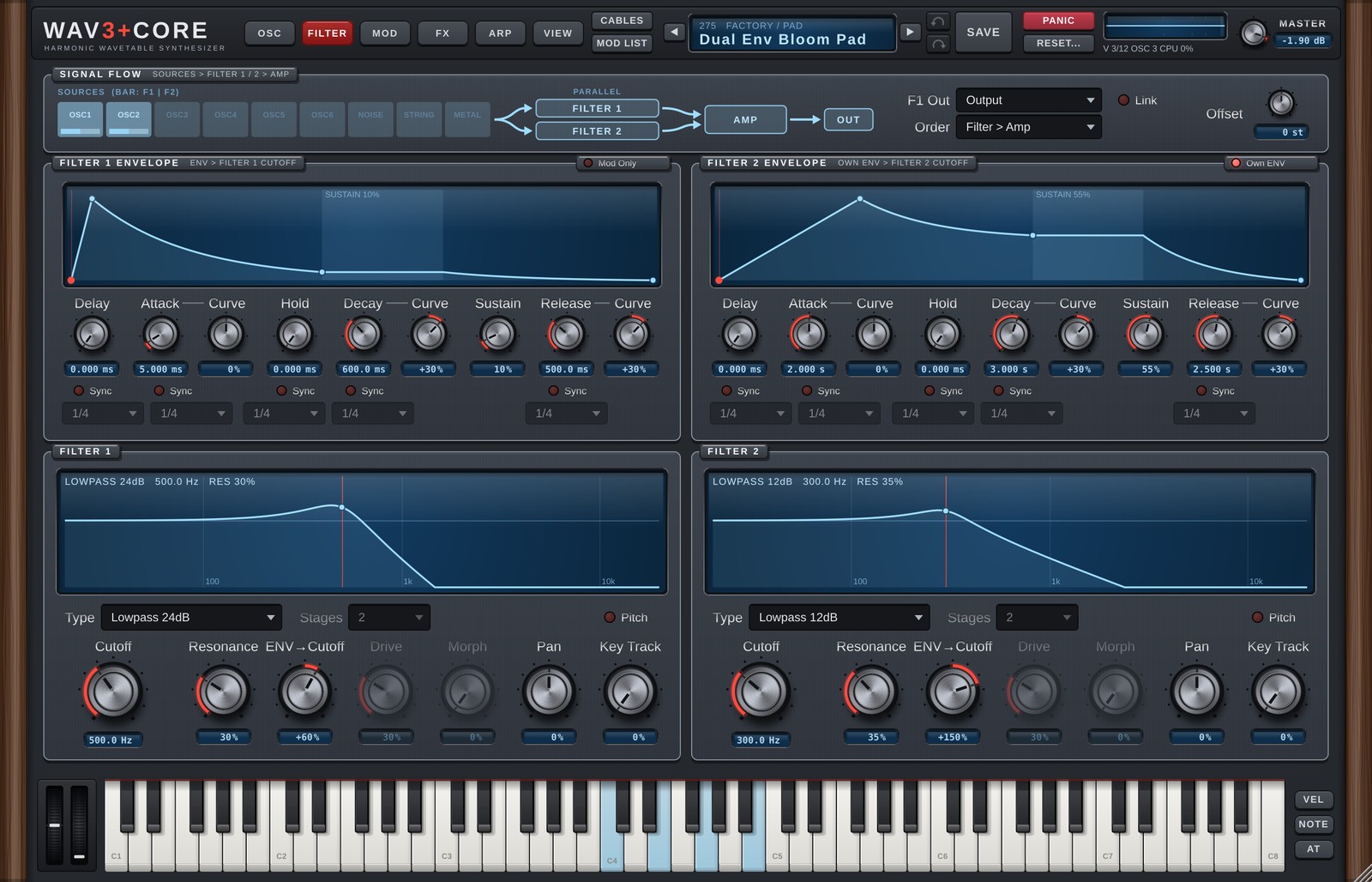
From top to bottom the FILTER page shows SIGNAL FLOW (routing), the envelopes and the filters. The left column is Filter 1, the right column Filter 2.
SIGNAL FLOW
A picture of the routing from the sources through the filters to the AMP.
- The bar under each SOURCES box shows how much of that source goes to Filter 1 and Filter 2 (F1<>F2). Clicking a box takes you to that source on the OSC page.
- F1 Out:
Output= the two filters run in parallel.To Filter 2= Filter 1 feeds Filter 2 (series). - Order (under F1 Out): the order of the FILTER and the AMP (v1.6).
Filter > Amp(default) = as before, the AMP (amp envelope and level) comes after the filters.Amp > Filter= the AMP comes first, then the filters. The Drive distortion follows the rise and fall of the amp envelope, and resonance ringing is not cut when the amp envelope ends after you release the key; it dies away by itself (if it never dies away, e.g. self-oscillation, it is faded out after at most 8 seconds). Clicking the AMP box in the picture also swaps the order. Not automatable. - Link: Filter 2's cutoff follows Filter 1's cutoff.
- Offset: with Link on, how many semitones Filter 2's cutoff is shifted from Filter 1.
FILTER 1 / 2 ENVELOPE
Envelopes that move the filter cutoff over time. The screen shows the shape.
| Control | Details |
|---|---|
| Delay | Time from the key press until it starts. |
| Attack | Time to rise to the top. |
| Hold | Time it stays at the top. |
| Decay | Time to fall to Sustain. |
| Sustain | Level while the key is held. |
| Release | Time to fall after the key is released. |
| Curve | Curve of Attack / Decay / Release (straight to exponential). |
| Sync | Set the times in note values (1/4 etc.). |
How far the envelope moves the cutoff is set with ENV→Cutoff in the filter section.
Own ENV (right of the Filter 2 title): on = Filter 2 uses its own envelope. Off = it shares Filter 1's envelope (the own envelope is shown dimmed). The first time you turn it on, Filter 1's envelope values are copied. The Filter 2 envelope is also available as the Mod Matrix source ENV Filter 2.
Filter 1's envelope is the same as the FILTER tab on the MOD page (editing either changes both).
FILTER 1 / 2
The screen shows the filter's frequency response. Drag horizontally for Cutoff and vertically for Resonance. When the cutoff is modulated, its current position is shown too.
| Control | Details |
|---|---|
| Type | Filter type (table below). |
| Stages | Number of Allpass stages (1-32). More stages delay the lows more, for a laser-like zap. |
| Pitch | Puts the cutoff exactly on the played note (following pitch bend and glide). The Cutoff knob then becomes Offset (semitones from the note; 12 = one octave up) and Key Track is disabled. |
| Cutoff | Cutoff frequency. |
| Resonance | Emphasis around the cutoff. |
| ENV→Cutoff | How much the envelope moves the cutoff. |
| Drive | Saturation inside the filter. Works with Ladder / Diode / Scream / Formant / Vowel / Comb / Phaser / Allpass (dimmed for other types). On Ladder, Diode and Scream, Drive above 30% now distorts much harder (v1.5; up to 30% it is unchanged). |
| Morph | Type-dependent shaping (table below). Dimmed for types where it has no effect. |
| Pan | Left/right position. |
| Key Track | How much the cutoff follows the played pitch (100% = one semitone per semitone, reference C4). |
Filter types
| Type | Details |
|---|---|
| Lowpass 24dB / 12dB | Removes highs (24 dB is steeper). |
| Highpass 24dB / 12dB | Removes lows. |
| Bandpass | Keeps only the area around the cutoff. |
| Notch | Removes only the area around the cutoff. |
| Peak | Boosts the area around the cutoff. |
| Allpass | Shifts the phase without changing the level (Stages; Morph = dry/wet). |
| Ladder | Analog-style ladder lowpass. |
| Diode | Diode ladder; good for 303-style bass. |
| Scream | Heavily driven, screaming filter. |
| Formant | Vowel-like filter. |
| Morph | The Morph knob moves LP → BP → HP → Notch. |
| Comb + / Comb - | Comb filters (Morph = damping). |
| Dual Peak / Dual Notch | Two peaks / notches (Morph = spacing). |
| Vowel | Vowel filter (Morph = A → E → I → O → U). |
| Phaser | Phaser-style (Morph = stage spread). |
With Formant / Vowel selected, a Voice slider appears in place of Stages. It sets the voice size (left = child, about 1/4 = woman, middle = man, right = large).
Version 1.6.0 · 2026-11-08 · W3PC Audio · wav3pluscore.com