6. MOD page
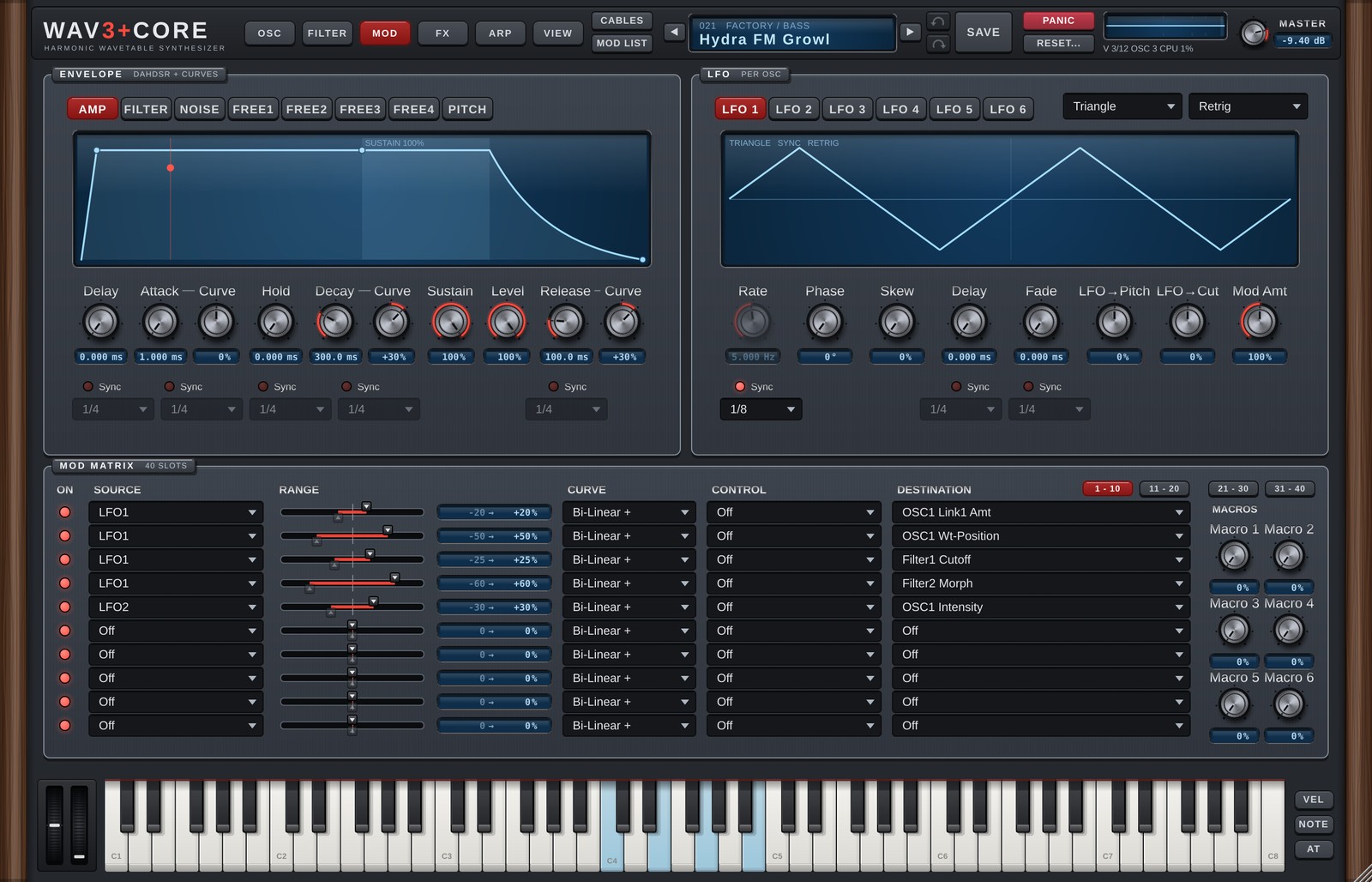
The MOD page holds everything that adds movement: envelopes, LFOs, the Mod Matrix and macros.
ENVELOPE
Choose the envelope with the tabs.
| Tab | Details |
|---|---|
| AMP | Volume envelope. |
| FILTER | Filter 1 cutoff envelope (the same one as on the FILTER page). |
| NOISE | NOISE volume envelope. Not used while Follow AMP ENV is on in NOISE on the OSC page (the knobs are dimmed). Sustain defaults to 1.0 (full). |
| FREE1-4 | General-purpose envelopes, used as Mod Matrix sources and by OSC TRIGGER. |
| PITCH | Pitch envelope. |
The controls are Delay / Attack / Hold / Decay / Sustain / Release (DAHDSR) plus a Curve for Attack / Decay / Release. The AMP tab also has Level right of Sustain (the volume of each voice, 0-100%, default 100% = the sound as before; 1.6). The Mod Matrix destination Voice Level is added to this knob. Turn on Sync for a stage to set its time in note values (1/4 etc.). An Attack turned fully left rises in 0.1 ms (with 0.1ms Attack On on the GLOBAL page; 1 ms when Off). Whether a retriggered note restarts from zero or continues from the current level is set with Env Start on the GLOBAL page (chapter 9). You can also edit on the screen:
- Drag a point horizontally to change that stage's time (Delay / Attack / Hold / Decay / Release).
- Drag the Sustain point vertically to change the Sustain level.
- Drag a line (Attack / Decay / Release) up or down to change that segment's curve (pull up to bulge upward).
- Synced stages do not move horizontally, because their time is set by the note value.
FREE ENV Custom (MSEG)
FREE1-4 switch between ADSR (set with the knobs) and Custom (draw your own).
| Action | Result |
|---|---|
| Click an empty spot | Adds a point (up to 128). |
| Drag a point | Moves it. The end points move vertically only. |
| Drag the ◆ between points up / down | Changes that segment's curve. |
| Right-click a point | Sustain point (holds here while the key is down) / Loop start (repeats from here to the sustain point) / Delete point |
| Right-click menu | Load shape (ADSR / Pluck / Swell / Ramp Up / Ramp Down / Gate 1/16 x4 / Wobble Loop), No sustain (one-shot), No loop |
With Sync on, the time axis is in beats, you can pick the length (1/16 to 8 Bars) and points snap to the beat grid (hold Shift to move freely). Without Sync, hold Shift to snap to the grid.
LFO
There are six LFOs, one for each of OSC1-6 (LFO 1 = OSC1's LFO). The Wave and Mode drop-downs sit at the right end of the LFO 1-6 tab row (1.6; they belong to the LFO that is open).
| Control | Details |
|---|---|
| Wave | Sine / Triangle / Square / Saw / S&H / Reverse Saw / Smooth Rnd / Noise / Custom |
| Rate | Speed (Hz). |
| Phase | Start position (0-360°). |
| Skew | Leans the wave forward (Triangle → Saw). 0% = unchanged. |
| Delay | Time from the key press until the LFO starts. |
| Fade | Time for the LFO to fade in. |
| LFO→Pitch | How much this LFO moves the pitch of its OSC directly (±100% = ±12 st, default 0 = the sound as before; 1.6). For vibrato. The Mod Matrix destination LFOn > Pitch Amt is added to this knob. |
| LFO→Cut | How much this LFO moves the filter cutoff directly. |
| Mod Amt | Overall depth of this LFO's modulation. |
| Mode | Free (runs freely) / Retrig (restarts on each note) / Host (locked to the DAW bar position) / One Shot (plays once per note) |
| Sync | Set the speed in note values (1/8 etc.). |
| Step: Instant | Right of Division. In Mode Host while playing, when the division changes (the Division knob, automation or a Mod Matrix Step): off (Wait, default) waits for a bar-aligned point, on switches at once (1.6, see "Modulating tempo-synced rates and times" below). |
| Sync (under Delay / Fade) | Set Delay / Fade in note values. |
With Custom you can draw one LFO cycle on the screen.
- Double-click an empty spot to add a point; double-click a point to delete it.
- Drag a point to move it; drag a line up or down to change its curve.
- Two points at the same position make a jump (a square-wave-like step).
- Right-click for
Load Shape(Triangle / Sine / Saw Down / Ramp Up / Square / Pulse 1/4 / Steps / Decay),Grid(snap),Flip VerticalandReverse (Mirror).
MOD MATRIX
A table that sets what moves (source), what is moved (destination) and by how much (range). There are 40 slots, shown 10 rows at a time; switch pages with 1 - 10 / 11 - 20 / 21 - 30 / 31 - 40 at the top right. A small dot on a page button means that hidden page has slots in use. When ASSIGN or the right-click Modulate with creates a slot, the table switches to the page with that slot. The page you were on is remembered when you close and reopen the window (it is not saved in the song).
Slots 21-40 were added in 1.6. Songs and presets from 1.5 and earlier load with slots 21-40 all Off (the sound does not change). AI SOUND can use all slots 1-40 when PARAMS is Full or higher (chapter 11).
| Column | Details |
|---|---|
| ON | Turns the slot on/off without losing its settings. Off keeps the source, range and destination but stops the modulation (the row is dimmed), handy for A/B-ing a single slot. |
| SOURCE | What does the moving (table below). |
| RANGE | How much. The upper handle on the slider sets the top of the range, the lower handle the bottom (double-click = automatic). The amount is shown on the right. |
| CURVE | How the source is used: Bi-Linear + (−1 to +1 as it is) / Bi-Linear - (inverted) / Uni-Linear + (0 to 1) / Uni-Linear - (1 to 0, strongest when the source is 0). Below the curves, the CURVE menu also has Sync: how this slot moves a tempo-synced rate or time (see "Modulating tempo-synced rates and times" below). When the destination is such a knob, a small tag on the right of the box shows the current Sync (SM / ST / ST. / STT / ALL). |
| CONTROL | A second source that scales this slot (e.g. the LFO only works as far as the Mod Wheel is raised). |
| DESTINATION | What is moved: almost any parameter of the oscillators, filters, envelopes, EQ, effects and more. A click opens the picker window (below). |
Choosing a CURVE: for sources that go from 0 to 1 (envelopes, Velocity, Mod Wheel, Aftertouch, Macros), use
Uni-Linear +: nothing moves at 0, and the destination moves by up to Range. WithBI-LINEARthe destination stays shifted by −Range while the source is 0 (on pitch, the note stays out of tune). Sources that swing up and down, such as LFOs, stay onBi-Linear +and move ±Range around the knob value.
The ◀ ▶ that appear at the edges of a drop-down while hovering, and the mouse wheel over it, step to the previous / next item. The SOURCE and CONTROL menus are grouped by type (LFO ▸, ENV ▸, MIDI ▸ …).
The DESTINATION picker (1.6): there are more than 380 destinations, so a click on DESTINATION opens a small window with a search field next to the row instead of a long menu.
- Left = the groups (OSC 1–6, OSC 1-6 (All), LFO, Filter 1 / 2, Noise, String, Metal, ENV, Voice, FX, Master, in the same order as the old menu). Right = the items of the selected group.
- You can type into the search field right away (e.g.
cut,osc 2 pitch,delay). It searches all groups and shows the group name next to each hit. While the search field is empty, ← → switch groups. - The current destination is filled and marked on the left. Destinations that other slots already use get a small dot and the slot numbers (
#2 #5); their groups get a dot too. - Click an item, or select it with ↑↓ and press Enter (or OK), to set it and close the window. The Off button clears the destination.
- Esc, ×, Cancel or a click outside the window change nothing. Undo takes one step back, the same as choosing from the menu.
Modulating tempo-synced rates and times (Sync)
When an LFO Rate, an FX Rate / Time / Decay, an envelope Attack / Decay / Release or an LFO Delay / Fade has Sync on (set in note values such as 1/4), each slot decides how the Mod Matrix moves it. Open the CURVE drop-down: the five Sync choices are below the curves.
| Sync | What it does |
|---|---|
| Smooth | A smooth multiplier, faster / slower (longer / shorter). Range ±100% = ±4 octaves (1/16 to 16 times). It leaves the note grid (no longer on the beat). |
| Step | Jumps between note values (1/4 → 1/8 → 1/16 …, straight notes only). About one step (×2) per 25% of Range. |
| Step + Dot | Straight and dotted notes (1/8. etc.). |
| Step + Triplet | Straight notes and triplets (1/8T etc.). |
| Step (All) | Straight, dotted and triplet notes (the finest steps). The default for new slots. |
- Destinations: the LFO Rate of OSC 1–6 (also OSC1-6 LFO Rate (All)), the Rate of Chorus / Hyper / Flanger / Phaser / Pan, Delay 1–3 Time, Reverb / Reverb 2 Decay and the FX Filter LFO Rate.
- With Sync off (Hz or ms knobs) the knob moves as before, whatever is chosen here.
- With Step on an envelope Attack / Decay / Release, the length is decided when the stage starts and does not change during the stage (a change made mid-stage applies from the next stage, so there is no click). The LFO Delay is decided when the key is pressed and the Fade when the fade starts; both stay for the rest of the note. Smooth changes them smoothly at any time, as before. When a Free ENV uses a Custom shape, which has no note lengths, Step works as the same multiplier as Smooth.
- On a Delay, Step switches with a short crossfade (20 ms), so there is no click (Smooth glides like the Time knob, so the pitch bends).
- LFOs that follow the song position (LFO Mode Host, Pan, the FX Filter LFO) stay on the bar with Step; Smooth drifts off the beat.
- For these LFOs, Step: Instant (right of Division, per LFO; 1.6) sets what happens when the division changes, whether by a Mod Matrix Step, the Division knob or automation. Off (Wait, default) keeps the old division until a point where both cycles start on the bar grid, so the movement joins smoothly. On (Instant) switches at once; the phase is recalculated from the song position, so it may jump, but this is the one for wobble basses where the switch itself makes the rhythm ("faster from this beat"). Songs and presets from before 1.6 (and factory 001–340) load with Instant, so they switch at once as before.
Songs and presets from before 1.6 load with every Sync set to
Smooth. OSC LFO Rates sound as before. FX Rates / Times used to ignore the Mod Matrix while Sync was on; songs with such a slot start moving (as Smooth) in 1.6.
Sources
| Source | Details |
|---|---|
| LFO1-6 | The per-OSC LFOs. |
| ENV Amp / ENV Filter / ENV Filter 2 / ENV Noise / ENV Pitch / Free ENV1-4 | Envelopes. |
| Velocity / Note / Aftertouch | Key velocity / pitch / aftertouch. |
| Mod Wheel / Pitch Bend / Expression | Wheels and pedal (Expression = CC#11; CC#4 is accepted too). |
| OSC1-6 Out | The oscillator's audio output itself. It moves at audio rate, giving FM-like effects. |
| Macro 1-6 | The macro knobs. |
| Random | A random value per note (fixed while the note plays). |
| Alternate | +1 / −1, swapping on every note. |
| Gate | 1 while a key is held, 0 when released. |
| Constant (On) | Always 1. Use it to offset a destination by the Range, or together with CONTROL. |
| Arp Mod 1-4 | The current value of the MOD lanes (FREE MOD) on the ARP page. |
| External | The level of the sidechain input (0 to 1). Route another track to this plugin's sidechain input in your DAW and set Attack / Release / Gain in EXTERNAL INPUT in MIDI (SOURCES on the OSC page, chapter 10). Open the filter with a kick, widen the Detune on a snare and so on. It is a 0-to-1 source, so use a UNI-LINEAR curve. |
Assigning by clicking knobs (ASSIGN)
Right-click an LFO / ENV tab (LFO 1, AMP, FREE1 …) for this menu (macros have the same items on the knob's right-click menu). A left-click on a tab still just opens that tab.
Since 1.6 the other sources shown on screen have the same menu:
| Right-click | Source |
|---|---|
| An OSC 1-6 row in SOURCES on the OSC page | OSC1-6 Out (the rest of the menu is the OSC copy / paste as before) |
| The two wheels left of the keyboard | Pitch Bend (left) / Mod Wheel (right). A right-click does not move the wheel |
| The VEL / NOTE / AT buttons at the right end of the keyboard (a click opens the same menu) | Velocity / Note / Aftertouch |
| The MOD1-4 tabs in the ARP page display (and the top of the right-click menu inside a MOD lane) | Arp Mod 1-4 |
| EXTERNAL INPUT under MIDI in SOURCES on the OSC page (Level meter, hint text, empty part of the panel) | External |
A right-click on the keys themselves still latches (holds) that key as before (Velocity / Note / Aftertouch are on the three buttons to the right).
| Item | Details |
|---|---|
| Assign LFO1 to Knobs | Enters the assign mode for that source. A banner appears at the top; on any page, clicking a knob connects it through a free Mod Matrix slot (the knob's value does not move; the amount is the Default Amount of Modulate with, initially 0%, shown as a dashed ring and cable). Drag a knob up / down to set that slot's amount. Choose the item again (Stop Assigning), press Esc or click the banner to finish. |
| Remove All Assignments of LFO1 (n) | Removes every slot of that source (one ↶ brings them back). |
| Show Mod List... | Opens the MOD LIST window (below). |
The LFO tab menu continues with copy / paste / swap / reset for the LFO.
- Shift+click a per-OSC knob (Level, Pan, Pitch, Unison, Wt-Pos, LFO→Pitch …) to connect it to the OSC1-6 (All) destination instead of only that knob's OSC (e.g.
OSC1-6 Level (All)). A plain click always uses only that knob's OSC (it works even when an All slot already exists). - In a knob's right-click Modulate with, Apply to chooses
This OSC(the knob's OSC) orAll OSCs(OSC1-6 together); it is remembered until the window is closed. Knobs without an All destination do not show it. - The points in the PARAMETRIC EQ graph on the FX page are destinations too. Right-click a point and choose Freq / Gain / Q to get that band knob's right-click menu (Modulate with etc.). In assign mode the points light up as well; click a point and choose Freq / Gain / Q to connect it (clicking the band's Freq / Gain / Q knob does the same).
- Since 1.6 every Mod Matrix destination can be made with a knob's (or EQ point's) right-click and the assign mode (new knobs: OSC Pitch, LFO LFO→Pitch, AMP Level; GLOBAL Analog and the EQ knobs are now connected).
Cables and MOD LIST
You can see which knob is moved by which source as slightly sagging cables (display only, the sound does not change). Cable colours follow the kind of source (LFO = purple, ENV = green, MACRO = amber, others = blue-grey). An end on a page that is not shown goes to a tag under that page's button in the header (▲ MOD etc.).
| How | Cables shown |
|---|---|
| Hold Ctrl (no click) over a knob | The cables connected to that knob, with an amount label (e.g. LFO1 → Filter1 Cutoff 35%). |
| Hold Ctrl over an LFO / ENV tab or a macro knob | All cables from that source. The LFO / ENV tab button lights up in the cable colour. |
| Hold Ctrl over an OSC 1-6 row, a wheel, an ARP MOD1-4 tab, the EXTERNAL INPUT meter or the VEL / NOTE / AT buttons right of the keyboard (1.6) | All cables from that source. The OSC row, the MOD tab and the VEL / NOTE / AT button light up. With the keyboard set to Hide in VIEW, Velocity / Note / Aftertouch cables start, like the wheels', at that slot's SOURCE in the Mod Matrix (the ▲ MOD tag on other pages). |
| Hold Ctrl for 0.4 s away from knobs and sources | All cables of the current page. They disappear when you release Ctrl (a quick tap such as Ctrl+Z in your DAW shows nothing). |
| Turn on CABLES in the header | All cables of the current page stay visible (remembered per computer). Ctrl + a knob on top of that shows that knob's cables strong with labels and dims the others. |
A slot with 0% amount (connected, but not changing the sound yet) is shown as a thin dashed cable and a dashed ring around the knob. When all cables are shown, labels appear only on the cable near the mouse so that many cables stay readable. "Cables of the current page" are those with at least one end visible on that page (cables with both ends on other pages are not shown).
MOD LIST (header button, right-click on a macro knob, or right-click on an LFO / ENV tab) is a window with one row per Mod Matrix slot in use (SOURCE and DESTINATION both not Off), in slot order. It scrolls when there are many rows.
| Column | Details |
|---|---|
| Number | The slot number (the dot shows the cable colour). Click it to go to that row of the MOD MATRIX on the MOD page. |
| Small knob | The slot's RANGE (upper end). Drag to change, double-click for 0%. |
| Source → destination | Click the destination name to go to the page (and tab) of its knob. Destinations without a knob go to the MOD MATRIX row. |
| % / curve | The amount ("low..high%" when the lower end is set by hand) and the CURVE (BI + / UNI + etc.). For a tempo-syncable rate or time, the Sync below it (Smooth / Step / Step . / Step T / Step All). |
| × | Removes the slot (undo with ↶). |
Hovering a row shows that slot's cable even when CABLES is off. Slots whose ON is off are shown dimmed. Drag the title to move the window; × at the top right closes it.
MACROS
Six macro knobs. Assign one macro to several Mod Matrix slots and one knob moves many parameters together. Double-click a name to rename it (saved with the preset).
Version 1.6.0 · 2026-11-08 · W3PC Audio · wav3pluscore.com