10. MIDI
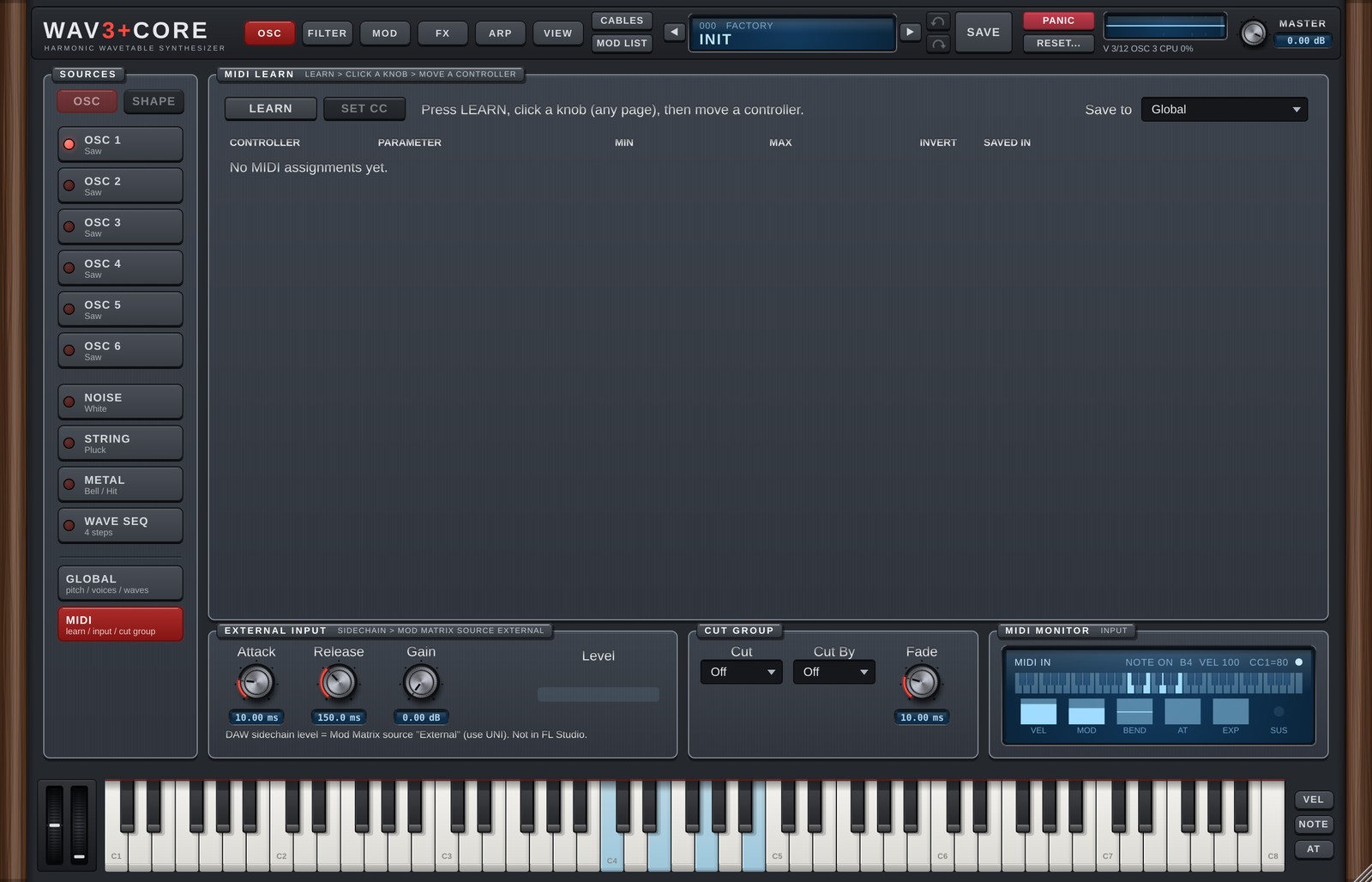
MIDI opens on the right of the OSC page when you click MIDI at the bottom of SOURCES (since 1.6, before it was the MIDI page). It holds MIDI LEARN, EXTERNAL INPUT, MIDI MONITOR (shows incoming MIDI) and CUT GROUP (moved from chapter 9). MIDI LEARN assigns the knobs and faders (CCs) of your MIDI controller to WAV3+CORE's knobs (MIDI Learn).
Assigning
- Press LEARN.
- Click the knob you want, on any page.
- Move a knob on your MIDI controller.
You can also right-click a knob, choose MIDI Learn and then move the controller.
Without a controller at hand, SET CC... lets you pick the CC number from a list.
The assignment list
| Column | Details |
|---|---|
| CONTROLLER | CC number. |
| PARAMETER | The assigned parameter. |
| MIN | Parameter position when the controller is at 0. |
| MAX | Parameter position when the controller is at 127. |
| INVERT | Reverses the direction. |
| SAVED IN | Global = the same assignment in every project and preset. This Preset = saved with the preset, and overrides a Global assignment of the same CC. |
| X | Removes the assignment. |
Save to at the top right chooses where new assignments are saved (Global / This Preset).
Assigning CC 1 (Mod Wheel) does not stop it from working as the Mod Matrix source Mod Wheel.
Global assignments are saved in %APPDATA%\WAV3PLUSCORE.
EXTERNAL INPUT (external input modulation)
At the bottom of MIDI. Route another track (a kick, for example) to this plugin's sidechain input in your DAW, and its level becomes the Mod Matrix source External (0 to 1). Only the level is read (no pitch tracking), so it is light; it uses the same input as the SIDECHAIN effect (External).
| Control | Details |
|---|---|
| Attack | How fast the value follows a rising level (ms). Shorter = snappier. |
| Release | How fast it falls back when the level drops (ms). |
| Gain | Boost for the measured level (dB), so a quiet input can still reach 1. Anything above 1 is clamped. |
| Level | The current value of External (meter). It stays still while nothing is connected. |
How to use it: in the Mod Matrix on the MOD page, set SOURCE to External, DESTINATION to e.g. Filter1 Cutoff, CURVE to Uni-Linear + and set the RANGE.
- How to connect a sidechain depends on the DAW (some DAWs do not support sidechain inputs on instruments).
- Not available in FL Studio. FL Studio does not pass audio input to instrument plugins (not even through Patcher). The same applies to
Externalin the SIDECHAIN effect. - While nothing is connected External is 0, so existing songs sound the same as before.
- While no voice is sounding, External cannot move FX knobs (the voices carry the value, like Macros).
CUT GROUP
Stops other WAV3+CORE instances in the same DAW (like an open / closed hi-hat).
| Control | Details |
|---|---|
| Cut | The group this instance stops when it plays (Off / 1-16). |
| Cut By | The group that stops this instance (Off / 1-16). Match another instance's Cut number and it stops this one when it plays. |
| Fade | Fade time when stopping. |
With Cut and Cut By set to the same number, an instance stops its own previous note (choke). It does not work if the DAW runs the plug-in in a separate process (bridged).
MIDI MONITOR
Shows incoming MIDI from your keyboard or DAW: the last note, velocity and CC, plus the current VEL / MOD / BEND / AT (aftertouch) / EXP / SUS values.
Version 1.6.0 · 2026-11-08 · W3PC Audio · wav3pluscore.com