9. GLOBAL
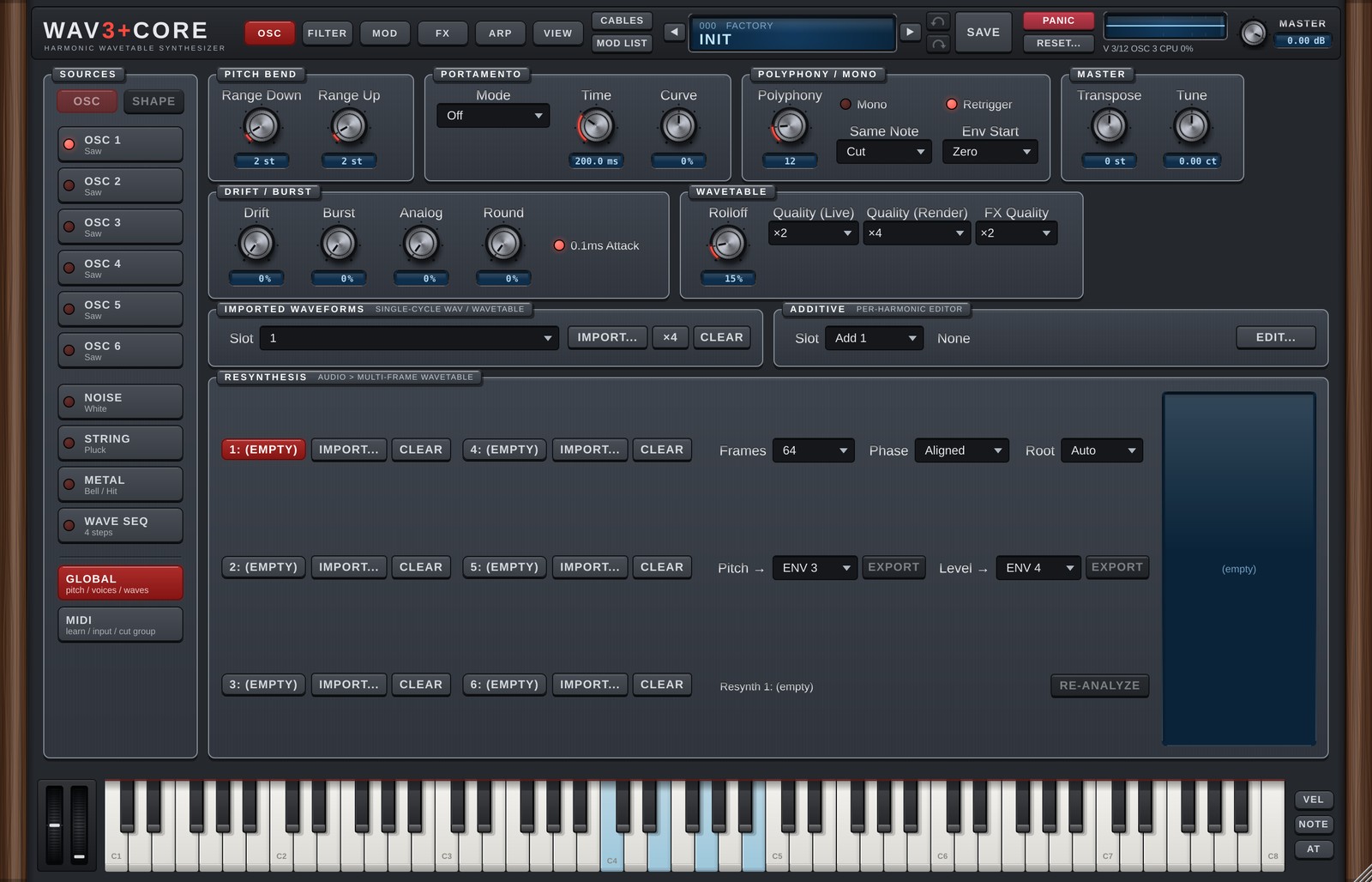
GLOBAL opens on the right of the OSC page when you click GLOBAL at the bottom of SOURCES (below the divider; since 1.6, before it was the GLOBAL page). MIDI MONITOR and CUT GROUP moved to MIDI (chapter 10). GLOBAL holds settings for the whole sound and the tools for making your own waves (import, additive and resynthesis).
PITCH BEND
| Control | Details |
|---|---|
| Range Down / Range Up | How many semitones pitch bend moves down / up (0-24). |
PORTAMENTO
Glides the pitch from one note to the next.
| Control | Details |
|---|---|
| Mode | Off / Norm, Fix / Norm, Var / Fing, Fix / Fing, Var |
| Time | Glide time (0-10 s). |
| Curve | Shape of the glide. |
Norm= always glides.Fing= glides only when you play the next key while still holding the previous one (legato).Fix= the same time whatever the interval.Var= longer for larger intervals.
DRIFT / BURST
| Control | Details |
|---|---|
| Drift | Slow random pitch drift per oscillator, for analog-style instability. |
| Burst | Adds a short "pop" at the moment of each note-on. |
| 0.1ms Attack | (v1.1) When On, an envelope Attack turned fully left rises in 0.1 ms instead of 1 ms, for snappier kicks and plucks. New sounds start On; older songs and presets load Off. |
POLYPHONY / MONO
| Control | Details |
|---|---|
| Polyphony | How many notes can play at once (1-64). |
| Mono | Single-note playing (for bass and leads). |
| Retrigger | In Mono, the next note restarts the envelopes. Off = legato playing continues the envelopes. |
| Same Note | When the same key is played again: Cut = stop the previous note / Overlap = let its tail ring on. |
| Env Start | (v1.1) When a note is retriggered while still sounding: Zero = envelopes restart from zero, and the oscillator phase and Retrig / One Shot LFOs restart too (after a 3 ms fade, so it does not click) / Level = envelopes continue from the current level (as before). New sounds start with Zero; older songs and presets load with Level. |
MASTER
| Control | Details |
|---|---|
| Transpose | Overall transpose (semitones). |
| Tune | Overall fine tuning (cents). |
WAVETABLE (quality)
| Control | Details |
|---|---|
| Rolloff | Slightly softens the very highest harmonics to reduce harshness and aliasing (default 15%). |
| Quality (Live) | Oversampling while playing (Off / ×2 / ×4). The waveforms are already built so the highs do not alias, so Off is usually enough. Higher settings use more CPU (a safety net for extreme sound design). |
| Quality (Render) | Quality when rendering offline (Same as Live / ×2 / ×4). While rendering, the higher of Live and Render is used. |
| FX Quality | (v1.1) How much faster Distortion / Saturator run internally (Off / ×2 / ×4, default ×2). At ×2 and above they also use anti-aliased curves, and Chorus / Flanger use a more accurate interpolation. While rendering, ×2 becomes ×4 automatically. Use ×4 for an even cleaner lead, or Off (the original processing) if things get heavy. Saved with each sound. Older songs and presets also load at ×2 (less grit from Distortion / Saturator, almost no change in level). |
If it feels heavy: first try Quality (Live) at
Off, then FX Quality atOffif it is still heavy. Rendered audio is set by Quality (Render), so lowering Live does not change your bounces.
IMPORTED WAVEFORMS
Eight slots for single-cycle WAVs (one period of a waveform). Since 1.6 this is a single row: choose a slot (with its name) in the Slot drop-down; the buttons work on that slot. Imported waves are used as User 1-8 on the oscillators.
| Button | Details |
|---|---|
| IMPORT... | Load a WAV file. |
| ×4 / ×3 / ×2 | Extract several cycles from one file into this and the following slots (for Wave A-D morphing). |
| CLEAR | Empty the slot. |
ADDITIVE OSCILLATORS
An additive editor where you draw the level and phase of each harmonic (8 slots). Since 1.6 GLOBAL only shows one row (Slot drop-down, name, EDIT...); EDIT... opens the editor in a window (close it with ×, Esc or a click outside). When an oscillator's Wave A is Add 1-8, the EDIT button at the top right of its waveform display opens it too. In the window: The waves are used as Add 1-8 on the oscillators.
| Part | Details |
|---|---|
| Slot / Name | Slot and name. |
| PRESET | Load a preset harmonic layout. |
| CLEAR | Clear everything. |
| AMP / PHASE | Draw harmonic levels / phases. |
| Smooth | Smooths the drawn harmonics. |
| ANTI-RING | Reduces overshoot (ringing) at the corners of the wave. Turn it off if the sound gets muddy. |
The screen shows harmonics 1-128; drag with the mouse to draw.
RESYNTHESIS
Analyses a recording (WAV) into a wavetable with many frames that change over time (6 slots). The results are used as Resynth 1-6 on the oscillators and on NOISE.
| Part | Details |
|---|---|
| IMPORT... / CLEAR | Load a sound / empty the slot. |
| Frames | Number of frames for the next import or re-analysis. |
| Phase | Aligned = harmonic phases locked to the fundamental (smooth morphing). |
| Root | Original pitch of the sound. Auto = detect. |
| Pitch → / Level → EXPORT | Export the recording's pitch / level movement to a Free ENV (Custom) and connect it in a free Mod Matrix slot. |
The screen on the right shows how harmonics 1-64 and the level change over time.
When you use a recording, please make sure you have the right to use it.
Version 1.6.0 · 2026-11-08 · W3PC Audio · wav3pluscore.com