8. ARP page
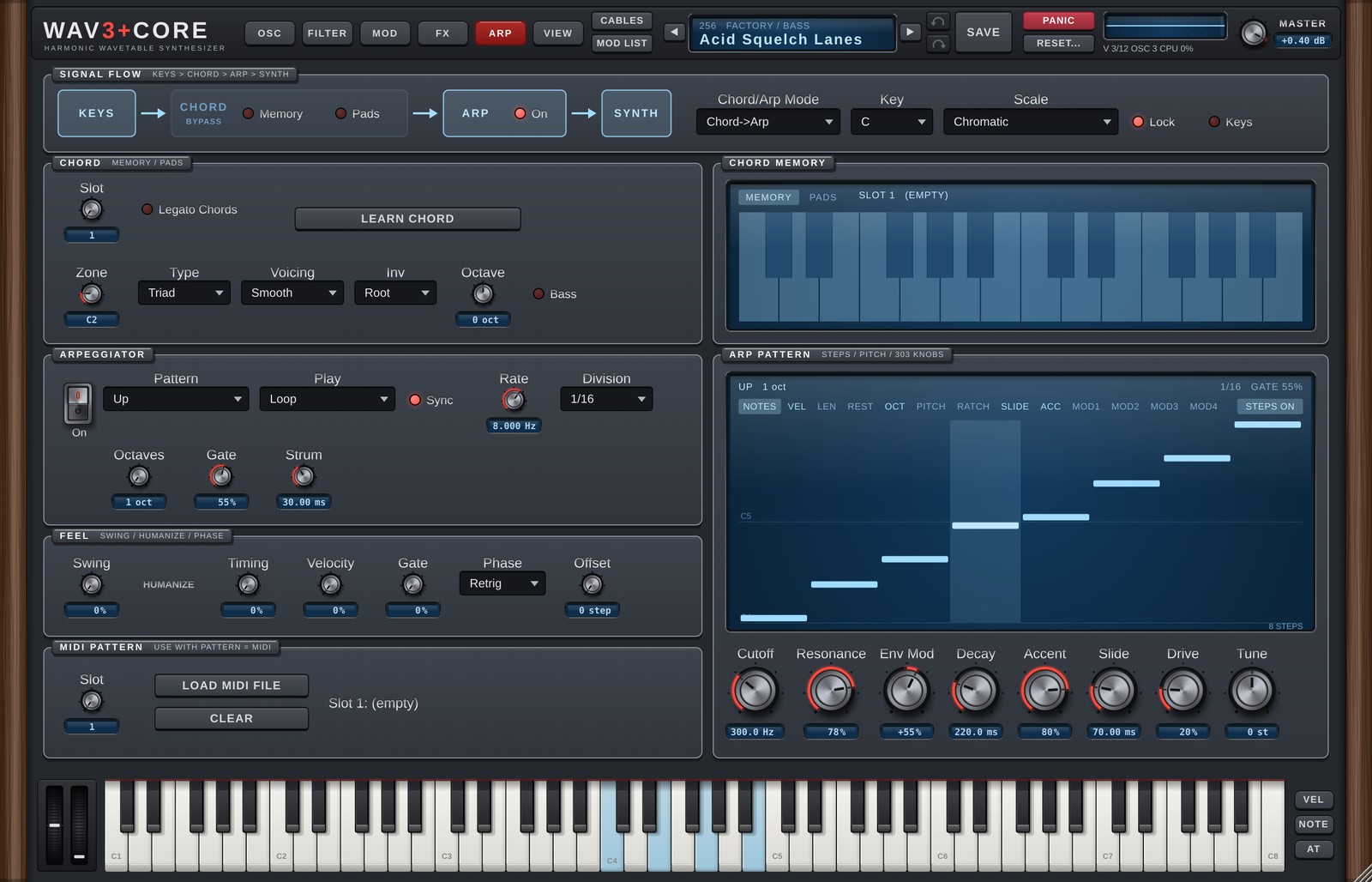
The ARP page brings together the chord functions (CHORD) and the arpeggiator (ARP) that process the notes you play.
SIGNAL FLOW
The strip at the top shows the flow: keys → CHORD → ARP → SYNTH.
| Part | Details |
|---|---|
| CHORD: Memory / Pads | Turn the chord functions on or off (see CHORD below). |
| ARP: On | Turn the arpeggiator on or off. |
| Chord/Arp Mode | Chord -> Arp = chords made by the chord functions are passed to the arpeggiator. Independent = they run separately. |
| Key / Scale | The song's key and scale, used by the chord pads and to snap arpeggiator notes to the scale. Chromatic = no snapping (as before). |
| Lock | Scale Lock. On (default): arpeggiator notes snap to the scale, the chord pads use chords of the scale, and keys outside the scale are greyed out on the on-screen keyboard. Off: the Scale is not used (the same as Chromatic; the chord pads use major chords of the Key, and no keys are greyed out). |
With Lock on, while a chord is sounding from the chord pads or Chord Memory, a scale that fits that chord is used instead (for both the arpeggiator snapping and the greyed-out keys). If all of the chord's notes are in the Key / Scale, nothing changes. If not (a borrowed chord, for example), it uses the scale starting on the chord's root that contains all of its notes and shares the most notes with the song's scale (for example, E in A minor → E Phrygian Dominant, B♭ in C major → B♭ Lydian). When you release the chord, it goes back to the Key / Scale.
Turn on Keys (with Lock on) and the notes you play on the keyboard that do not go through the pads, Chord Memory or the arpeggiator also snap to the current scale (to the chord's scale while a pad is held). Notes outside the scale move to the nearest scale note (down when equally close). Off by default.
There are 33 scales: the basics (Major, Minor, Dorian…) plus Japanese (In), Hirajoshi, Ryukyu, Pelog, Iwato, Kumoi, Epic, Romantic and more. The list is in the appendix.
When a scale is selected (and Lock is on), the arpeggiator's notes (after the OCT / PITCH lanes) snap to it. Notes shifted up snap up, notes shifted down snap down, and unshifted notes go to the nearest scale note. Notes you play with the arpeggiator off sound as played (greyed-out keys still play).
CHORD
Memory (chord lock)
Plays a stored chord shape from a single key, transposed so that the key you press is the root.
- Choose a slot with Slot.
- Press LEARN CHORD, then play the chord on the keyboard.
- Turn Memory on: one key now plays that chord.
The stored chord appears on the MEMORY tab of the CHORD MEMORY screen on the right.
Turn on Legato Chords (right of Slot) and pressing another key stops the previous key's chord and replaces it with the new one (notes that belong to both chords keep ringing). Releasing the key whose chord was replaced does not stop the chord that is sounding. Off (the default): chords stack until each key is released. The chord pads always replace the previous chord, whatever this switch is set to.
Pads (chord pads)
Turns one octave of the keyboard (12 keys) into pads that play the chords of the scale.
| Control | Details |
|---|---|
| Zone | The first key of the pad octave (default C2). The zone is coloured on the keyboard at the bottom. |
| Type | Triad / 7th / 9th |
| Voicing | Smooth = moves to the closest shape from the previous chord (voice leading). Fixed = keeps the shape set by Inv. |
| Inv | Inversion (Root / 1st / 2nd / 3rd). |
| Octave | Pitch (the root starts around C3). |
| Bass | Adds the root an octave lower. |
- Pressing the next pad stops the previous chord (shared notes are not restarted).
- The
PADStab of the CHORD MEMORY screen shows the chords on the 12 pads. Click to audition, right-click to choose a different chord (Auto / Scale Chords / 20 types per root / Reset All). Re-chosen chords are stored as semitones from the key, so they transpose when you change Key.
ARPEGGIATOR
| Control | Details |
|---|---|
| Pattern | Note order (table below). |
| Play | Loop = repeats / One Shot = stops after one cycle / One Shot + Hold = holds the last note until the key is released. |
| Sync | On = speed in note values (Division); off = Rate in Hz. |
| Rate / Division | Speed. |
| Octaves | How many octaves it spans. |
| Gate | Length of each note within its step. |
| Strum | Spread time for the Strum patterns (0-200 ms). |
Patterns:
| Pattern | Details |
|---|---|
| Up / Down / Up/Down / Up/Down (Repeat) | Rising / falling / back and forth (with or without repeating the end notes). |
| As Played | In the order played. |
| Random | Random. |
| Chord | All held notes together. |
| MIDI Pattern | Plays a loaded MIDI file pattern (see MIDI PATTERN). |
| Converge / Diverge | Outside in / inside out. |
| Thumb / Pinky | The lowest / highest note alternates with the others. |
| Trill | Alternates neighbouring notes. |
| Strum Up / Strum Down / Strum Up/Down | Notes slightly staggered, like a guitar strum. |
FEEL
| Control | Details |
|---|---|
| Swing | Delays the off-beats for a swung rhythm. |
| HUMANIZE: Timing / Velocity / Gate | Small random variations of timing / velocity / length for a human feel. |
| Phase | Retrig = restart on every key press / Host = follow the song's bar position / Free = keep running. |
| Offset | Shifts the starting step. |
ARP PATTERN (step lanes)
The screen on the right lets you draw per-step values in lanes. Switch lanes with the tabs.
| Lane | Details |
|---|---|
| NOTES | Shows the notes the arpeggiator plays. |
| VEL | Velocity (0-100%). |
| LEN | Length (10-200%, multiplied by Gate). |
| REST | Rests. |
| OCT | Octave (−2 to +2). |
| PITCH | Semitones (−12 to +12). |
| RATCH | Plays a step 1-4 times. |
| SLIDE | Connects smoothly to the next step (with Mono it glides with portamento). |
| ACC | Accent: louder, with a deeper filter envelope (amount = the Accent knob). |
| MOD1-4 | FREE MOD: moves any parameter by step values (below). |
- Click / drag to draw. Right-click for the menu (Steps 1-32 / Reset / Randomize / Shift / Copy Steps 1-4 to All / Reset All).
- Each lane can have its own length (1-32). Lanes of different lengths drift against each other (polymeter).
- STEPS ON/OFF at the top right turns all lanes off. When off, the lanes have no effect (the sound is the same as the defaults) and only NOTES is shown.
- Lane values are saved with the sound.
FREE MOD (MOD1-4)
The MOD lanes move a parameter with per-step values. At the top right of the lane, choose the destination (the same list as the Mod Matrix) and the amount (−100 to +100%). Glide moves smoothly to the next step. The MOD lane values can also be used as the Mod Matrix sources Arp Mod 1-4 and by OSC TRIGGER.
303 knobs
The row at the bottom of the screen is a set of shortcuts for 303 style bass.
| Knob | What it actually moves |
|---|---|
| Cutoff / Resonance | Filter 1 Cutoff / Resonance |
| Env Mod / Decay | Filter 1 ENV→Cutoff / filter envelope Decay |
| Accent | Strength of the ACC lane |
| Slide | Portamento time (works with Mono + the SLIDE lane) |
| Drive | Filter 1 Drive (dimmed for filter types where it has no effect) |
| Tune | Overall transpose (Master Transpose) |
Set Filter 1 to Diode or Ladder and turn on Mono in GLOBAL (SOURCES on the OSC page) for a classic 303 sound.
MIDI PATTERN
MIDI file patterns used when Pattern is MIDI Pattern.
- Choose a slot with Slot.
- LOAD MIDI FILE loads a MIDI file (.mid).
- CLEAR empties the slot.
The pattern is transposed so that the lowest note in the MIDI file lands on the lowest key you hold. Patterns are saved with the sound.
Version 1.6.0 · 2026-11-08 · W3PC Audio · wav3pluscore.com